
Turn on suggestions
Auto-suggest helps you quickly narrow down your search results by suggesting possible matches as you type.
All Apps and Add-ons
×
Join the Conversation
Without signing in, you're just watching from the sidelines. Sign in or Register to connect, share, and be part of the Splunk Community.
- Find Answers
- :
- Apps & Add-ons
- :
- All Apps and Add-ons
- :
- All Apps and Add-ons
- :
- Re: Custom Cluster Map Visualization: Why is the a...
Options
- Subscribe to RSS Feed
- Mark Topic as New
- Mark Topic as Read
- Float this Topic for Current User
- Bookmark Topic
- Subscribe to Topic
- Mute Topic
- Printer Friendly Page
- Mark as New
- Bookmark Message
- Subscribe to Message
- Mute Message
- Subscribe to RSS Feed
- Permalink
- Report Inappropriate Content
Custom Cluster Map Visualization: Why is the app not displaying the correct count per cluster nor does it drilldown for a larger cluster number?

rbardonetorian
Path Finder
01-30-2017
11:56 AM
All,
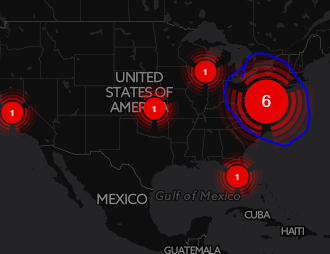
I have been trying to get this Custom Cluster Map Visualization app to work properly. So far I can see clusters with small number that represent a count comprised of the general lat/lon. When a cluster goes above "1", I can not drilldown like all the other clusters allow me to do. Could someone shed some light? Thank you!!
  <row>
    <panel>
      <title>T</title>
      <viz type="viz_clustermap.clustermap">
        <search>
          <query>index="index" sourcetype="T" dest_ip="*" | head 10000 | iplocation dest_ip | geostats latfield=lat longfield=lon count by dest_ip | sort-count</query>
          <earliest>$field1.earliest$</earliest>
          <latest>$field1.latest$</latest>
        </search>
        <option name="height">600</option>
        <option name="refresh.display">none</option>
        <option name="viz_clustermap.clustermap.drilldown">all</option>
        <option name="viz_clustermap.clustermap.lat">30.032974</option>
        <option name="viz_clustermap.clustermap.lng">-5.546875</option>
        <option name="viz_clustermap.clustermap.markerColor1">#ff0000</option>
        <option name="viz_clustermap.clustermap.markerColor2">#ff0000</option>
        <option name="viz_clustermap.clustermap.markerColor3">#ff0000</option>
        <option name="viz_clustermap.clustermap.markerColor4">#ff0000</option>
        <option name="viz_clustermap.clustermap.maxClusters">791</option>
        <option name="viz_clustermap.clustermap.numberFormat_min_0">0.[0]</option>
        <option name="viz_clustermap.clustermap.numberFormat_min_1000">1.1a</option>
        <option name="viz_clustermap.clustermap.numberFormat_min_10000">1a</option>
        <option name="viz_clustermap.clustermap.numberFormat_min_1000000">1.1a</option>
        <option name="viz_clustermap.clustermap.size">36</option>
        <option name="viz_clustermap.clustermap.tiles">dark</option>
        <option name="viz_clustermap.clustermap.tiles_max_zoom">18</option>
        <option name="viz_clustermap.clustermap.tiles_min_zoom">0</option>
        <option name="viz_clustermap.clustermap.tiles_url">http://{s}.tile.openstreetmap.org/{z}/{x}/{y}.png</option>
        <option name="viz_clustermap.clustermap.zoom">3</option>
        <drilldown>
          <set token="map.click.lat">$click.lat.value$</set>
          <set token="map.click.lon">$click.lon.value$</set>
        </drilldown>
      </viz>
    </panel>
  </row>
  <row>
Enterprise 6.5
Chrome Browser


- Mark as New
- Bookmark Message
- Subscribe to Message
- Mute Message
- Subscribe to RSS Feed
- Permalink
- Report Inappropriate Content

ziegfried
Influencer
05-24-2017
01:28 PM
The custom cluster map does not support results split-by a field. You'll have to remove ... by dest_ip part from geostats)
- Mark as New
- Bookmark Message
- Subscribe to Message
- Mute Message
- Subscribe to RSS Feed
- Permalink
- Report Inappropriate Content
rbardonetorian
Path Finder
01-30-2017
12:00 PM
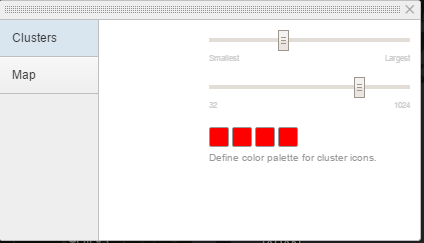
PS. if anyone can tell me where to find a legend / definition to what all the options are for this app, it would be a great way for extra points. Thx!! 😉

Got questions? Get answers!
Join the Splunk Community Slack to learn, troubleshoot, and make connections with fellow Splunk practitioners in real time!
Meet up IRL or virtually!
Join Splunk User Groups to connect and learn in-person by region or remotely by topic or industry.
Get Updates on the Splunk Community!
Design, Compete, Win: Submit Your Best Splunk Dashboards for a .conf26 Pass
Hello Splunkers, We’re excited to kick off a Splunk Dashboard contest! We know that dashboards are a primary ...
May 2026 Splunk Expert Sessions: Security & Observability
Level Up Your Operations: May 2026 Splunk Expert Sessions
Whether you are refining your security posture or ...
Network to App: Observability Unlocked [May & June Series]
In today’s digital landscape, your environment is no longer confined to the data center. It spans complex ...
