
Join the Conversation
- Find Answers
- :
- Apps & Add-ons
- :
- All Apps and Add-ons
- :
- All Apps and Add-ons
- :
- Re: Comodo C2 Reported as High Severity Intrusion ...
- Subscribe to RSS Feed
- Mark Topic as New
- Mark Topic as Read
- Float this Topic for Current User
- Bookmark Topic
- Subscribe to Topic
- Mute Topic
- Printer Friendly Page
- Mark as New
- Bookmark Message
- Subscribe to Message
- Mute Message
- Subscribe to RSS Feed
- Permalink
- Report Inappropriate Content

All,
I am running the Infosec App on Splunk Enterprise. The app is pulling all the good information and populating its dashboards.
We use Comodo on our Windows clients and the Infosec App is flagging the C2 IP that the Comodo client reports to as a High Severity Intrusion.
Can I whitelist the Comodo IP to prevent the Infosec app from alerting against it?
- Mark as New
- Bookmark Message
- Subscribe to Message
- Mute Message
- Subscribe to RSS Feed
- Permalink
- Report Inappropriate Content


Hi @frednuffer, you can filter out the IP using basic Splunk Enterprise capabilities but a couple of comments/questions first:
- do you mean the Comodo IP is flagged as a suspected C2 communication or it shows up under IDS/IPS?
- If it is showing up as an intrusion on IDS/IPS reports, another intrusion detection mechanism in your environment is picking the IP as an intrusion;
- If the IP is showing up under suspected C2 communication, one of simple ways to filter out an IP:
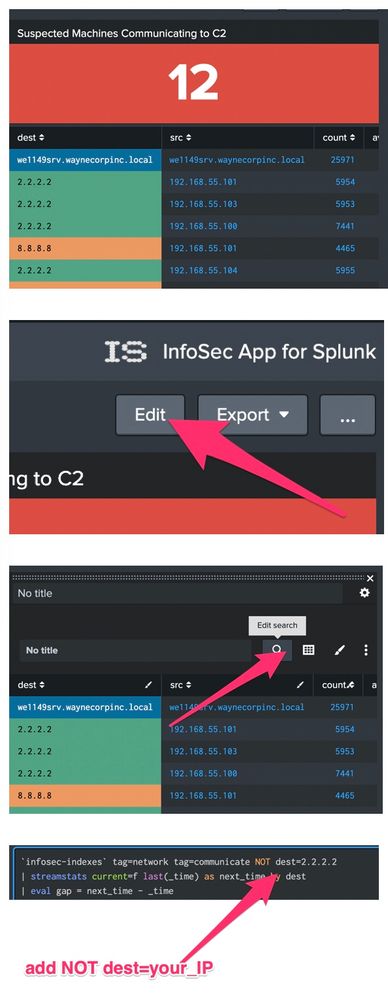
You can change the searches populating the InfoSec dashboards. For example, you can edit a dashboard, open the report you want to change and add a filter like the one below to the search string.
NOT dest=2.2.2.2
- Mark as New
- Bookmark Message
- Subscribe to Message
- Mute Message
- Subscribe to RSS Feed
- Permalink
- Report Inappropriate Content
Thank you for the reply!
- do you mean the Comodo IP is flagged as a suspected C2 communication or it shows up under IDS/IPS?
It shows up under IDS/IPS as a suspected scanning attack.
If it is showing up as an intrusion on IDS/IPS reports, another intrusion detection mechanism in your environment is picking the IP as an intrusion;
Yes - this is flagged by our Fortinet firewall. I am working with the network admin to whitelist the IP on the firewall level, but I suspect I will continuously run into items like that as we build our infrastructure out. I am looking for a method of handling this from the Splunk side as well as the firewall side.
If the IP is showing up under suspected C2 communication, one of simple ways to filter out an IP:
| tstats summariesonly=true allow_old_summaries=true dc(IDS_Attacks.signature) as attack_count from datamodel=Intrusion_Detection.IDS_Attacks where * IDS_Attacks.severity=* by IDS_Attacks.src
| rename "IDS_Attacks.src" as src, "IDS_Attacks." as ""
| sort 5 - attack_count
| search "src"!=2.2.2.2
This works for the dashboard, but the correct solution is to modify the firewall config.
- Mark as New
- Bookmark Message
- Subscribe to Message
- Mute Message
- Subscribe to RSS Feed
- Permalink
- Report Inappropriate Content
Hi @frednuffer, you can filter out the IP using basic Splunk Enterprise capabilities but a couple of comments/questions first:
- do you mean the Comodo IP is flagged as a suspected C2 communication or it shows up under IDS/IPS?
- If it is showing up as an intrusion on IDS/IPS reports, another intrusion detection mechanism in your environment is picking the IP as an intrusion;
- If the IP is showing up under suspected C2 communication, one of simple ways to filter out an IP:
You can change the searches populating the InfoSec dashboards. For example, you can edit a dashboard, open the report you want to change and add a filter like the one below to the search string.
NOT dest=2.2.2.2

Join the Splunk Community Slack to learn, troubleshoot, and make connections with fellow Splunk practitioners in real time!
Join Splunk User Groups to connect and learn in-person by region or remotely by topic or industry.
[Puzzles] Solve, Learn, Repeat: Character substitutions with Regular Expressions
Splunk Community Badges!
[Puzzles] Solve, Learn, Repeat: Matching cron expressions
