
Join the Conversation
- Find Answers
- :
- Apps & Add-ons
- :
- All Apps and Add-ons
- :
- All Apps and Add-ons
- :
- Re: Alert Manager App
- Subscribe to RSS Feed
- Mark Topic as New
- Mark Topic as Read
- Float this Topic for Current User
- Bookmark Topic
- Subscribe to Topic
- Mute Topic
- Printer Friendly Page
- Mark as New
- Bookmark Message
- Subscribe to Message
- Mute Message
- Subscribe to RSS Feed
- Permalink
- Report Inappropriate Content

Hello,
What are the variables I can use the display_fields cell under the incident setting tab?
Also, there is a way to make the Alert description more readable it is ignoring my description structure and present it in a single row.
Thanks
- Mark as New
- Bookmark Message
- Subscribe to Message
- Mute Message
- Subscribe to RSS Feed
- Permalink
- Report Inappropriate Content

Hi
display_fields contains a space-delimited list of field names. The field names are used to pick fields from the results of the alert and will be shown in the incident posture dashboard when you expand an incident by clicking the icon at the beginning of a row:
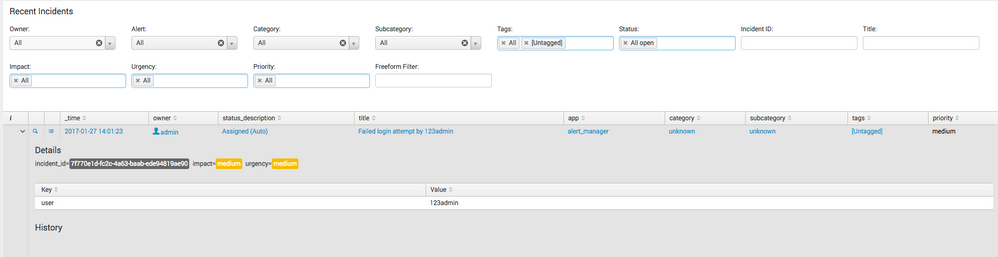
In my exmple, I added 'user' to display_fields, which is a field in the results triggering the alert.
Larger screenshot: https://img42.com/a7nfO
Regarding the description: What do you mean exactly with description?
- Mark as New
- Bookmark Message
- Subscribe to Message
- Mute Message
- Subscribe to RSS Feed
- Permalink
- Report Inappropriate Content
Hi
display_fields contains a space-delimited list of field names. The field names are used to pick fields from the results of the alert and will be shown in the incident posture dashboard when you expand an incident by clicking the icon at the beginning of a row:
In my exmple, I added 'user' to display_fields, which is a field in the results triggering the alert.
Larger screenshot: https://img42.com/a7nfO
Regarding the description: What do you mean exactly with description?
- Mark as New
- Bookmark Message
- Subscribe to Message
- Mute Message
- Subscribe to RSS Feed
- Permalink
- Report Inappropriate Content
Hi Simon,
Thank you for the quick answer, I've understood now how to use the display_fields.
About the description I would like to be able to see it as an email content, for example:
Description:
1. Test
2. Test
And not
Description: 1.Test 2.Test
Thank you.
- Mark as New
- Bookmark Message
- Subscribe to Message
- Mute Message
- Subscribe to RSS Feed
- Permalink
- Report Inappropriate Content
I've found how to fix the description as I wanted using HTML Tags.



Join the Splunk Community Slack to learn, troubleshoot, and make connections with fellow Splunk practitioners in real time!
Join Splunk User Groups to connect and learn in-person by region or remotely by topic or industry.
Persistent Queue at TcpOut — One of Splunk's Most Practical Features
Skip the Awkward Silence: Have a .conf-ersation at .conf26
Rethinking Zero Trust: From Product Purchases to Logical Control Evidence
