
Turn on suggestions
Auto-suggest helps you quickly narrow down your search results by suggesting possible matches as you type.
All Apps and Add-ons
×
Join the Conversation
Without signing in, you're just watching from the sidelines. Sign in or Register to connect, share, and be part of the Splunk Community.
- Find Answers
- :
- Apps & Add-ons
- :
- All Apps and Add-ons
- :
- All Apps and Add-ons
- :
- API Modular input Response Handle JSON
Options
- Subscribe to RSS Feed
- Mark Topic as New
- Mark Topic as Read
- Float this Topic for Current User
- Bookmark Topic
- Subscribe to Topic
- Mute Topic
- Printer Friendly Page
- Mark as New
- Bookmark Message
- Subscribe to Message
- Mute Message
- Subscribe to RSS Feed
- Permalink
- Report Inappropriate Content
API Modular input Response Handle JSON

dsofoulis
Path Finder
01-31-2018
03:00 PM
Hi Everyone,
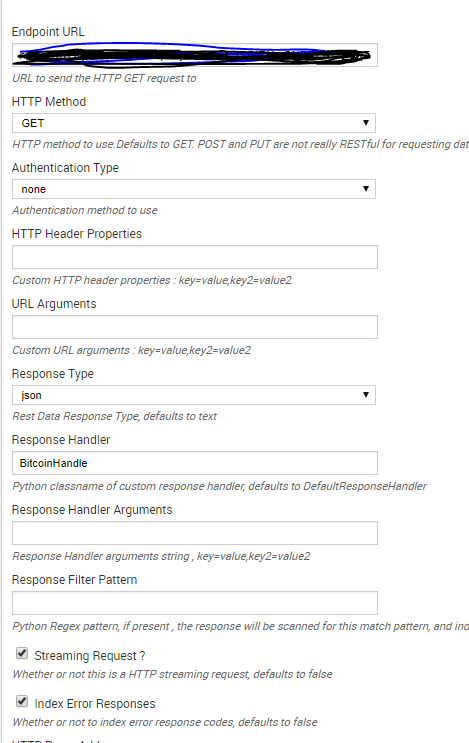
I am using the API modular input to collect data from an API. Problem is the getting the data in, correctly. Without using a response handle I can get everything in one event and I'm not able to break them into individual events. Using a response handle I'm not able to get the complete data.
SAMPLE Data looks like this:
{
    "Meta Data": {
        "1. Information": "Intraday Prices and Volumes for Digital Currency",
        "2. Digital Currency Code": "BTC",
        "3. Digital Currency Name": "Bitcoin",
        "4. Market Code": "AUD",
        "5. Market Name": "Australian Dollar",
        "6. Interval": "5min",
        "7. Last Refreshed": "2018-01-31 22:20:00",
        "8. Time Zone": "UTC"
    },
    "Time Series (Digital Currency Intraday)": {
        "2018-01-31 22:20:00": {
            "1a. price (AUD)": "12474.57250163",
            "1b. price (USD)": "10049.09321579",
            "2. volume": "1947.32278014",
            "3. market cap (USD)": "19568828.13886100"
        },
        "2018-01-31 22:15:00": {
            "1a. price (AUD)": "12477.02432481",
            "1b. price (USD)": "10051.06832152",
            "2. volume": "1946.46090562",
            "3. market cap (USD)": "19564011.54755900"
        },
        "2018-01-31 22:10:00": {
            "1a. price (AUD)": "12482.11267077",
            "1b. price (USD)": "10055.16732073",
            "2. volume": "1947.86047516",
            "3. market cap (USD)": "19586062.99517900"
        },
        "2018-01-31 22:05:00": {
            "1a. price (AUD)": "12469.69385098",
            "1b. price (USD)": "10045.16314001",
            "2. volume": "1957.84301556",
            "3. market cap (USD)": "19666852.49383900"
        },
        "2018-01-31 22:00:00": {
            "1a. price (AUD)": "12465.88588954",
            "1b. price (USD)": "10045.88292284",
            "2. volume": "1967.23063556",
            "3. market cap (USD)": "19762568.64706900"
        },
        "2018-01-31 21:55:00": {
            "1a. price (AUD)": "12449.19799086",
            "1b. price (USD)": "10032.43464665",
            "2. volume": "2016.41002232",
            "3. market cap (USD)": "20229501.76977700"
        },
        "2018-01-31 21:50:00": {
            "1a. price (AUD)": "12459.09475997",
            "1b. price (USD)": "10040.41015555",
            "2. volume": "2016.23520360",
            "3. market cap (USD)": "20243828.41419600"
        },
};
I am also using a customer response handler, see below:
class BitcoinHandle:
def __init__(self,**args):
    pass

def __call__(self, response_object,raw_response_output,response_type,req_args,endpoint):
    if response_type == "json":
        output = json.loads(raw_response_output)
        for price in output["Meta Data"]:
            print_xml_stream(json.dumps(price))


    else:
        print_xml_stream(raw_response_output)
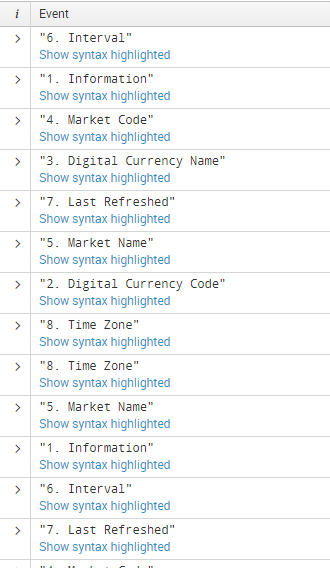
The issue that I'm having is that it's not looping through the nested JSON data, I am only getting the following data, not I'm not even getting the key value pairs, just the heading. I have no idea what I'm doing wrong. I would like to have all the data coming in and breaking correctly. Please help!




Got questions? Get answers!
Join the Splunk Community Slack to learn, troubleshoot, and make connections with fellow Splunk practitioners in real time!
Meet up IRL or virtually!
Join Splunk User Groups to connect and learn in-person by region or remotely by topic or industry.
Get Updates on the Splunk Community!
Meet Splunk Observability Studio: AI-Assisted OpenTelemetry Instrumentation Without ...
Instrumentation is usually the last step or even an afterthought when building out a project. The feature ...
Federated Search for Cisco Security and Analytics Logging (SAL) is now GA on Splunk ...
Federated Search for Cisco Security Analytics and Logging (SAL) is now generally available as part of the ...
Your Path to AgenticOps: AI Experiences for Every Splunk Practitioner
Your Path to AgenticOps: AI Experiences for Every Splunk Practitioner
Join us for a demo-driven look at how ...
