
Join the Conversation
- Find Answers
- :
- Using Splunk
- :
- Other Using Splunk
- :
- Alerting
- :
- Re: extract characters after colon
- Subscribe to RSS Feed
- Mark Topic as New
- Mark Topic as Read
- Float this Topic for Current User
- Bookmark Topic
- Subscribe to Topic
- Mute Topic
- Printer Friendly Page
- Mark as New
- Bookmark Message
- Subscribe to Message
- Mute Message
- Subscribe to RSS Feed
- Permalink
- Report Inappropriate Content
extract characters after colon

Hi ,
My log consists of below
msg: 2018-07-07 14:30:02.226 INFO 7 --- [nio-8080-exec-6] c.f.p.a.service.CGEventRetimeService : <
I need to extract the values after <> : i.e) 12006 alone and create alert to be sent to user .
How do I do it ?
- Mark as New
- Bookmark Message
- Subscribe to Message
- Mute Message
- Subscribe to RSS Feed
- Permalink
- Report Inappropriate Content

- Mark as New
- Bookmark Message
- Subscribe to Message
- Mute Message
- Subscribe to RSS Feed
- Permalink
- Report Inappropriate Content

Two options:
- use the characters in front of it as demarkation point:
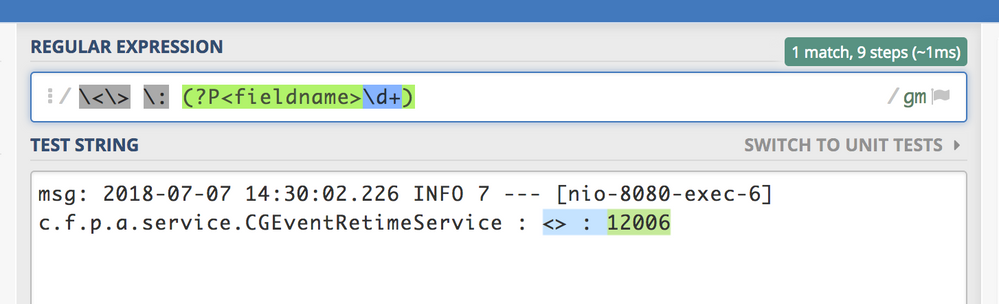
| rex "\<\>\s+:\s+(?<field1>\d+)"https://regex101.com/r/0na0Fq/1 - if it is really at the end of the event and you don't have other (similar) logs that cause issues, you can grab if from the end of the string:
| rex "(?<field1>\d+)$"https://regex101.com/r/0na0Fq/2
Note that second option is a simpler regex, but less efficient.
- Mark as New
- Bookmark Message
- Subscribe to Message
- Mute Message
- Subscribe to RSS Feed
- Permalink
- Report Inappropriate Content
This should work:
| rex "\<\>\s\:\s(?<NUMBERS>\d+)"
Let us know if you need more help.
- Mark as New
- Bookmark Message
- Subscribe to Message
- Mute Message
- Subscribe to RSS Feed
- Permalink
- Report Inappropriate Content
To be more precise - i need to search for msg with " Invalid Retimed Control Group " text and extract the highlighted felds
msg: 2018-07-07 14:30:02.226 INFO 7 --- [nio-8080-exec-6] c.f.p.a.service.CGEventRetimeService : < Invalid Retimed Control Group > : CCF 2018 12006
and display the highlighted bold once as separate columns in CSV file as below
Date - 2018-07-07
Time - 14:30:02
PTVL - CCF
MY - 2018
CG - 12006
- Mark as New
- Bookmark Message
- Subscribe to Message
- Mute Message
- Subscribe to RSS Feed
- Permalink
- Report Inappropriate Content
give this a shot:
| rex "^msg\:\s(?<DATE>.[^\s]+)\s(?<TIME>.[^\s]+).[^\:]+\:.[^\:]+\:\s(?<PTVL>.[^\s]+)\s(?<MY>.[^\s]+)\s(?<CG>.[^\s]+)"
- Mark as New
- Bookmark Message
- Subscribe to Message
- Mute Message
- Subscribe to RSS Feed
- Permalink
- Report Inappropriate Content
You will want to do
| table DATE TIME PTVL MY CG



Join the Splunk Community Slack to learn, troubleshoot, and make connections with fellow Splunk practitioners in real time!
Join Splunk User Groups to connect and learn in-person by region or remotely by topic or industry.
Persistent Queue at TcpOut — One of Splunk's Most Practical Features
Skip the Awkward Silence: Have a .conf-ersation at .conf26
Rethinking Zero Trust: From Product Purchases to Logical Control Evidence
