
Join the Conversation
- Find Answers
- :
- Using Splunk
- :
- Other Using Splunk
- :
- Alerting
- :
- What time frame does the auto for Schedule Window ...
- Subscribe to RSS Feed
- Mark Topic as New
- Mark Topic as Read
- Float this Topic for Current User
- Bookmark Topic
- Subscribe to Topic
- Mute Topic
- Printer Friendly Page
- Mark as New
- Bookmark Message
- Subscribe to Message
- Mute Message
- Subscribe to RSS Feed
- Permalink
- Report Inappropriate Content

We spoke recently about What does the Schedule Window option for an Alert mean?
@woodcock said there -
-- It (I assume auto) allows splunk to shift the actual execution of that search forward in time a bit (keeping the effective timepicker value unshifted) so that Splunk can rearrange/reorder multiple scheduled searches slightly so that they don't all happen at the same time.
So, let's say the search was scheduled for 1 p.m. and with auto it ended up running at 1:03 p.m. The search was supposed to cover 30 minutes. What would happen? which 30 minutes will be covered?
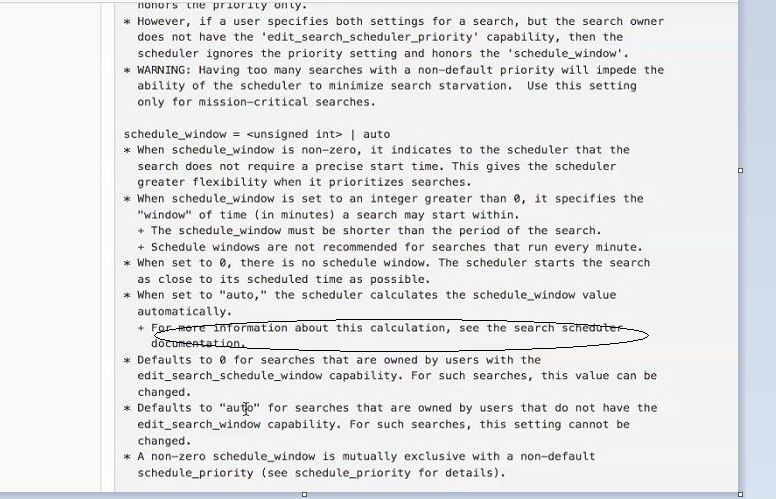
From the docs at savedsearches.conf
- Mark as New
- Bookmark Message
- Subscribe to Message
- Mute Message
- Subscribe to RSS Feed
- Permalink
- Report Inappropriate Content

The same 30 minutes that would have been covered if it had run exactly on time. That is the whole point, right? Otherwise nobody would use the feature (it would be useless).
- Mark as New
- Bookmark Message
- Subscribe to Message
- Mute Message
- Subscribe to RSS Feed
- Permalink
- Report Inappropriate Content


- Mark as New
- Bookmark Message
- Subscribe to Message
- Mute Message
- Subscribe to RSS Feed
- Permalink
- Report Inappropriate Content
The same 30 minutes that would have been covered if it had run exactly on time. That is the whole point, right? Otherwise nobody would use the feature (it would be useless).
- Mark as New
- Bookmark Message
- Subscribe to Message
- Mute Message
- Subscribe to RSS Feed
- Permalink
- Report Inappropriate Content
Gorgeous @woodcock !!!
- Mark as New
- Bookmark Message
- Subscribe to Message
- Mute Message
- Subscribe to RSS Feed
- Permalink
- Report Inappropriate Content
btw, what is the time window when using auto? is it 5 minutes?
- Mark as New
- Bookmark Message
- Subscribe to Message
- Mute Message
- Subscribe to RSS Feed
- Permalink
- Report Inappropriate Content
And if the user doesn't have the capability, it seems that it's being set to auto.

Join the Splunk Community Slack to learn, troubleshoot, and make connections with fellow Splunk practitioners in real time!
Join Splunk User Groups to connect and learn in-person by region or remotely by topic or industry.
Announcing Modern Navigation: A New Era of Splunk User Experience
Modernize your Splunk Apps – Introducing Python 3.13 in Splunk
Step into “Hunt the Insider: An Splunk ES Premier Mystery” to catch a cybercriminal ...
