
Join the Conversation
- Find Answers
- :
- Using Splunk
- :
- Other Using Splunk
- :
- Alerting
- :
- Trouble Scheduling Alert With Search For Specific ...
- Subscribe to RSS Feed
- Mark Topic as New
- Mark Topic as Read
- Float this Topic for Current User
- Bookmark Topic
- Subscribe to Topic
- Mute Topic
- Printer Friendly Page
- Mark as New
- Bookmark Message
- Subscribe to Message
- Mute Message
- Subscribe to RSS Feed
- Permalink
- Report Inappropriate Content

For some reason, our network goes crazy every day from 2:30 to 2:35.
I'm trying to schedule a daily alert that will perform a search from 2:30 to 2:35 and report on that data if it's bad/slow.
I've created a daily scheduled alert that "Runs every day" at 15:00.
I then tried to specify my search with an "Advanced" time range of -30min for "Earliest" and -25min for "Latest" but Splunk doesn't like this.
How can I have an alert that is run daily that will only search for the specific time range of 2:30 - 2:35?
- Mark as New
- Bookmark Message
- Subscribe to Message
- Mute Message
- Subscribe to RSS Feed
- Permalink
- Report Inappropriate Content

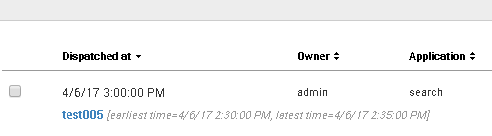
I was able to perform an alert. What is the problem?
Cron schedule:0 15 * * *

index=* earliest=-30m@m latest =-25m@m

- Mark as New
- Bookmark Message
- Subscribe to Message
- Mute Message
- Subscribe to RSS Feed
- Permalink
- Report Inappropriate Content
- Mark as New
- Bookmark Message
- Subscribe to Message
- Mute Message
- Subscribe to RSS Feed
- Permalink
- Report Inappropriate Content
Thank you Hiroshi,
Yes, if I use the chron syntax everything works well. The issue was when I tried to use the "Run every day of the week" option and specify a time.
But the chron syntax works perfectly. Thank you.

Join the Splunk Community Slack to learn, troubleshoot, and make connections with fellow Splunk practitioners in real time!
Join Splunk User Groups to connect and learn in-person by region or remotely by topic or industry.
[Puzzles] Solve, Learn, Reuse: Word-play
Tuning Edge Processor in Hybrid Mode: What Limits Each Data Path
Best Practices: Splunk auto adjust pipeline queue
