
Join the Conversation
- Find Answers
- :
- Using Splunk
- :
- Other Using Splunk
- :
- Alerting
- :
- Re: Trigger alert on value from predict calculatio...
- Subscribe to RSS Feed
- Mark Topic as New
- Mark Topic as Read
- Float this Topic for Current User
- Bookmark Topic
- Subscribe to Topic
- Mute Topic
- Printer Friendly Page
- Mark as New
- Bookmark Message
- Subscribe to Message
- Mute Message
- Subscribe to RSS Feed
- Permalink
- Report Inappropriate Content
Trigger alert on value from predict calculation

Hi,
I am trying to build an alert from the following query. The query collects the counters for memory usage, especially the free amount. It plots a time chart of the last 21 days and performs a prediction over the coming 14 days. The graph itself is perfect. It also shows in the prediction that in the next 14 days we run out of memory.
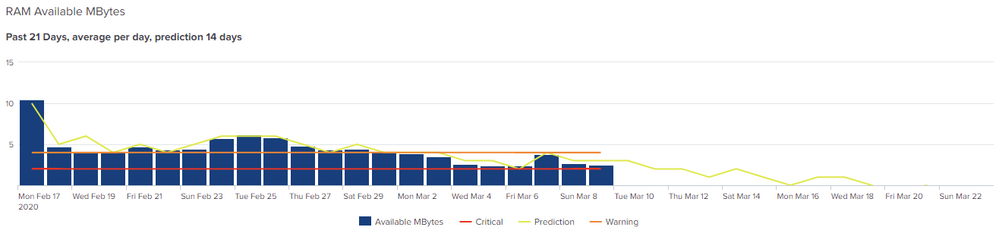
index=xxxxx host=xxxxx source="Perfmon:Memory" counter="Available MBytes"
| eval Value=(Value/1024)
| timechart span=1d avg(Value) as "Available MBytes", latest(host) as host, latest(counter) as counter
| lookup resource_thresholds.csv resource_name AS host, resource_metric AS counter OUTPUTNEW resource_threshold_warning,resource_threshold_critical
| eval Warning=resource_threshold_warning
| eval Critical=resource_threshold_critical
| predict "Available MBytes" as Prediction future_timespan=14
| eval Prediction = round(Prediction,0)
| fields - lower95(Prediction), upper95(Prediction) resource_threshold_warning resource_threshold_critical host counter
I want to run this as a scheduled alert (email, MS Teams) every night and be informed when the prediction hits 0 or lower somewhere in the future 14 days in this case.
For some reason I cannot seem to get my head around the logic here to trigger the alert. Any suggestions?
- Mark as New
- Bookmark Message
- Subscribe to Message
- Mute Message
- Subscribe to RSS Feed
- Permalink
- Report Inappropriate Content
Right, eventually found something that works for me. Not sure if it is the best way but it does work. Below is the query to get the result shown above.
I simply added in the alert the line
| search Prediction < 2000
Just above the last one where I removed the fields I don't want to see. The result is two dates in the future. the 11th and the 12th of April. So it works and returns the dates to focus on.
For the alert itself the end result needs to be cleaned up but it does what I need.
index=xxxxx host=xxxxx source="Perfmon:Memory" counter="Available MBytes"
| eval Value=round(Value,0)
| timechart span=1d avg(Value) as "Available MBytes", latest(host) as host, latest(counter) as counter partial=false
| lookup resource_thresholds.csv resource_name AS host, resource_metric AS counter OUTPUTNEW resource_threshold_warning,resource_threshold_critical
| eval Warning=resource_threshold_warning
| eval Critical=resource_threshold_critical
| predict "Available MBytes" as Prediction future_timespan=14
| eval Prediction = round(Prediction,0)
| fields - lower95(Prediction), upper95(Prediction) resource_threshold_warning resource_threshold_critical host counter



Join the Splunk Community Slack to learn, troubleshoot, and make connections with fellow Splunk practitioners in real time!
Join Splunk User Groups to connect and learn in-person by region or remotely by topic or industry.
Data Management Digest – August 2026
Your Feedback. Our Roadmap. Visit the PX Feedback Booth at .conf26
Agentic SOC Triage: Investigating Splunk ES Notables with MCP Server and a Local LLM
