
Join the Conversation
- Find Answers
- :
- Using Splunk
- :
- Other Using Splunk
- :
- Alerting
- :
- How to set up an alert to trigger every hour, unti...
- Subscribe to RSS Feed
- Mark Topic as New
- Mark Topic as Read
- Float this Topic for Current User
- Bookmark Topic
- Subscribe to Topic
- Mute Topic
- Printer Friendly Page
- Mark as New
- Bookmark Message
- Subscribe to Message
- Mute Message
- Subscribe to RSS Feed
- Permalink
- Report Inappropriate Content
How to set up an alert to trigger every hour, until a report returns a result of 10 events?

Hi All,
I have a report where the result is at max 10 events. I want to set an alert for every one hour until it reaches the max count.
In the following image, if the first alert event count is 10, then the remaining alerts should not trigger.
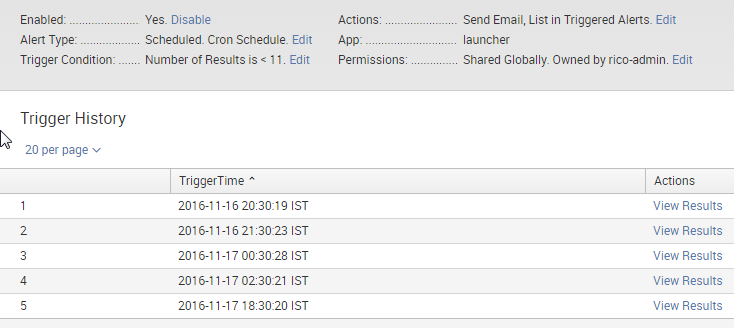
Any help can be appreciated.
Thanks!
V Karumanchi

- Mark as New
- Bookmark Message
- Subscribe to Message
- Mute Message
- Subscribe to RSS Feed
- Permalink
- Report Inappropriate Content

Seems like you have set it up on Cron scheduling. While you can also setup hourly alert though cron schedule, there is already an option to Run every hour. Try editing the Alert Type and change Schedule. (Possibly run every hour for last 60 minutes, however, depends on your use case).
Cron will give you more flexibility like run every hour between 9 AM to 5 PM only on Weekdays etc. However, for your question you can also set cron expression as 0 */1 * * *.
I don't think you require a Throttle once you have setup alert to trigger hourly. However, Throttle is in place in Splunk to snooze alert for specific period once it has already triggered so that multiple alerts can be avoided to take and complete actionable items for alert already triggered.
| makeresults | eval message= "Happy Splunking!!!"
- Mark as New
- Bookmark Message
- Subscribe to Message
- Mute Message
- Subscribe to RSS Feed
- Permalink
- Report Inappropriate Content

In your alert actions, you can configure suppression. This controls how often you receive notifications. You could also adjust the frequency of the search schedule itself.

A Season of Skills: New Splunk Courses to Light Up Your Learning Journey
Announcing the Migration of the Splunk Add-on for Microsoft Azure Inputs to ...
Splunk Observability for AI
