
Join the Conversation
- Find Answers
- :
- Using Splunk
- :
- Other Using Splunk
- :
- Alerting
- :
- How to capture fields in Service Now Tickets
- Subscribe to RSS Feed
- Mark Topic as New
- Mark Topic as Read
- Float this Topic for Current User
- Bookmark Topic
- Subscribe to Topic
- Mute Topic
- Printer Friendly Page
- Mark as New
- Bookmark Message
- Subscribe to Message
- Mute Message
- Subscribe to RSS Feed
- Permalink
- Report Inappropriate Content
How to capture fields in Service Now Tickets

I can able to create Service Now tickets from Splunk. In the email alert i receive Affected computer, UPN, Event title ,File name.
I want to capture same details in the service now ticket.
But in service now tickets, i don't have any informations. Its blank with no info.
Please help me how to pass this info from splunk.
Do i want to do any changes in setting -> Field -> Workflow? What changes i want to do.
Please help me
Email Alert

Received Service Now Ticket with no Info
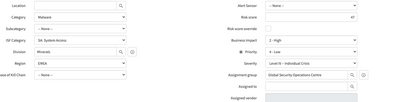
Servic now alert setting
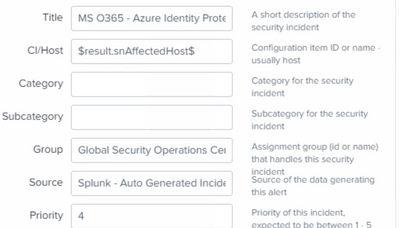
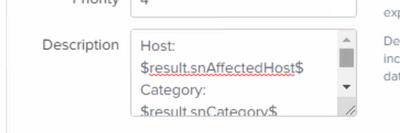
@isoutamo @ITWhisperer @gcusello @thambisetty @bowesmana @DalJeanis
- Mark as New
- Bookmark Message
- Subscribe to Message
- Mute Message
- Subscribe to RSS Feed
- Permalink
- Report Inappropriate Content


I have presented a topic in Dubai user group on how best we can make use of servicenow add-on. I am sure your question will be answered in below video.
https://www.youtube.com/watch?v=DNYobMVbj6c
If this helps, give a like below.

Join the Splunk Community Slack to learn, troubleshoot, and make connections with fellow Splunk practitioners in real time!
Join Splunk User Groups to connect and learn in-person by region or remotely by topic or industry.
Make Your Machine Data AI-Ready in Splunk
Splunk Asynchronous Forwarding Explained
How to Monitor AI Agents with Splunk Agent Observability
