
Join the Conversation
- Find Answers
- :
- Using Splunk
- :
- Other Using Splunk
- :
- Alerting
- :
- Custom alert will not work
- Subscribe to RSS Feed
- Mark Topic as New
- Mark Topic as Read
- Float this Topic for Current User
- Bookmark Topic
- Subscribe to Topic
- Mute Topic
- Printer Friendly Page
- Mark as New
- Bookmark Message
- Subscribe to Message
- Mute Message
- Subscribe to RSS Feed
- Permalink
- Report Inappropriate Content
Custom alert will not work

Hello, I have struggled with alerting a specific search I've made.
EVENT_TYPE="Login" LOGIN_STATUS=*
[search EVENT_TYPE="Login" LOGIN_STATUS="LOGIN_ERROR_PASSWORD_LOCKOUT"
| stats count by USER_ID
| table USER_ID]
| stats latest(LOGIN_STATUS) AS LOGIN_STATUS
latest(USER_NAME) AS USER_NAME
latest(UserAccountId) AS "Account Id"
latest(USER_TYPE) AS "User Type"
latest(TIMESTAMP) AS "Time stamp" by USER_ID
| where LOGIN_STATUS="LOGIN_ERROR_PASSWORD_LOCKOUT"
Which results in this
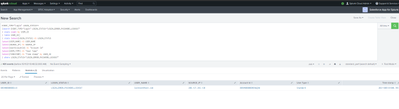
I have tried number of results > 0
search USER_ID> 0
I tried using field tokens such as $RESULT.userid$ > 0
Does anyone know how I can edit my search or trigger to actually trigger when I receive results?
- Mark as New
- Bookmark Message
- Subscribe to Message
- Mute Message
- Subscribe to RSS Feed
- Permalink
- Report Inappropriate Content


I've found triggering the alert when the number of results is not zero works best in most cases.
What alert action are you using? Have you checked the Triggered Alerts page to verify the alert did not trigger?
If this reply helps you, Karma would be appreciated.
- Mark as New
- Bookmark Message
- Subscribe to Message
- Mute Message
- Subscribe to RSS Feed
- Permalink
- Report Inappropriate Content
For my other alerts that worked, for some reason this one refuses to set off. It's like it doesn't recognize the results as results.
I'm using an email alert to my email and checked my triggered alerts page, I did not see it on there.


Join the Splunk Community Slack to learn, troubleshoot, and make connections with fellow Splunk practitioners in real time!
Join Splunk User Groups to connect and learn in-person by region or remotely by topic or industry.
Data Management Digest – September 2026
Federated Search for CloudWatch Unified Data Store Is Generally Available
Announcing Modern Navigation: A New Era of Splunk User Experience
