
Join the Conversation
- Find Answers
- :
- Using Splunk
- :
- Other Using Splunk
- :
- Alerting
- :
- Compare two Splunk Alert search with same time spa...
- Subscribe to RSS Feed
- Mark Topic as New
- Mark Topic as Read
- Float this Topic for Current User
- Bookmark Topic
- Subscribe to Topic
- Mute Topic
- Printer Friendly Page
- Mark as New
- Bookmark Message
- Subscribe to Message
- Mute Message
- Subscribe to RSS Feed
- Permalink
- Report Inappropriate Content

Dear Professor,
I have two alert search like this
1. Search 1:
index="abc" sourcetype="abc" service.name=financing request.method="POST" request.uri="*/applications" response.status="200"
|timechart span=2m count as applicaton_today
|eval mytime=strftime(_time,"%Y-%m-%dT%H:%M")
|eval yesterday_time=strftime(_time,"%H:%M")
|fields _time,yesterday_time,applicaton_today
And here is output

index="xyz" sourcetype="xyz" "Application * sent to xyz success"
|timechart span=2m count as omni_today
|eval mytime=strftime(_time,"%Y-%m-%dT%H:%M")
|eval yesterday_time=strftime(_time,"%H:%M")
|fields _time,yesterday_time,omni_today
And here is output

3. I try to combine two search like this then calculate spike.
index="abc" sourcetype="abc" service.name=financing request.method="POST" request.uri="*/applications" response.status="200"
|timechart span=2m count as app_today
|eval mytime=strftime(_time,"%Y-%m-%dT%H:%M")
|eval yesterday_time=strftime(_time,"%H:%M")
| append [search index="xyz" sourcetype="xyz" "Application * sent to xyz"
| timechart span=2m count as omni_today]
|fields _time,yesterday_time,app_today,omni_today
|eval spike=if(omni_today < app_today AND _time <= now() - 3*60 AND _time >= relative_time(now(),"@d") + 7.5*3600, 1, 0)
Here is output
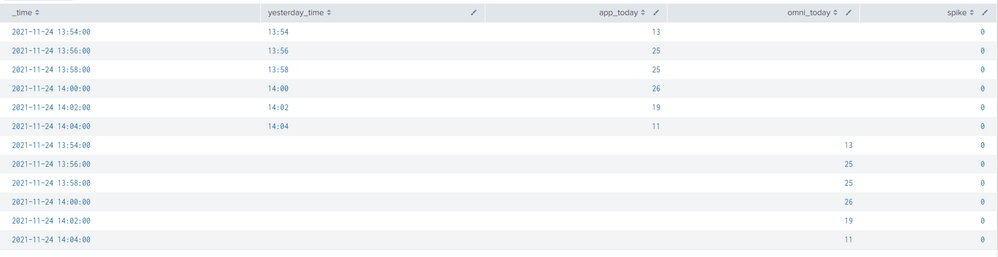
But it shows two time span (like image).
How can I combine two search with only time span like this.
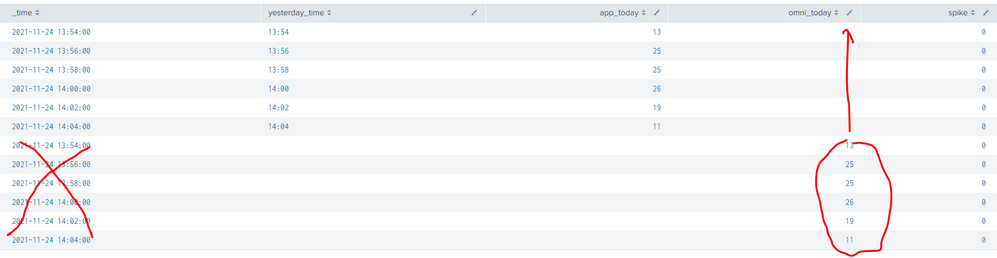
Thank you for your help.
- Mark as New
- Bookmark Message
- Subscribe to Message
- Mute Message
- Subscribe to RSS Feed
- Permalink
- Report Inappropriate Content


Well. You simply asked splunk to append results of one search to results of another search. So splunk did it - took rows of results from one search and "glued" them to the end of another search.
You could further transform combined results but it's better to start off without the append in the first place. (subsearches have their own limits and can trigger some tricky behaviour).
Since you're doing mostly same thing with two sets of result data, you can just get all your events amd then calculate separate stats for both kinds of events.
(index="abc" sourcetype="abc" service.name=financing request.method="POST" request.uri="*/applications" response.status="200") OR ( index="xyz" sourcetype="xyz" "Application * sent to xyz")
|timechart span=2m count(eval(sourcetype="abc")) as app_today count(eval(sourcetype="xyz")) as omni_today
|eval mytime=strftime(_time,"%Y-%m-%dT%H:%M")
|eval yesterday_time=strftime(_time,"%H:%M")
|fields _time,yesterday_time,app_today,omni_today
|eval spike=if(omni_today < app_today AND _time <= now() - 3*60 AND _time >= relative_time(now(),"@d") + 7.5*3600, 1, 0)
- Mark as New
- Bookmark Message
- Subscribe to Message
- Mute Message
- Subscribe to RSS Feed
- Permalink
- Report Inappropriate Content
Well. You simply asked splunk to append results of one search to results of another search. So splunk did it - took rows of results from one search and "glued" them to the end of another search.
You could further transform combined results but it's better to start off without the append in the first place. (subsearches have their own limits and can trigger some tricky behaviour).
Since you're doing mostly same thing with two sets of result data, you can just get all your events amd then calculate separate stats for both kinds of events.
(index="abc" sourcetype="abc" service.name=financing request.method="POST" request.uri="*/applications" response.status="200") OR ( index="xyz" sourcetype="xyz" "Application * sent to xyz")
|timechart span=2m count(eval(sourcetype="abc")) as app_today count(eval(sourcetype="xyz")) as omni_today
|eval mytime=strftime(_time,"%Y-%m-%dT%H:%M")
|eval yesterday_time=strftime(_time,"%H:%M")
|fields _time,yesterday_time,app_today,omni_today
|eval spike=if(omni_today < app_today AND _time <= now() - 3*60 AND _time >= relative_time(now(),"@d") + 7.5*3600, 1, 0)
- Mark as New
- Bookmark Message
- Subscribe to Message
- Mute Message
- Subscribe to RSS Feed
- Permalink
- Report Inappropriate Content
Thank you for your help.
With my way, it's really easy by change "append" to "appendcols".

Join the Splunk Community Slack to learn, troubleshoot, and make connections with fellow Splunk practitioners in real time!
Join Splunk User Groups to connect and learn in-person by region or remotely by topic or industry.
Persistent Queue at TcpOut — One of Splunk's Most Practical Features
Build resilience for the agentic era: Join us at Splunk Go San Jose
Manage Edge Processor pipelines end to end with APIs
