
Join the Conversation
- Find Answers
- :
- Using Splunk
- :
- Other Using Splunk
- :
- Alerting
- :
- Re: Compare text strings over 2 days
- Subscribe to RSS Feed
- Mark Topic as New
- Mark Topic as Read
- Float this Topic for Current User
- Bookmark Topic
- Subscribe to Topic
- Mute Topic
- Printer Friendly Page
- Mark as New
- Bookmark Message
- Subscribe to Message
- Mute Message
- Subscribe to RSS Feed
- Permalink
- Report Inappropriate Content
Compare text strings over 2 days

Hello,
i have a log file which is capturing processed files.
The file text always has the same string, its just the date prefix which changes.
So i would like to read in the files processed today and compare to yesterday and how the difference.
I have used the answers to other questions to get the file date read in by day, however the diff command does not work, is this only for integers rather than string.
Successfully processed file 20211105-zone-Foo Bar1.txt
Successfully processed file 20211105-zone-Bar 1.txt
Successfully processed file 20211106_zone-Foo Bar1.txt
Successfully processed file 20211106-zone-Bar Foo1.txt
index=foo source=bar earliest=-1d@d latest=now "Successfully processed file"
| rex "\-zone\-(?<File>.+)"
| eval Day=if(_time<relative_time(now(),"@d"),"Yesterday","Today")
| chart values(File) by Day
| eval Diff=Yesterday-Today
| where Yesterday!=Today
i would like to report that Bar 1.txt and Bar Foo1.txt are the differences.
- Mark as New
- Bookmark Message
- Subscribe to Message
- Mute Message
- Subscribe to RSS Feed
- Permalink
- Report Inappropriate Content


| makeresults
| eval _raw= "Successfully processed file 20211105-zone-Foo Bar1.txt
Successfully processed file 20211105-zone-Bar 1.txt
Successfully processed file 20211106-zone-Foo Bar1.txt
Successfully processed file 20211106-zone-Bar Foo1.txt"
| multikv noheader=t
| table _raw
``` The lines above set up example data (correcting typo?) ```
| rex "(?<date>\d+)\-zone\-(?<file>.+)"
| stats count by file
| where count = 1- Mark as New
- Bookmark Message
- Subscribe to Message
- Mute Message
- Subscribe to RSS Feed
- Permalink
- Report Inappropriate Content

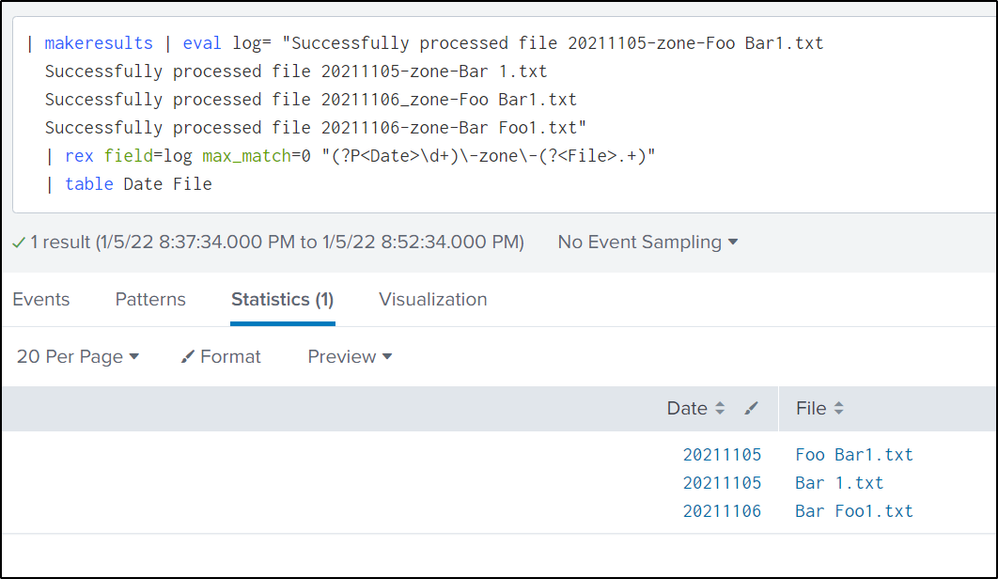
Please check this.. this works fine picking up the Date and File name..
| makeresults | eval log= "Successfully processed file 20211105-zone-Foo Bar1.txt
Successfully processed file 20211105-zone-Bar 1.txt
Successfully processed file 20211106_zone-Foo Bar1.txt
Successfully processed file 20211106-zone-Bar Foo1.txt"
| rex field=log max_match=0 "(?P<Date>\d+)\-zone\-(?<File>.+)"
| table Date File
i have come up with compare logic, but the eval works only once.. not sure of how to do the eval multiple times.. as you have the real logs, pls check this and update us what happen:
| makeresults | eval log= "Successfully processed file 20211105-zone-Foo Bar1.txt
Successfully processed file 20211105-zone-Bar 1.txt
Successfully processed file 20211106_zone-Foo Bar1.txt
Successfully processed file 20211106-zone-Bar Foo1.txt"
| rex field=log max_match=0 "(?P<Date>\d+)\-zone\-(?<File>.+)"
| eval compare=strptime(Date,"%Y%m%d")
| where compare > strptime(Date,"%Y%m%d")
| table Date File Day
- Mark as New
- Bookmark Message
- Subscribe to Message
- Mute Message
- Subscribe to RSS Feed
- Permalink
- Report Inappropriate Content

The diff command does indeed work on strings, but produces output like that of the Linux diff command, which probably is not what you seek.
@@ -1 +1 @@
-Bar Foo1.txt Foo Bar1.txt
+Bar 1.txt Foo Bar1.txt
I regret that don't know how to solve the problem.
If this reply helps you, Karma would be appreciated.


Join the Splunk Community Slack to learn, troubleshoot, and make connections with fellow Splunk practitioners in real time!
Join Splunk User Groups to connect and learn in-person by region or remotely by topic or industry.
Meet Splunk Observability Studio: AI-Assisted OpenTelemetry Instrumentation Without ...
Federated Search for Cisco Security and Analytics Logging (SAL) is now GA on Splunk ...
Your Path to AgenticOps: AI Experiences for Every Splunk Practitioner
