
Join the Conversation
- Find Answers
- :
- Using Splunk
- :
- Other Using Splunk
- :
- Alerting
- :
- Can we customize Pagerduty alert with urgency?
- Subscribe to RSS Feed
- Mark Topic as New
- Mark Topic as Read
- Float this Topic for Current User
- Bookmark Topic
- Subscribe to Topic
- Mute Topic
- Printer Friendly Page
- Mark as New
- Bookmark Message
- Subscribe to Message
- Mute Message
- Subscribe to RSS Feed
- Permalink
- Report Inappropriate Content
Can we customize Pagerduty alert with urgency?

Hey,
currently we have successfully integrated pagerduty in splunk which means whenever a splunk alert is triggered a pagerduty alert will be created and shown in our pagerduty service. Now we are looking for a way to customize the urgency. All the alerts have "High" urgency in pagerduty per default when the splunk integration creates these alerts and we want to specify that in the custom details here:
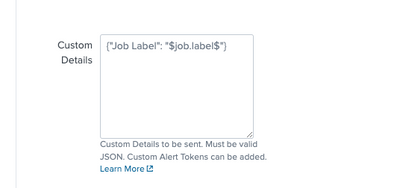
Tried a few things with adding "urgency" to the json but without any success. Also the documentation is not referencing the urgency anywhere. Does anybody know how to do this?
Thanks
- Mark as New
- Bookmark Message
- Subscribe to Message
- Mute Message
- Subscribe to RSS Feed
- Permalink
- Report Inappropriate Content

hi @GoJoker
Based on the documentation for PagerDuty alert creation, you can use the custom details section to set severity of the alert from Splunk. Urgencies in PagerDuty can be set based on this severity, you'll need to select "Dynamic notifications based on alert severity" option along with your custom assign and escalation policy. There is not configuration available in the current add-on to set these options, you'll have to set the severity in the custom details segment of the alert
Reference:
https://developer.pagerduty.com/docs/ZG9jOjExMDI5NTgx-send-an-alert-event
https://support.pagerduty.com/docs/configurable-service-settings#:~:text=PagerDuty%20uses%20the%20co....
~ If the above reply helps, a Karma upvote would be appreciated.
- Mark as New
- Bookmark Message
- Subscribe to Message
- Mute Message
- Subscribe to RSS Feed
- Permalink
- Report Inappropriate Content
Dynamic notifications based on severity is looking for severity in the root of the payload. The pagerduty adddon inserts the custom_details Json object into the payload and it will not get recognized.
However, you can create an event orchestration that looks for severity in the custom_details object and set the severity based on the content of the severity field.
{
"client": "Splunk",
"client_url": "<<splunkurl>",
"contexts": null,
"description": "<<incident_descr>>",
"event_type": "trigger",
"incident_key": "<<incident_key>>",
"service_key": "<<service_key>>",
"details": {
"LastSuccessfulCall": "Friday Dec 08, 2023 04:41:58PM",
"active": "true",
"custom_details": {
"severity": "info"
},
"field1": "value1",
"field2": "value2"
}
}

Join the Splunk Community Slack to learn, troubleshoot, and make connections with fellow Splunk practitioners in real time!
Join Splunk User Groups to connect and learn in-person by region or remotely by topic or industry.
[Puzzles] Solve, Learn, Repeat: Matching cron expressions
Design, Compete, Win: Submit Your Best Splunk Dashboards for a .conf26 Pass
May 2026 Splunk Expert Sessions: Security & Observability
