
Join the Conversation
- Find Answers
- :
- Using Splunk
- :
- Other Using Splunk
- :
- Alerting
- :
- CPU Utilization
- Subscribe to RSS Feed
- Mark Topic as New
- Mark Topic as Read
- Float this Topic for Current User
- Bookmark Topic
- Subscribe to Topic
- Mute Topic
- Printer Friendly Page
- Mark as New
- Bookmark Message
- Subscribe to Message
- Mute Message
- Subscribe to RSS Feed
- Permalink
- Report Inappropriate Content
CPU Utilization

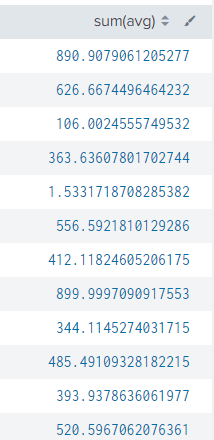
I am trying to find out cpu utilization by process. value of Cpu utilization is coming as 100% and below, which is absolutely fine. but for the processes, it exceeding 100% value, i understand, its happening due to multiple cores configured. is there any way i can fetch it in (less than equal to 100 value).
Also i thought of dividing the values by cores (eg: 890/9 , 626/7). if i use "case" or "if" this will have multiple statements (for eg: process utilization till 4200).
Is there an easy way to perform this?
can i acheive it by integrating python script in alert, i know this can be done, but can someone help me with the process(unaware of integrating custom commands)?
process query i am running
index=perf_process object=Process instance!=_Total instance!=Idle
| fields _time host counter instance Value
| search counter="% Processor Time"
| stats avg(Value) as avg by instance host _time
| stats sum(avg) by _time host
@splunk

Join the Splunk Community Slack to learn, troubleshoot, and make connections with fellow Splunk practitioners in real time!
Join Splunk User Groups to connect and learn in-person by region or remotely by topic or industry.
Data Outage Monitoring and Reporting
Manage Datasets and Connections in Catalog on Splunk Cloud Platform
Persistent Queue at TcpOut — One of Splunk's Most Practical Features
