
Join the Conversation
- Find Answers
- :
- Using Splunk
- :
- Other Using Splunk
- :
- Alerting
- :
- Re: Alert settings menu: What's the difference bet...
- Subscribe to RSS Feed
- Mark Topic as New
- Mark Topic as Read
- Float this Topic for Current User
- Bookmark Topic
- Subscribe to Topic
- Mute Topic
- Printer Friendly Page
- Mark as New
- Bookmark Message
- Subscribe to Message
- Mute Message
- Subscribe to RSS Feed
- Permalink
- Report Inappropriate Content

What's the difference between alerts' Per-Result and the Number of Results options?
We are not clear about the difference between them.
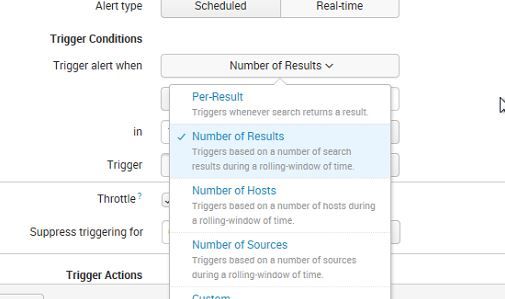
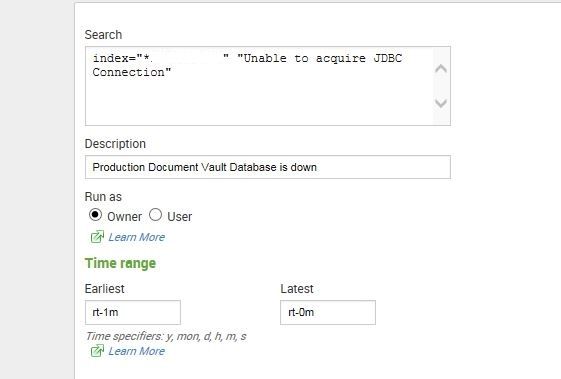
When we set it up like this, we get alerts from August. Why is that?
- Mark as New
- Bookmark Message
- Subscribe to Message
- Mute Message
- Subscribe to RSS Feed
- Permalink
- Report Inappropriate Content


Hey @ddrillic, It looks like the Number of Results triggers based on custom # of results.
Select Save As > Alert.
Specify the following values for the fields in the Save As Alert dialog box.
    Title: Errors in the last 24 hours
    Alert type: Scheduled
    Time Range: Run every day
    Schedule: At 10:00
    Trigger condition: Number of Results
    Trigger when number of results: is greater than 5.

Select the Send Email alert action.
Set the following email settings, using tokens in the Subject and Message fields.

    To: email recipient
    Priority: Normal
    Subject: Too many errors alert: $name$
    Message: There were $job.resultCount$ errors reported on $trigger_date$.
    Include: Link to Alert and Link to Results
And per-result triggers every time there is a search result, although you can specify a time period and optional field values for suppression.
- Mark as New
- Bookmark Message
- Subscribe to Message
- Mute Message
- Subscribe to RSS Feed
- Permalink
- Report Inappropriate Content
About the alerts from August. Maybe they got stuck in the Unix mail queues - how do we clear them, if that's the case?
- Mark as New
- Bookmark Message
- Subscribe to Message
- Mute Message
- Subscribe to RSS Feed
- Permalink
- Report Inappropriate Content
Hey @ddrillic, It looks like the Number of Results triggers based on custom # of results.
Select Save As > Alert.
Specify the following values for the fields in the Save As Alert dialog box.
    Title: Errors in the last 24 hours
    Alert type: Scheduled
    Time Range: Run every day
    Schedule: At 10:00
    Trigger condition: Number of Results
    Trigger when number of results: is greater than 5.

Select the Send Email alert action.
Set the following email settings, using tokens in the Subject and Message fields.

    To: email recipient
    Priority: Normal
    Subject: Too many errors alert: $name$
    Message: There were $job.resultCount$ errors reported on $trigger_date$.
    Include: Link to Alert and Link to Results
And per-result triggers every time there is a search result, although you can specify a time period and optional field values for suppression.
- Mark as New
- Bookmark Message
- Subscribe to Message
- Mute Message
- Subscribe to RSS Feed
- Permalink
- Report Inappropriate Content
Thank you @lfedak!




Join the Splunk Community Slack to learn, troubleshoot, and make connections with fellow Splunk practitioners in real time!
Join Splunk User Groups to connect and learn in-person by region or remotely by topic or industry.
Cisco Data Fabric from Architecture to Investigation, Better SOC Visibility, and More ...
The Trust Gap: Why a Data Foundation is Fundamental to an Agentic Enterprise
Data Management Digest – September 2026
