
Join the Conversation
- Find Answers
- :
- Apps & Add-ons
- :
- All Apps and Add-ons
- :
- All Apps and Add-ons
- :
- Splunk App for AWS Billing: Why is a single entry ...
- Subscribe to RSS Feed
- Mark Topic as New
- Mark Topic as Read
- Float this Topic for Current User
- Bookmark Topic
- Subscribe to Topic
- Mute Topic
- Printer Friendly Page
- Mark as New
- Bookmark Message
- Subscribe to Message
- Mute Message
- Subscribe to RSS Feed
- Permalink
- Report Inappropriate Content

When I do a particular search on a unique record ID, I get 1 piece of raw data back, but some of the fields are reporting 2 entries. I believe this is skewing my results further down the line.
For a particular search:
index=aws-bill RecordId=39613589688296092585051622
I get exactly 1 Event, but hovering over the field for Blended cost, I see 2 lots of data. Value is "0.00000170" but the count is 2. Why is this?
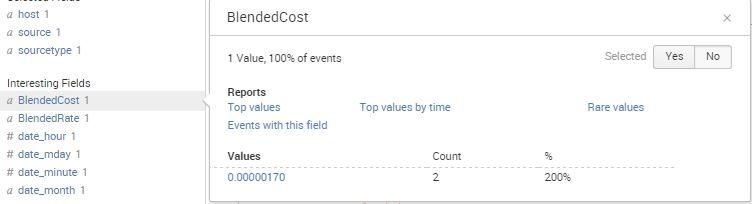
Also, when I do this search and show as a chart:
index=aws-bill RecordId=39613589688296092585051622 | timechart sum(BlendedCost) as $ by showback
I get a barchart with the value as "0.00000340" which is double the Blended cost.
Where is this coming from? What are my options for getting better results?

- Mark as New
- Bookmark Message
- Subscribe to Message
- Mute Message
- Subscribe to RSS Feed
- Permalink
- Report Inappropriate Content

OK, that explains it; you are telling Splunk to extract json fields twice: once at index time ( INDEXED_EXTRACTIONS=json ) and once at search time ( KV_MODE=json). Get rid of the KV_MODE setting.
See this Q&A for a more complete discussion:
http://answers.splunk.com/answers/174939/why-are-my-json-fields-extracted-twice.html
- Mark as New
- Bookmark Message
- Subscribe to Message
- Mute Message
- Subscribe to RSS Feed
- Permalink
- Report Inappropriate Content

The latest version 2.0.9 uses just KV_MODE=json, so it does not cause any duplicates. Thanks to woodcock for the heads up.
- Mark as New
- Bookmark Message
- Subscribe to Message
- Mute Message
- Subscribe to RSS Feed
- Permalink
- Report Inappropriate Content
OK, that explains it; you are telling Splunk to extract json fields twice: once at index time ( INDEXED_EXTRACTIONS=json ) and once at search time ( KV_MODE=json). Get rid of the KV_MODE setting.
See this Q&A for a more complete discussion:
http://answers.splunk.com/answers/174939/why-are-my-json-fields-extracted-twice.html
- Mark as New
- Bookmark Message
- Subscribe to Message
- Mute Message
- Subscribe to RSS Feed
- Permalink
- Report Inappropriate Content
Your picture is unambiguously clear: it is be because your 1 matching event has a multivalued field called BlendedCost with 2 values, both of which are the same: 0.00000170. How is the BlendedCost field created? What is in the raw data (_raw field)?
- Mark as New
- Bookmark Message
- Subscribe to Message
- Mute Message
- Subscribe to RSS Feed
- Permalink
- Report Inappropriate Content
inputs.conf:
 [script:///opt/splunk/etc/apps/SplunkAppforAWSBilling/bin/ProcessDetailedReport.py]
 disabled = 0
 index = aws-bill
 interval = 10800
 passAuth = splunk-system-user
 source = SplunkAppforAWSBilling_Import
 sourcetype = SplunkAppforAWSBilling_Processor
props.conf:
 [source::SplunkAppforAWSBilling_Import]
 INDEXED_EXTRACTIONS=json
 KV_MODE=json
 TIME_PREFIX=\"UsageStartDate\"\:
 TIME_FORMAT=%Y-%m-%d %H:%M:%S
transforms.conf
 #######################
 #  Lookups
 #######################
 [payer_account_id]
 filename = payer_account_id.csv

 [linked_account_id]
 filename = linked_account_id.csv
- Mark as New
- Bookmark Message
- Subscribe to Message
- Mute Message
- Subscribe to RSS Feed
- Permalink
- Report Inappropriate Content
Hi, No it seems to be a single entry in the raw data: "BlendedCost": "0.00000170"
It is sucked in from a spreadsheet which comes from AWS billing. BlendedCost is one of the columns in the spreadsheet and that also only has the single entry.
Raw data is:
{"user:hostname": "awswarsp01", "PricingPlanId": "505699", "user:showback": "IT:Aris", "ProductName": "Amazon Elastic Compute Cloud", "ResourceId": "i-9fdb5ea1", "PayerAccountId": "311971337317", "UsageStartDate": "2015-08-01 00:00:00", "BlendedCost": "0.00000170", "InvoiceID": "Estimated", "ReservedInstance": "N", "RecordType": "LineItem", "RecordId": "39613589688296092585051622", "Operation": "InterZone-Out", "user:Name": "inst-aris-app-01", "SubscriptionId": "28816468", "user:project": "aris design", "ItemDescription": "$0.010 per GB - regional data transfer - in/out/between EC2 AZs or using IPs or ELB", "UnBlendedCost": "0.00000170", "UnBlendedRate": "0.0100000000", "UsageType": "APS2-DataTransfer-Regional-Bytes", "LinkedAccountId": "311971337317", "BlendedRate": "0.0100000000", "user:environment": "production", "UsageQuantity": "0.00016988", "UsageEndDate": "2015-08-01 01:00:00", "RateId": "3510837"}
Mark
- Mark as New
- Bookmark Message
- Subscribe to Message
- Mute Message
- Subscribe to RSS Feed
- Permalink
- Report Inappropriate Content
I didn't say it was in the raw data twice (although that is one way to have a multivalued field created with the same value twice). So now we have half of the pieces of the puzzle; what are your Splunk configurations (particularly inputs.conf, props.conf and transforms.conf)?
- Mark as New
- Bookmark Message
- Subscribe to Message
- Mute Message
- Subscribe to RSS Feed
- Permalink
- Report Inappropriate Content
inputs.conf:
[script:///opt/splunk/etc/apps/SplunkAppforAWSBilling/bin/ProcessDetailedReport.py]
disabled = 0
index = aws-bill
interval = 10800
passAuth = splunk-system-user
source = SplunkAppforAWSBilling_Import
sourcetype = SplunkAppforAWSBilling_Processor
props.conf:
[source::SplunkAppforAWSBilling_Import]
INDEXED_EXTRACTIONS=json
KV_MODE=json
TIME_PREFIX=\"UsageStartDate\":
TIME_FORMAT=%Y-%m-%d %H:%M:%S
transforms.conf
#######################
# Lookups
#######################
[payer_account_id]
filename = payer_account_id.csv
[linked_account_id]
filename = linked_account_id.csv
- Mark as New
- Bookmark Message
- Subscribe to Message
- Mute Message
- Subscribe to RSS Feed
- Permalink
- Report Inappropriate Content
trying to highlight that 2nd search but get this error:
You are only allowed to submit 2 posts per day until you reach 40 points of reputation level.

Join the Splunk Community Slack to learn, troubleshoot, and make connections with fellow Splunk practitioners in real time!
Join Splunk User Groups to connect and learn in-person by region or remotely by topic or industry.
Make Your Machine Data AI-Ready in Splunk
How to Break a Kubernetes Pod on Purpose and Let the AI Troubleshooting Agent Find ...
Splunk Add-on for Microsoft Windows 11.0.3: Parse Once, Search Faster
