
Are you a member of the Splunk Community?
- Find Answers
- :
- Using Splunk
- :
- Splunk Search
- :
- use the heat map option and highlight the max and ...
- Subscribe to RSS Feed
- Mark Topic as New
- Mark Topic as Read
- Float this Topic for Current User
- Bookmark Topic
- Subscribe to Topic
- Mute Topic
- Printer Friendly Page
- Mark as New
- Bookmark Message
- Subscribe to Message
- Mute Message
- Subscribe to RSS Feed
- Permalink
- Report Inappropriate Content
use the heat map option and highlight the max and min per each column.

hi there
THis is my sample data. I want to use the heat map option and highlight the max and min per each column.
So I would have 2 values highlighted in each column, the max and the min.
Can this be done in Splunk 7.3.1?
| makeresults
      | eval data = "
 1    10;
 2    9;
 3    8;
 4    7;
 5    6;
 6    5;
 7    4;
 8    3;
 9    2;
 10   1;
     "
      | makemv delim=";" data
      | mvexpand data
      | rex field=data "(?<Date>\d+)\s+(?<Y>\d+)"
      | fields + Date Y | fields - _time
      |search Y = * |
      chart count(Y) by Y | sort + Y
this is what I get just using the default setting.
![![heat map example][1]](/t5/image/serverpage/image-id/8634i3D4044A0F5502C16/image-size/large?v=v2&px=999 "![heat map example][1]")
similar question asked here before
https://answers.splunk.com/answers/116018/splunk-6-simple-xml-dataoverlaymode-on-table-can-we-specif...
- Mark as New
- Bookmark Message
- Subscribe to Message
- Mute Message
- Subscribe to RSS Feed
- Permalink
- Report Inappropriate Content

@HattrickNZ I have posted an answer to @somesoni2 's question posted above. https://answers.splunk.com/answers/116018/splunk-6-simple-xml-dataoverlaymode-on-table-can-we-specif...
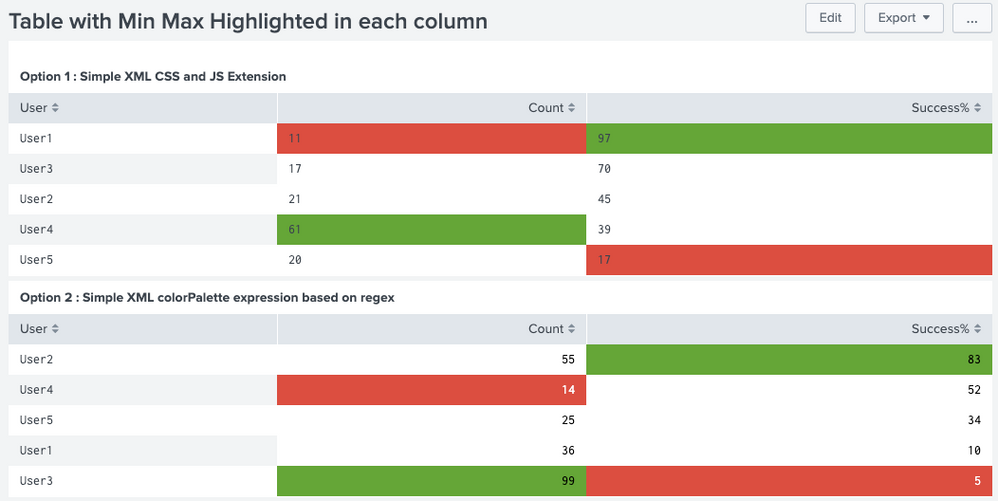


Please refer to one of my older answer on similar lines which also explains both approaches: https://answers.splunk.com/answers/686288/how-do-you-highlight-a-table-cell-based-on-a-field.html
Do upvote the other answers if you find them useful!
| makeresults | eval message= "Happy Splunking!!!"

Index This | Why did the turkey cross the road?
Enter the Agentic Era with Splunk AI Assistant for SPL 1.4
Feel the Splunk Love: Real Stories from Real Customers
