
Join the Conversation
- Find Answers
- :
- Using Splunk
- :
- Splunk Search
- :
- Re: timestamp issue
- Subscribe to RSS Feed
- Mark Topic as New
- Mark Topic as Read
- Float this Topic for Current User
- Bookmark Topic
- Subscribe to Topic
- Mute Topic
- Printer Friendly Page
- Mark as New
- Bookmark Message
- Subscribe to Message
- Mute Message
- Subscribe to RSS Feed
- Permalink
- Report Inappropriate Content
timestamp issue

Hi
I have issue with timestamp, here is the problem:
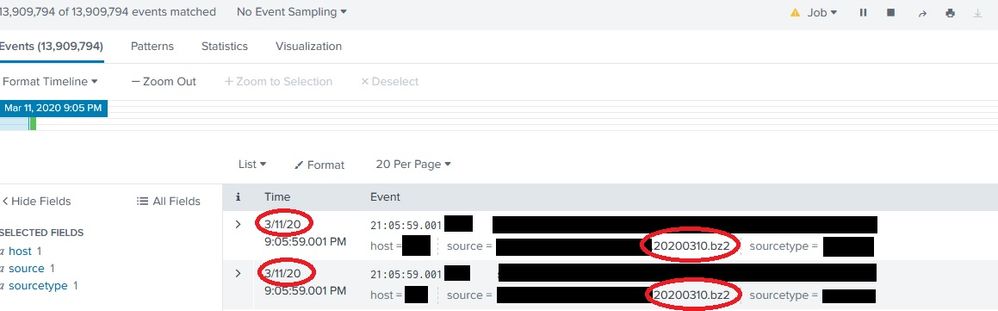
every day at "1 AM" all log files copy into the logserver. this logs belong to the yesterday but splunk consider today date (import date) as timestamp!
1-as you see in screenshot logfile name is 20200310.bz2 but timestamp is 3/11/20 (log belong yesterday but import today).
2-as you see in screenshot every line start with time not date and I can't use timestamp of events.
now question is how can I handle this with splunk?
Thanks,

- Mark as New
- Bookmark Message
- Subscribe to Message
- Mute Message
- Subscribe to RSS Feed
- Permalink
- Report Inappropriate Content

"Archive files (such as a .tar or .zip file, are decompressed before being indexed."
https://docs.splunk.com/Documentation/Splunk/latest/Data/Monitorfilesanddirectories#How_Splunk_Enter...
So it is reading the timestamp of the recorded event and not the timestamp of the source file.
If you would like to extract the timestamp when the bz2 file is created, use this splunk answer:
https://answers.splunk.com/answers/705686/how-do-you-extract-a-timestamp-from-a-filename.html
Unless you've a specific use case where the timestamp of the source file is needed, would recommend, using the event time, because all your events will be occurring at 1am. With millions of record to search through, it will quickly turn into a pain point.
- Mark as New
- Bookmark Message
- Subscribe to Message
- Mute Message
- Subscribe to RSS Feed
- Permalink
- Report Inappropriate Content
1-bz2 file create next day so not resolve issue if we consider create date of file.
2-this log file only store time of event not date (application create a log file each day, and file name is today date and every line of log file start with time.)
e.g.
file name = 20200311
01:00:00 info logmessage
02:00:00 info logmessage
03:00:00 info logmessage
...

Join the Splunk Community Slack to learn, troubleshoot, and make connections with fellow Splunk practitioners in real time!
Join Splunk User Groups to connect and learn in-person by region or remotely by topic or industry.
Make Your Machine Data AI-Ready in Splunk
Splunk Asynchronous Forwarding Explained
How to Monitor AI Agents with Splunk Agent Observability
