
Join the Conversation
- Find Answers
- :
- Using Splunk
- :
- Splunk Search
- :
- time chart
- Subscribe to RSS Feed
- Mark Topic as New
- Mark Topic as Read
- Float this Topic for Current User
- Bookmark Topic
- Subscribe to Topic
- Mute Topic
- Printer Friendly Page
- Mark as New
- Bookmark Message
- Subscribe to Message
- Mute Message
- Subscribe to RSS Feed
- Permalink
- Report Inappropriate Content

I have two queries and i want to display both the query result in line chart (one line in the line chart from the result of query 1 and another line in the line chart from the result of query 2)
below is the query which i append the two queries ,but i am not getting proper line chart
index="cx_aws" host="aw-lx0244.deltadev.ent" source ="pf-enrollee-family-roster-service" AND ("/persons/" OR "/contracts/") AND HttpStatusCode|bucket _time span=1h | stats count by _time
|append
[search index="cx_aws" host="aw-lx0244.deltadev.ent" source="pf-enrollee-family-roster-service" AND ("/persons/" OR "/contracts/") AND HttpStatusCode | eval TimeTaken3 = trim(replace(TimeTaken, ",","")) | eval REQUESTED_URL2 = trim(replace(REQUESTED_URL, "/contracts/",""))| eval REQUESTED_URL3 = trim(replace(REQUESTED_URL2, "/enrollees","")) | sort -num(TimeTaken3) | WHERE TimeTaken3>10000|bucket _time span=1h | stats count by _time]
please suggest in order to achieve the two line sin the line chart(one for each query)
- Mark as New
- Bookmark Message
- Subscribe to Message
- Mute Message
- Subscribe to RSS Feed
- Permalink
- Report Inappropriate Content


HI @vinod0313,
please see my approach and adapt it to your real situation (I cannot test it!):
index="cx_aws" host="aw-lx0244.deltadev.ent" source ="pf-enrollee-family-roster-service" ("/persons/" OR "/contracts/") HttpStatusCode
| bucket _time span=1h
| stats count AS "First" by _time
|append [ search
     index="cx_aws" host="aw-lx0244.deltadev.ent" source="pf-enrollee-family-roster-service" ("/persons/" OR "/contracts/") HttpStatusCode
     | eval TimeTaken3=trim(replace(TimeTaken, ",",""))
     | eval REQUESTED_URL2=trim(replace(REQUESTED_URL, "/contracts/",""))
     | eval REQUESTED_URL3 = trim(replace(REQUESTED_URL2, "/enrollees",""))
     | sort -num(TimeTaken3)
     | WHERE TimeTaken3>10000
     | bucket _time span=1h
     | stats count AS "Second" by _time
     ]
| stats values(First) AS First values(Second) AS Second BY _time
Beware to the number of result of the second search: if they could be more than 50,000 you could have errors.
Otherwise, you could try a different approach:
index="cx_aws" (host="aw-lx0244.deltadev.ent" OR host="aw-lx0244.deltadev.ent") source ="pf-enrollee-family-roster-service" ("/persons/" OR "/contracts/") HttpStatusCode
| stats count AS "First" by _time
| eval TimeTaken3=trim(replace(TimeTaken, ",",""))
| eval REQUESTED_URL2=trim(replace(REQUESTED_URL, "/contracts/",""))
| eval REQUESTED_URL3 = trim(replace(REQUESTED_URL2, "/enrollees",""))
| search TimeTaken3>10000 OR host="aw-lx0244.deltadev.ent"
| timechart span=1h count BY host
Ciao.
Giuseppe
- Mark as New
- Bookmark Message
- Subscribe to Message
- Mute Message
- Subscribe to RSS Feed
- Permalink
- Report Inappropriate Content
hi @gcusello
Thanks for your response, i have tried with your suggestion and below is the response chart
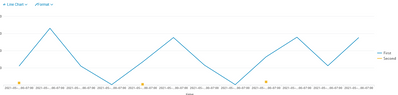
is there any chance that we can get second also line chart(now we are not getting as line)
- Mark as New
- Bookmark Message
- Subscribe to Message
- Mute Message
- Subscribe to RSS Feed
- Permalink
- Report Inappropriate Content
Hi @vinod0313,
please, try the second one because I think that's better, anyway, for the first solution, did you tried different options in the chart? bacause it seems that you haven't some values.
Ciao.
Giuseppe
- Mark as New
- Bookmark Message
- Subscribe to Message
- Mute Message
- Subscribe to RSS Feed
- Permalink
- Report Inappropriate Content
HI @gcusello
The second one didn't worked actually and i tried the options in the chart with first solution and it worked.
Thanks a lot.
- Mark as New
- Bookmark Message
- Subscribe to Message
- Mute Message
- Subscribe to RSS Feed
- Permalink
- Report Inappropriate Content
HI @vinod0313,
please see my approach and adapt it to your real situation (I cannot test it!):
index="cx_aws" host="aw-lx0244.deltadev.ent" source ="pf-enrollee-family-roster-service" ("/persons/" OR "/contracts/") HttpStatusCode
| bucket _time span=1h
| stats count AS "First" by _time
|append [ search
     index="cx_aws" host="aw-lx0244.deltadev.ent" source="pf-enrollee-family-roster-service" ("/persons/" OR "/contracts/") HttpStatusCode
     | eval TimeTaken3=trim(replace(TimeTaken, ",",""))
     | eval REQUESTED_URL2=trim(replace(REQUESTED_URL, "/contracts/",""))
     | eval REQUESTED_URL3 = trim(replace(REQUESTED_URL2, "/enrollees",""))
     | sort -num(TimeTaken3)
     | WHERE TimeTaken3>10000
     | bucket _time span=1h
     | stats count AS "Second" by _time
     ]
| stats values(First) AS First values(Second) AS Second BY _time
Beware to the number of result of the second search: if they could be more than 50,000 you could have errors.
Otherwise, you could try a different approach:
index="cx_aws" (host="aw-lx0244.deltadev.ent" OR host="aw-lx0244.deltadev.ent") source ="pf-enrollee-family-roster-service" ("/persons/" OR "/contracts/") HttpStatusCode
| stats count AS "First" by _time
| eval TimeTaken3=trim(replace(TimeTaken, ",",""))
| eval REQUESTED_URL2=trim(replace(REQUESTED_URL, "/contracts/",""))
| eval REQUESTED_URL3 = trim(replace(REQUESTED_URL2, "/enrollees",""))
| search TimeTaken3>10000 OR host="aw-lx0244.deltadev.ent"
| timechart span=1h count BY host
Ciao.
Giuseppe

Splunk Observability for AI
[Puzzles] Solve, Learn, Repeat: Dereferencing XML to Fixed-length events
Stay Connected: Your Guide to December Tech Talks, Office Hours, and Webinars!
