
Join the Conversation
- Find Answers
- :
- Using Splunk
- :
- Splunk Search
- :
- subtract previous results with current result
- Subscribe to RSS Feed
- Mark Topic as New
- Mark Topic as Read
- Float this Topic for Current User
- Bookmark Topic
- Subscribe to Topic
- Mute Topic
- Printer Friendly Page
- Mark as New
- Bookmark Message
- Subscribe to Message
- Mute Message
- Subscribe to RSS Feed
- Permalink
- Report Inappropriate Content

Hi All,
I have a result which shows the total user directory count for every 1hr, but I want to how many user got created in last hour. Below is the current result which is showing entire user count,
2016-19-09 11:00:03 1920117
2016-19-09 10:00:03 1919999
2016-19-09 09:00:03 1919891
2016-19-09 08:00:03 1919769
2016-19-09 07:00:03 1919657
2016-19-09 06:00:03 1919571
Consider opening value 1919571, after 1hr 86 user account got created then my next hour count is 1919657, but I want to add one more column stating that 86 user created in last 1hr OR is it possible to subtract the previous value with current value. So that i can show management that for each date N number of users created.
Please help me with query which will show me the result of count for each hour
Thanks!
- Mark as New
- Bookmark Message
- Subscribe to Message
- Mute Message
- Subscribe to RSS Feed
- Permalink
- Report Inappropriate Content


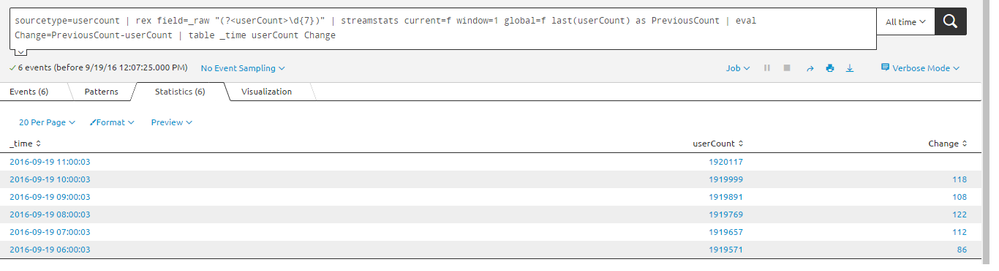
tested and working fine..
sourcetype=usercount | rex field=_raw "(?<userCount>\d{7})" | streamstats current=f window=1 global=f last(userCount) as PreviousCount | eval Change=PreviousCount-userCount | table _time userCount Change
autoregress also working fine.. tested and good ...
sourcetype=usercount | rex field=_raw "(?<userCount>\d{7})" | autoregress userCount p=1 | eval UserChange=userCount_p1-userCount | table _time userCount UserChange
Sekar
PS - If this or any post helped you in any way, pls consider upvoting, thanks for reading !

- Mark as New
- Bookmark Message
- Subscribe to Message
- Mute Message
- Subscribe to RSS Feed
- Permalink
- Report Inappropriate Content

There are many ways to do this but the most straightforward is to use the delta command:
https://docs.splunk.com/Documentation/Splunk/6.4.3/SearchReference/Delta
- Mark as New
- Bookmark Message
- Subscribe to Message
- Mute Message
- Subscribe to RSS Feed
- Permalink
- Report Inappropriate Content
Thanks Woodcock Sir.. on your previous post on this same topic, I learnt the autoregress and now Delta!
Sekar
PS - If this or any post helped you in any way, pls consider upvoting, thanks for reading !
- Mark as New
- Bookmark Message
- Subscribe to Message
- Mute Message
- Subscribe to RSS Feed
- Permalink
- Report Inappropriate Content
tested and working fine..
sourcetype=usercount | rex field=_raw "(?<userCount>\d{7})" | streamstats current=f window=1 global=f last(userCount) as PreviousCount | eval Change=PreviousCount-userCount | table _time userCount Change
autoregress also working fine.. tested and good ...
sourcetype=usercount | rex field=_raw "(?<userCount>\d{7})" | autoregress userCount p=1 | eval UserChange=userCount_p1-userCount | table _time userCount UserChange
Sekar
PS - If this or any post helped you in any way, pls consider upvoting, thanks for reading !
- Mark as New
- Bookmark Message
- Subscribe to Message
- Mute Message
- Subscribe to RSS Feed
- Permalink
- Report Inappropriate Content
Its working... Thanks much inventsekar!

.conf25 technical session recap of Observability for Gen AI: Monitoring LLM ...
A Season of Skills: New Splunk Courses to Light Up Your Learning Journey
Announcing the Migration of the Splunk Add-on for Microsoft Azure Inputs to ...
