
Join the Conversation
- Find Answers
- :
- Using Splunk
- :
- Splunk Search
- :
- subtract previous results with current result
- Subscribe to RSS Feed
- Mark Topic as New
- Mark Topic as Read
- Float this Topic for Current User
- Bookmark Topic
- Subscribe to Topic
- Mute Topic
- Printer Friendly Page
- Mark as New
- Bookmark Message
- Subscribe to Message
- Mute Message
- Subscribe to RSS Feed
- Permalink
- Report Inappropriate Content

Hi All,
I have a result which shows the total user directory count for every 1hr, but I want to how many user got created in last hour. Below is the current result which is showing entire user count,
2016-19-09 11:00:03 1920117
2016-19-09 10:00:03 1919999
2016-19-09 09:00:03 1919891
2016-19-09 08:00:03 1919769
2016-19-09 07:00:03 1919657
2016-19-09 06:00:03 1919571
Consider opening value 1919571, after 1hr 86 user account got created then my next hour count is 1919657, but I want to add one more column stating that 86 user created in last 1hr OR is it possible to subtract the previous value with current value. So that i can show management that for each date N number of users created.
Please help me with query which will show me the result of count for each hour
Thanks!
- Mark as New
- Bookmark Message
- Subscribe to Message
- Mute Message
- Subscribe to RSS Feed
- Permalink
- Report Inappropriate Content


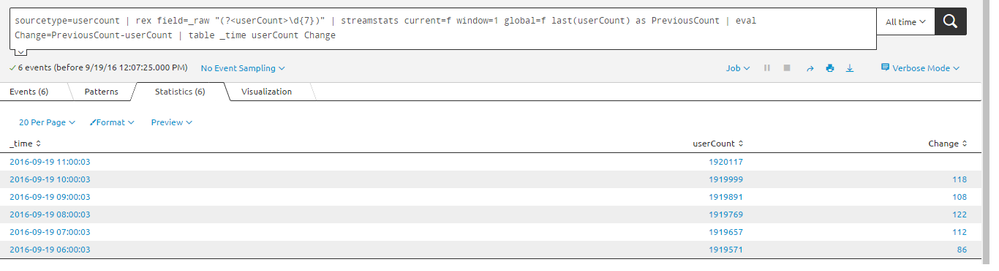
tested and working fine..
sourcetype=usercount | rex field=_raw "(?<userCount>\d{7})" | streamstats current=f window=1 global=f last(userCount) as PreviousCount | eval Change=PreviousCount-userCount | table _time userCount Change
autoregress also working fine.. tested and good ...
sourcetype=usercount | rex field=_raw "(?<userCount>\d{7})" | autoregress userCount p=1 | eval UserChange=userCount_p1-userCount | table _time userCount UserChange

- Mark as New
- Bookmark Message
- Subscribe to Message
- Mute Message
- Subscribe to RSS Feed
- Permalink
- Report Inappropriate Content

There are many ways to do this but the most straightforward is to use the delta command:
https://docs.splunk.com/Documentation/Splunk/6.4.3/SearchReference/Delta
- Mark as New
- Bookmark Message
- Subscribe to Message
- Mute Message
- Subscribe to RSS Feed
- Permalink
- Report Inappropriate Content
Thanks Woodcock Sir.. on your previous post on this same topic, I learnt the autoregress and now Delta!
- Mark as New
- Bookmark Message
- Subscribe to Message
- Mute Message
- Subscribe to RSS Feed
- Permalink
- Report Inappropriate Content
tested and working fine..
sourcetype=usercount | rex field=_raw "(?<userCount>\d{7})" | streamstats current=f window=1 global=f last(userCount) as PreviousCount | eval Change=PreviousCount-userCount | table _time userCount Change
autoregress also working fine.. tested and good ...
sourcetype=usercount | rex field=_raw "(?<userCount>\d{7})" | autoregress userCount p=1 | eval UserChange=userCount_p1-userCount | table _time userCount UserChange
- Mark as New
- Bookmark Message
- Subscribe to Message
- Mute Message
- Subscribe to RSS Feed
- Permalink
- Report Inappropriate Content
Its working... Thanks much inventsekar!

Join the Splunk Community Slack to learn, troubleshoot, and make connections with fellow Splunk practitioners in real time!
Join Splunk User Groups to connect and learn in-person by region or remotely by topic or industry.
Why Splunk Customers Should Attend Cisco Live 2026 Las Vegas
What Is the Name of the USB Key Inserted by Bob Smith? (BOTS Hint, Not the Answer)
Automating Threat Operations and Threat Hunting with Recorded Future
