
Turn on suggestions
Auto-suggest helps you quickly narrow down your search results by suggesting possible matches as you type.
Splunk Search
×
Join the Conversation
Without signing in, you're just watching from the sidelines. Sign in or Register to connect, share, and be part of the Splunk Community.
Turn on suggestions
Auto-suggest helps you quickly narrow down your search results by suggesting possible matches as you type.
- Find Answers
- :
- Using Splunk
- :
- Splunk Search
- :
- increase the width of the column in the barchart
Options
- Subscribe to RSS Feed
- Mark Topic as New
- Mark Topic as Read
- Float this Topic for Current User
- Bookmark Topic
- Subscribe to Topic
- Mute Topic
- Printer Friendly Page
- Mark as New
- Bookmark Message
- Subscribe to Message
- Mute Message
- Subscribe to RSS Feed
- Permalink
- Report Inappropriate Content
increase the width of the column in the barchart

venky1544
Builder
07-13-2021
04:55 AM
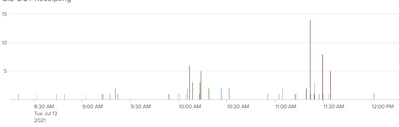
Hi All
I have a bar chart generated using a timechart command I want to increase the width of the bar column they seem to be very thin
I have tried using the below setting as well still not working changed the value to 5 as well
<option name="charting.chart.columnStyle.width">1</option>
This setting was also giving me a validation warning
- Mark as New
- Bookmark Message
- Subscribe to Message
- Mute Message
- Subscribe to RSS Feed
- Permalink
- Report Inappropriate Content

richgalloway

SplunkTrust
07-13-2021
06:22 AM
The size of the columns is based on the number of columns that need to fit into the space available. Reduce the number of columns and they'll be wider.
You don't say what the validation warning was, but I'm guessing it said you tried to use a deprecated option.
---
If this reply helps you, Karma would be appreciated.
If this reply helps you, Karma would be appreciated.

Get Updates on the Splunk Community!
Upcoming Webinar: Unmasking Insider Threats with Slunk Enterprise Security’s UEBA
Join us on Wed, Dec 10. at 10AM PST / 1PM EST for a live webinar and demo with Splunk experts! Discover how ...
.conf25 technical session recap of Observability for Gen AI: Monitoring LLM ...
If you’re unfamiliar, .conf is Splunk’s premier event where the Splunk community, customers, partners, and ...
A Season of Skills: New Splunk Courses to Light Up Your Learning Journey
There’s something special about this time of year—maybe it’s the glow of the holidays, maybe it’s the ...
