
Join the Conversation
- Find Answers
- :
- Using Splunk
- :
- Splunk Search
- :
- Re: i need to extract fields from XML
- Subscribe to RSS Feed
- Mark Topic as New
- Mark Topic as Read
- Float this Topic for Current User
- Bookmark Topic
- Subscribe to Topic
- Mute Topic
- Printer Friendly Page
- Mark as New
- Bookmark Message
- Subscribe to Message
- Mute Message
- Subscribe to RSS Feed
- Permalink
- Report Inappropriate Content

from this data i want to extract theses fields "Message", "Query" and "Row". when i try to extract i am getting error that i am extracting multiple fields. i haven't had issues with field extraction prior to this.
<Check>
    <Message>Machine without MachinePersonnel</Message>
    <Query>
SELECT
    Machine.CorporateName
FROM Machine Machine
LEFT OUTER JOIN MachinePersonnel MachinePersonnel
ON Machine.CorporateName = MachinePersonnel.Machine
WHERE MachinePersonnel.Machine IS NULL
    </QUERY>

    <Row>
        <CorporateName>adx07mrbotn</CorporateName>
    </Row>
    <Row>
        <CorporateName>rns01mrbotn</CorporateName>
    </Row>
    <Row>
        <CorporateName>log01mrbotn</CorporateName>
    </Row>
    <Row>
        <CorporateName>log03mrbotn</CorporateName>
    </Row>
    <Row>
        <CorporateName>svr02mrbotn</CorporateName>
    </Row>
    <Row>
        <CorporateName>san01mrbotn</CorporateName>
    </Row>
</Check>
**
- Mark as New
- Bookmark Message
- Subscribe to Message
- Mute Message
- Subscribe to RSS Feed
- Permalink
- Report Inappropriate Content


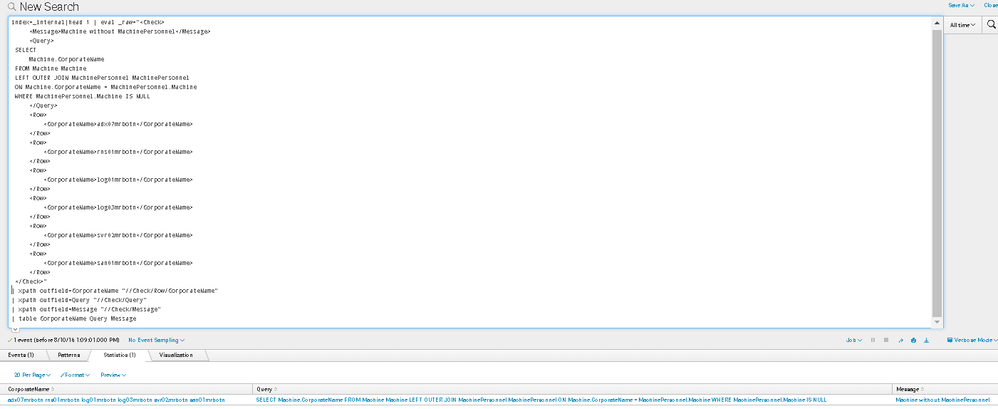
This works when i just shove all that xml into the _raw field with an eval statement.
| xpath outfield=CorporateName "//Check/Row/CorporateName"
| xpath outfield=Query "//Check/Query"
| xpath outfield=Message "//Check/Message"
| table CorporateName Query Message
As somesoni2 mentioned, we need more details on how you're trying to extract. The example I just gave only works if you're indexing these as complete events.

- Mark as New
- Bookmark Message
- Subscribe to Message
- Mute Message
- Subscribe to RSS Feed
- Permalink
- Report Inappropriate Content

The problem you will run in to with field extractions, is number of occurrences. IFX only handles single occurrence. You have couple of options
1) Edit props/transforms and include MV_ADD=true
OR
2) Use the field transformations UI to add it from there. Check the create multivalue field checkbox. Something like this for your regex should work.
Regex: `(CorporateName)\>([^\<]+)`
Format: `$1::$2`
create multivalue field: `checked`
This will create a multivalue field called CorporateName with all instances in that field. You can then use mvexpand in your search to expand them in to rows.
http://docs.splunk.com/Documentation/Splunk/6.4.2/Knowledge/Managefieldtransforms
- Mark as New
- Bookmark Message
- Subscribe to Message
- Mute Message
- Subscribe to RSS Feed
- Permalink
- Report Inappropriate Content
sorry i ran out of replies the other day. this is getting the data separated in to the fields i need. but i still would like to know why the field extraction tool doesn't work for this. i have never had issues with it in the past. and i can't attach a snip of what i want to show you.. urg..
- Mark as New
- Bookmark Message
- Subscribe to Message
- Mute Message
- Subscribe to RSS Feed
- Permalink
- Report Inappropriate Content
This works when i just shove all that xml into the _raw field with an eval statement.
| xpath outfield=CorporateName "//Check/Row/CorporateName"
| xpath outfield=Query "//Check/Query"
| xpath outfield=Message "//Check/Message"
| table CorporateName Query Message
As somesoni2 mentioned, we need more details on how you're trying to extract. The example I just gave only works if you're indexing these as complete events.
- Mark as New
- Bookmark Message
- Subscribe to Message
- Mute Message
- Subscribe to RSS Feed
- Permalink
- Report Inappropriate Content
sorry i ran out of replies the other day. this is getting the data separated in to the fields i need. but i still would like to know why the field extraction tool doesn't work for this. i have never had issues with it in the past. and i can't attach a snip of what i want to show you.. urg..
- Mark as New
- Bookmark Message
- Subscribe to Message
- Mute Message
- Subscribe to RSS Feed
- Permalink
- Report Inappropriate Content
The reason the IFX (interactive field extractor) isn't working is because it's extracting multiple values for the same key/field in each event. See sundaresh's reply below.
- Mark as New
- Bookmark Message
- Subscribe to Message
- Mute Message
- Subscribe to RSS Feed
- Permalink
- Report Inappropriate Content

How is your data ingested? Is this a raw events OR value of a field? Did you ingested this data with configuration to parse this as an XML event? What is your current search?
- Mark as New
- Bookmark Message
- Subscribe to Message
- Mute Message
- Subscribe to RSS Feed
- Permalink
- Report Inappropriate Content
raw event
search=
sourcetype=DBIntegrity

Join the Splunk Community Slack to learn, troubleshoot, and make connections with fellow Splunk practitioners in real time!
Join Splunk User Groups to connect and learn in-person by region or remotely by topic or industry.
Index This | What travels the world but is also stuck in place?
Discover New Use Cases: Unlock Greater Value from Your Existing Splunk Data
Continue Your Journey: Join Session 2 of the Data Management and Federation Bootcamp ...
