
Join the Conversation
- Find Answers
- :
- Using Splunk
- :
- Splunk Search
- :
- how to remove spaces in xml data after field extra...
- Subscribe to RSS Feed
- Mark Topic as New
- Mark Topic as Read
- Float this Topic for Current User
- Bookmark Topic
- Subscribe to Topic
- Mute Topic
- Printer Friendly Page
- Mark as New
- Bookmark Message
- Subscribe to Message
- Mute Message
- Subscribe to RSS Feed
- Permalink
- Report Inappropriate Content
how to remove spaces in xml data after field extraction

I am trying to make a field extraction from xml data and but I am having a problem with special ascii characters being captures as well.
what is the best approach to exclude this characters?
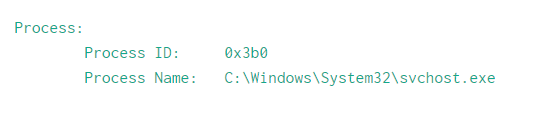
This is what the data looks like and when I try to capture "Process Name" using regex below.
index=main | rex field=_raw "Process Name\:(?<process_name>.+)Permissions\W
this is the result I am getting for process_name field
\tC:\Windows\System32\svchost.exe\n\n

- Mark as New
- Bookmark Message
- Subscribe to Message
- Mute Message
- Subscribe to RSS Feed
- Permalink
- Report Inappropriate Content

Looking into the data, it seems it is Windows Eventlog? Then there is already ready-made Official addon (Splunk_TA_windows) to do this and extract fields. Just install them into your Search Heads & indexers & HF
The Logic from the TA is
[system_props_xml_kv]
# Extracts anything in the form of <tag>value</tag> as tag::value
SOURCE_KEY = System_Props_Xml
REGEX = (?ms)<(\w*)>([^<]*)<\/\1>
FORMAT = $1::$2
MV_ADD = 1

[system_props_xml_attributes]
# Extracts values from following fields:
# Provider: Name, Guid
# TimeCreated: SystemTime, RawTime
# Correlation: ActivityID, RelativeActivityID
# Execution: ProcessID, ThreadID, ProcessorID, SessionID, KernelTime, UserTime, ProcessorTime
# Security: UserID
SOURCE_KEY = System_Props_Xml
REGEX = (?ms)([^\s=]+)\s*=\s*(\'[^<\']*\'|"[^<"]*")
FORMAT = $1::$2
MV_ADD = 1
But if you want to do it manually, the regex should be:
index=main | rex field=_raw "Process Name:\s*(?<process_name>.+)"
- Mark as New
- Bookmark Message
- Subscribe to Message
- Mute Message
- Subscribe to RSS Feed
- Permalink
- Report Inappropriate Content

@michaelrosello if you don't need spaces (white-spaces) in xml data, best approach would be to removed while indexing the data using SEDCMD : https://docs.splunk.com/Documentation/Splunk/latest/Data/Anonymizedata
1) Search time you would not need extra formatting to remove spaces from data
2) You will index only required data.
| makeresults | eval message= "Happy Splunking!!!"
- Mark as New
- Bookmark Message
- Subscribe to Message
- Mute Message
- Subscribe to RSS Feed
- Permalink
- Report Inappropriate Content

Hi @michaelrosello,
You can go for something like this :
index=main | rex field=_raw "Process Name\:[\s]+(?<process_name>.+)\n\nPermissions\W
The right way to go about extracting fields from XML at search time is using the spath command :
https://docs.splunk.com/Documentation/Splunk/7.2.6/SearchReference/spath
In your case since it's windows logs I wouldn't bother with the extractions, just grab the windows TA from splunkbase because all the field extractions are already done there :
https://splunkbase.splunk.com/app/742/
Cheers,
David

Unlock Faster Time-to-Value on Edge and Ingest Processor with New SPL2 Pipeline ...
Splunk MCP & Agentic AI: Machine Data Without Limits
Application management with Targeted Application Install for Victoria Experience
