
Join the Conversation
- Find Answers
- :
- Using Splunk
- :
- Splunk Search
- :
- Re: how to extract time from a string time field?
- Subscribe to RSS Feed
- Mark Topic as New
- Mark Topic as Read
- Float this Topic for Current User
- Bookmark Topic
- Subscribe to Topic
- Mute Topic
- Printer Friendly Page
- Mark as New
- Bookmark Message
- Subscribe to Message
- Mute Message
- Subscribe to RSS Feed
- Permalink
- Report Inappropriate Content

I have that field that shows time in a string. the values of the field are something like:
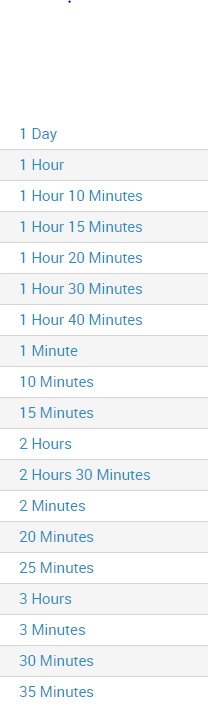
Is there a way to extract the number of hours for each one?
for example if I have value of 2 days I will get 16 hours (8 hours a day), and if I have 30 minutes value, I will get 0.5 hours.
Thank you

- Mark as New
- Bookmark Message
- Subscribe to Message
- Mute Message
- Subscribe to RSS Feed
- Permalink
- Report Inappropriate Content
Create 3 new fields from this existing field and then calculate hours -
| rex field=<existing_field> "(?<DAYS>\d+)\s*Day"
| rex field=<existing_field> "(?<HOURS>\d+)\s*Hour"
| rex field=<existing_field> "(?<MINS>\d+)\s*Minute"
| eval FINAL_TIME=8*DAYS + HOURS + round(MINS/60,2)
- Mark as New
- Bookmark Message
- Subscribe to Message
- Mute Message
- Subscribe to RSS Feed
- Permalink
- Report Inappropriate Content
Create 3 new fields from this existing field and then calculate hours -
| rex field=<existing_field> "(?<DAYS>\d+)\s*Day"
| rex field=<existing_field> "(?<HOURS>\d+)\s*Hour"
| rex field=<existing_field> "(?<MINS>\d+)\s*Minute"
| eval FINAL_TIME=8*DAYS + HOURS + round(MINS/60,2)
- Mark as New
- Bookmark Message
- Subscribe to Message
- Mute Message
- Subscribe to RSS Feed
- Permalink
- Report Inappropriate Content
I think that might be really helpful for me, but I get no results in the FINAL_TIME field. I think it happens because the values does not contain days hours and minutes, only 1 or 2 of them on each value. I think I need to check if for example "Days" exists in the field and only then try to extract it. what is the best way to do it?
Thank you!
- Mark as New
- Bookmark Message
- Subscribe to Message
- Mute Message
- Subscribe to RSS Feed
- Permalink
- Report Inappropriate Content
This will work -
   | rex field=<existing_field> "(?<DAYS>\d+)\s*Day"
    | rex field=<existing_field> "(?<HOURS>\d+)\s*Hour"
    | rex field=<existing_field> "(?<MINS>\d+)\s*Minute"
    | eval DAYS=if(isnull(DAYS),0,DAYS) | eval HOURS=if(isnull(HOURS),0,HOURS) | eval MINS=if(isnull(MINS),0,MINS)
    | eval FINAL_TIME=8*DAYS + HOURS + round(MINS/60,2)

Join the Splunk Community Slack to learn, troubleshoot, and make connections with fellow Splunk practitioners in real time!
Join Splunk User Groups to connect and learn in-person by region or remotely by topic or industry.
Observability Simplified: Combining User Experience, Application Performance & ...
Event Series May & June: From Network Visibility to Service Intelligence
Global Splunk User Group Events: May + June 2026
