
Join the Conversation
- Find Answers
- :
- Using Splunk
- :
- Splunk Search
- :
- horse shoe meter for visualisation
- Subscribe to RSS Feed
- Mark Topic as New
- Mark Topic as Read
- Float this Topic for Current User
- Bookmark Topic
- Subscribe to Topic
- Mute Topic
- Printer Friendly Page
- Mark as New
- Bookmark Message
- Subscribe to Message
- Mute Message
- Subscribe to RSS Feed
- Permalink
- Report Inappropriate Content
horse shoe meter for visualisation

Hi I have a query to see the success and failure rate.
The query will give the fields success and failure rate as output.
I wanted to use horse shoe meter visualization but the meter shows both the rates but the numeric value being displayed is either success rate or the failure rate but not both.
Could you please help.
- Mark as New
- Bookmark Message
- Subscribe to Message
- Mute Message
- Subscribe to RSS Feed
- Permalink
- Report Inappropriate Content

@Deepz2612 try the following run anywhere example. It does the following:
1) Runs an independent search (search without visualization), to get the Success and Failure rate.
2) Using Search Event Handler sets the tokens for Success Rate and Failure Rate.
3) Inside the Horseshoe custom visualization, use run anywhere search and display one of success or failure token based on which Radial Chart needs to be drawn using corresponding token set in the previous step.
4) Use the tokens to display the Caption text as expected.
5) Give an id to the horseshoe meter and use CSS Selector to
a) Hide actual horseshoe meter text using CSS selector.
b) Change the font and position of the caption position to override the actual value position and font.
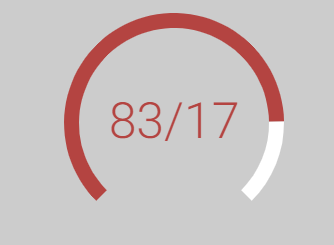
Following is the complete code for the run anywhere example as per your use case:
<dashboard>
  <label>Horseshoe Meter</label>
  <search>
    <query>| makeresults
| fields - _time
| eval success=random()
| eval success=substr(success,0,2)
| eval failure=100-success
    </query>
    <progress>
      <set token="tokSuccess">$result.success$</set>
      <set token="tokFailure">$result.failure$</set>
    </progress>
  </search>
  <row>
    <panel>
      <html>
        <style>
          #my_horseshoe_meter .meter-center-text{
            visibility: hidden !important;
          }
          #my_horseshoe_meter .meter-under-text{
            font-size: 50px !important;
            font-weight: 250 !important;
            transform: translateY(15px) !important;
          }
        </style>
      </html>
      <viz id="my_horseshoe_meter" type="horseshoe_meter_app.horseshoe_meter">
        <search>
          <query>| makeresults
          | fields - _time
          | eval failure="$tokFailure$"</query>
          <earliest>-24h@h</earliest>
          <latest>now</latest>
          <sampleRatio>1</sampleRatio>
        </search>
        <option name="drilldown">none</option>
        <option name="horseshoe_meter_app.horseshoe_meter.backgroundColor">#ccc</option>
        <option name="horseshoe_meter_app.horseshoe_meter.caption">$tokFailure$/$tokSuccess$</option>
        <option name="horseshoe_meter_app.horseshoe_meter.dialColor">#fff</option>
        <option name="horseshoe_meter_app.horseshoe_meter.maxRangeColor">#b44441</option>
        <option name="horseshoe_meter_app.horseshoe_meter.maxRangeThreshold">30</option>
        <option name="horseshoe_meter_app.horseshoe_meter.maxValue">100</option>
        <option name="horseshoe_meter_app.horseshoe_meter.midRangeColor">#fbcd2f</option>
        <option name="horseshoe_meter_app.horseshoe_meter.midRangeThreshold">10</option>
        <option name="horseshoe_meter_app.horseshoe_meter.minRangeColor">#3fc77a</option>
        <option name="horseshoe_meter_app.horseshoe_meter.minValue">0</option>
        <option name="horseshoe_meter_app.horseshoe_meter.thresholdStyle">realValue</option>
        <option name="horseshoe_meter_app.horseshoe_meter.useRangemap">true</option>
        <option name="horseshoe_meter_app.horseshoe_meter.valueColor">#555</option>
        <option name="trellis.enabled">0</option>
        <option name="trellis.scales.shared">1</option>
        <option name="trellis.size">medium</option>
      </viz>
    </panel>
  </row>
</dashboard>
Please try out and confirm!
| makeresults | eval message= "Happy Splunking!!!"

- Mark as New
- Bookmark Message
- Subscribe to Message
- Mute Message
- Subscribe to RSS Feed
- Permalink
- Report Inappropriate Content
Hi,
I tried the above and receiving the error as below.
Error rendering Horseshoe Meter visualization: This visualization cannot render non-numeric results. To build a horseshoe meter visualization, use a search that returns numeric values.
- Mark as New
- Bookmark Message
- Subscribe to Message
- Mute Message
- Subscribe to RSS Feed
- Permalink
- Report Inappropriate Content
@Deepz2612 Did you get issue with run anywhere example or your own implementation?
Did you print the value of $tokFailure$ which is used in Horseshoe Meter? Is it numeric?
| makeresults | eval message= "Happy Splunking!!!"

Join the Splunk Community Slack to learn, troubleshoot, and make connections with fellow Splunk practitioners in real time!
Join Splunk User Groups to connect and learn in-person by region or remotely by topic or industry.
[Puzzles] Solve, Learn, Repeat: Character substitutions with Regular Expressions
Splunk Community Badges!
[Puzzles] Solve, Learn, Repeat: Matching cron expressions
