
Are you a member of the Splunk Community?
- Find Answers
- :
- Using Splunk
- :
- Splunk Search
- :
- Re: extract content of brackets
- Subscribe to RSS Feed
- Mark Topic as New
- Mark Topic as Read
- Float this Topic for Current User
- Bookmark Topic
- Subscribe to Topic
- Mute Topic
- Printer Friendly Page
- Mark as New
- Bookmark Message
- Subscribe to Message
- Mute Message
- Subscribe to RSS Feed
- Permalink
- Report Inappropriate Content
extract content of brackets

how can i extract content of first bracket if it is string?
e.g:
2020-04-21 23:59:59,093 INFO xxx.xxx-zz-00000 [process] start[ppp] time[00] tag[xxx]
2020-04-21 23:59:59,093 INFO xxx.xxx-zz-00000 [1234567] start[ppp] time[00] tag[xxx]
....
expected result:
process
have huge log file need to extract process with this conditions
1-content of first bracket
2-it must be string not number!
Thanks,
- Mark as New
- Bookmark Message
- Subscribe to Message
- Mute Message
- Subscribe to RSS Feed
- Permalink
- Report Inappropriate Content

Hi @mehrdad_2000,
If you just want whatever is between square brackets but ensuring it only contains letters and not numbers, you can do something like:
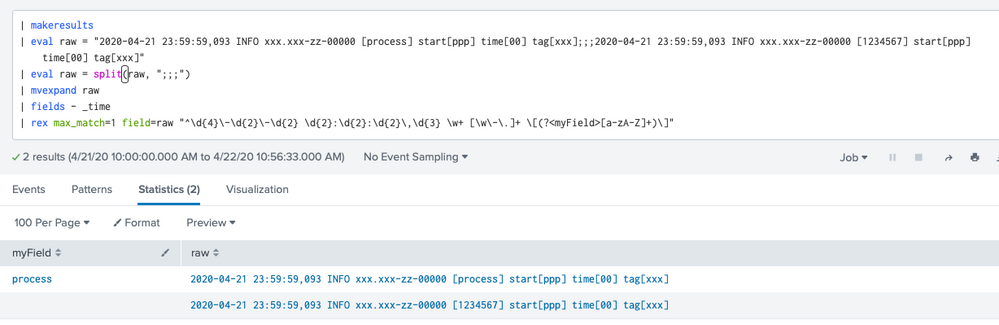
| rex max_match=1 "^\d{4}\-\d{2}\-\d{2} \d{2}:\d{2}:\d{2}\,\d{3} \w+ [\w\-\.]+ \[(?<myField>[a-zA-Z]+)\]"
For instance, if I use your sample data:

- Mark as New
- Bookmark Message
- Subscribe to Message
- Mute Message
- Subscribe to RSS Feed
- Permalink
- Report Inappropriate Content
As I mentioned this is large log file and need more complete regex to do this.
For example your answer extract only fixed pattern that i mention, but not work on these:
2020-04-21 23:59:59,093 INFO xxxx.xxxxx-zz-00000xxx111 [process] start[ppp] time[00] tag[xxx]
2020-04-21 23:59:59,093 INFO xx.xxx-zz-00000x [report] start[ppp] time[00] tag[xxx]
Expected output:
process
report
- Mark as New
- Bookmark Message
- Subscribe to Message
- Mute Message
- Subscribe to RSS Feed
- Permalink
- Report Inappropriate Content
Hmm, that's interesting. I have tested both your samples on regex101 and my regex works fine with them. Look:

Index This | Why did the turkey cross the road?
Enter the Agentic Era with Splunk AI Assistant for SPL 1.4
Feel the Splunk Love: Real Stories from Real Customers
