
Join the Conversation
- Find Answers
- :
- Using Splunk
- :
- Splunk Search
- :
- Re: delete events from specific time
- Subscribe to RSS Feed
- Mark Topic as New
- Mark Topic as Read
- Float this Topic for Current User
- Bookmark Topic
- Subscribe to Topic
- Mute Topic
- Printer Friendly Page
- Mark as New
- Bookmark Message
- Subscribe to Message
- Mute Message
- Subscribe to RSS Feed
- Permalink
- Report Inappropriate Content

hey, im trying to delete events that got into the system on a specific time range.
i see the events when i use splunk time range picker
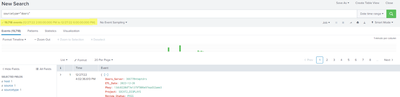
but when i try and use where to find those events without time picker i can't find them and im too scared to just run delete query without specifying exactly what i want to delete.
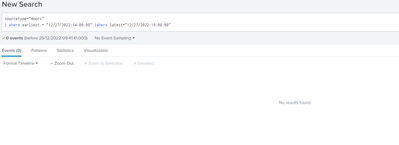
iv'e also tried only one "where" clause with earliest and latest didn't worked too.
what am i doing wrong?
- Mark as New
- Bookmark Message
- Subscribe to Message
- Mute Message
- Subscribe to RSS Feed
- Permalink
- Report Inappropriate Content


You don't need a where command, just put the earliest and latest on the search line. Try something like this
sourcetype="doors" earliest="12/27/2022:14:00:00" latest="12/27/2022:18:00:00"You are right to be concerned about the delete command, it is very powerful and cannot be undone.
- Mark as New
- Bookmark Message
- Subscribe to Message
- Mute Message
- Subscribe to RSS Feed
- Permalink
- Report Inappropriate Content

"where" doesn't work like that 🙂
Your "wheres" would effectively look for events which have fields called "earliest" and "latest" with given values (and not even timestamps but literal string values). So it's definitely not what you want. Use @ITWhisperer 's way.
And yes, delete is not a very good thing to use.
It does not delete the data from index as such. Just marks it "invisible" so the events don't pop up in the search results but they are still in the index files. From Splunk's point of view however the operation is irreversible, you canot "undelete" events. So the command requires a special capability granted to the user.
Anyway, delete command is not something used widely with Splunk. Typically you'd prepare your ingestion process in a testing environment or at least using a test index which you can quickly drop and recreate as new and only if you have a working method, you'd deploy to production. And then you don't usually want to delete your data from indexes since it's there for a reason.
- Mark as New
- Bookmark Message
- Subscribe to Message
- Mute Message
- Subscribe to RSS Feed
- Permalink
- Report Inappropriate Content
I'm seeing by your comment that i misunderstood the "Where" command .. what a blunder.
thanks for the explanation.
- Mark as New
- Bookmark Message
- Subscribe to Message
- Mute Message
- Subscribe to RSS Feed
- Permalink
- Report Inappropriate Content
You don't need a where command, just put the earliest and latest on the search line. Try something like this
sourcetype="doors" earliest="12/27/2022:14:00:00" latest="12/27/2022:18:00:00"You are right to be concerned about the delete command, it is very powerful and cannot be undone.

Join the Splunk Community Slack to learn, troubleshoot, and make connections with fellow Splunk practitioners in real time!
Join Splunk User Groups to connect and learn in-person by region or remotely by topic or industry.
Manage Edge Processor pipelines end to end with APIs
Splunk Brings Proof of Control to Digital Asset Transfers
Manage Ingest Processor pipelines end to end with APIs
