
Join the Conversation
- Find Answers
- :
- Using Splunk
- :
- Splunk Search
- :
- csv extrtactions not working
- Subscribe to RSS Feed
- Mark Topic as New
- Mark Topic as Read
- Float this Topic for Current User
- Bookmark Topic
- Subscribe to Topic
- Mute Topic
- Printer Friendly Page
- Mark as New
- Bookmark Message
- Subscribe to Message
- Mute Message
- Subscribe to RSS Feed
- Permalink
- Report Inappropriate Content

Hello
am trying to ingest csv data into splunk.
inputs.conf
[monitor:///tmp/mycsv/test.csv]
sourcetype=mytest
index=csvfiles
disabled=false
and my props.conf looks like
[mytest]
INDEXED_EXTRACTIONS = CSV
HEADER_FIELD_LINE_NUMBER = 1
SHOULD_LINEMERGE = false
LINE_BREAKER = ([\r\n]+)
when i search my data it is not extracting any fields.
can any one help me in solving this
Here is my csv file example
"_id","timestamp","eventName","transactionId","userId","trackingIds","runAs","objectId","operation","before","after","changedFields","revision","component","realm"
"123ab-776df","2016-12-19T13:42:41.001Z","session-timed-out","125-vca310324","id=abc,ab=user","[123aser445]",id=qr1249,ab=user","96c1c88","delete","","","","","session","/"
Thanks in advance
- Mark as New
- Bookmark Message
- Subscribe to Message
- Mute Message
- Subscribe to RSS Feed
- Permalink
- Report Inappropriate Content


Hi saifuddin9122,
how are you receiving events, from a Forwarder or from a local drive?
if you are using a forwarder, you have to deploy props.conf in both Splunk server and Forwarders and inputs.conf on forwarders.
Bye.
Giuseppe
- Mark as New
- Bookmark Message
- Subscribe to Message
- Mute Message
- Subscribe to RSS Feed
- Permalink
- Report Inappropriate Content

I have tried almost similar props.conf for csv sourcetype and field extraction worked fine for me.
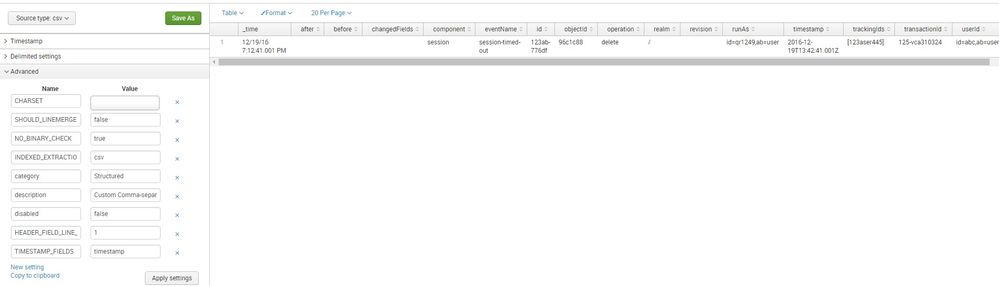
PS: id=qr1249,ab=user" in your data should begin with double quotes. Can you please try to add a single csv file with Data Preview turned on? By default Splunk will apply csv sourcetype, on top of which you can tell first line to be Header line and timestamp column to be time field. Once preview is as per your need you can save sourcetype as Custom > mytest_csv , as per your need.
[mytest_csv ]
SHOULD_LINEMERGE=false
NO_BINARY_CHECK=true
CHARSET=AUTO
INDEXED_EXTRACTIONS=csv
category=Structured
description=Custom Comma-separated value. Header field line is 1. Timestamp column is timestamp.
disabled=false
HEADER_FIELD_LINE_NUMBER=1
TIMESTAMP_FIELDS=timestamp
| makeresults | eval message= "Happy Splunking!!!"


- Mark as New
- Bookmark Message
- Subscribe to Message
- Mute Message
- Subscribe to RSS Feed
- Permalink
- Report Inappropriate Content
i tried it other way also. i just wrote transforms.conf in which i specified DELIMS and FILEDS. it is also working but the only problem am facing by doing this is, the header field is also getting ingested.
- Mark as New
- Bookmark Message
- Subscribe to Message
- Mute Message
- Subscribe to RSS Feed
- Permalink
- Report Inappropriate Content
Hi saifuddin9122,
how are you receiving events, from a Forwarder or from a local drive?
if you are using a forwarder, you have to deploy props.conf in both Splunk server and Forwarders and inputs.conf on forwarders.
Bye.
Giuseppe
- Mark as New
- Bookmark Message
- Subscribe to Message
- Mute Message
- Subscribe to RSS Feed
- Permalink
- Report Inappropriate Content
Thanks For the reply....
it worked for me
- Mark as New
- Bookmark Message
- Subscribe to Message
- Mute Message
- Subscribe to RSS Feed
- Permalink
- Report Inappropriate Content

Since this is structured data file, the props.conf should be on the forwarder where you're monitoring the file. See this:
Where have you put your props.conf file?

Join the Splunk Community Slack to learn, troubleshoot, and make connections with fellow Splunk practitioners in real time!
Join Splunk User Groups to connect and learn in-person by region or remotely by topic or industry.
[Puzzles] Solve, Learn, Repeat: Character substitutions with Regular Expressions
Splunk Community Badges!
[Puzzles] Solve, Learn, Repeat: Matching cron expressions
