
Join the Conversation
- Find Answers
- :
- Using Splunk
- :
- Splunk Search
- :
- Re: count events in multivalue field
- Subscribe to RSS Feed
- Mark Topic as New
- Mark Topic as Read
- Float this Topic for Current User
- Bookmark Topic
- Subscribe to Topic
- Mute Topic
- Printer Friendly Page
- Mark as New
- Bookmark Message
- Subscribe to Message
- Mute Message
- Subscribe to RSS Feed
- Permalink
- Report Inappropriate Content

Hi,
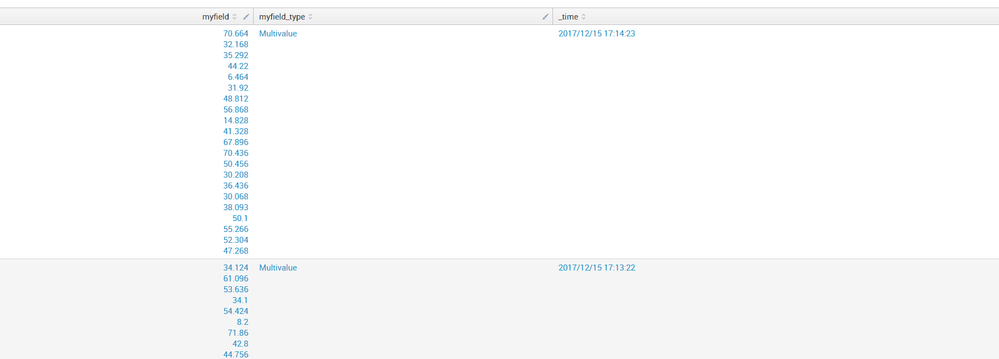
I want to deal the multivalue field to get the counts whch is satisfied the conditions I set. For example, in the following picture, I want to get search result of (myfield>44) in one event.

- Mark as New
- Bookmark Message
- Subscribe to Message
- Mute Message
- Subscribe to RSS Feed
- Permalink
- Report Inappropriate Content


HI
Can you please try this?
YOUR_SEARCH
| eval myfield=mvfilter(myfield>44)
| eval n=mvcount(myfield)
My Sample search:
| makeresults
| eval myfield="10,20,30,40"
| makemv delim="," myfield
| eval myfield=mvfilter(myfield>20)
| eval n=mvcount(myfield)
Thanks
- Mark as New
- Bookmark Message
- Subscribe to Message
- Mute Message
- Subscribe to RSS Feed
- Permalink
- Report Inappropriate Content

try this:
|eval myfield_count=mvcount(mvfilter(myfield>44))
- Mark as New
- Bookmark Message
- Subscribe to Message
- Mute Message
- Subscribe to RSS Feed
- Permalink
- Report Inappropriate Content
Thanks! It works!
- Mark as New
- Bookmark Message
- Subscribe to Message
- Mute Message
- Subscribe to RSS Feed
- Permalink
- Report Inappropriate Content
HI
Can you please try this?
YOUR_SEARCH
| eval myfield=mvfilter(myfield>44)
| eval n=mvcount(myfield)
My Sample search:
| makeresults
| eval myfield="10,20,30,40"
| makemv delim="," myfield
| eval myfield=mvfilter(myfield>20)
| eval n=mvcount(myfield)
Thanks
- Mark as New
- Bookmark Message
- Subscribe to Message
- Mute Message
- Subscribe to RSS Feed
- Permalink
- Report Inappropriate Content
It works,thank you!
While I have another question, it seems that splunk parse the float to string sometimes, and because of this problem, the mvfilter function may become invalid. How can I solve it in this situation?
- Mark as New
- Bookmark Message
- Subscribe to Message
- Mute Message
- Subscribe to RSS Feed
- Permalink
- Report Inappropriate Content
Hih @perlish
Can you please share events or sample data which causes an error?
- Mark as New
- Bookmark Message
- Subscribe to Message
- Mute Message
- Subscribe to RSS Feed
- Permalink
- Report Inappropriate Content
I'm sorry that I don't have the sample data. When I tried to solve the question I asked ,I used nomv() method and found that the single value's type is string. Therefore, I asked the following question.
- Mark as New
- Bookmark Message
- Subscribe to Message
- Mute Message
- Subscribe to RSS Feed
- Permalink
- Report Inappropriate Content
try this command
| eval n=mvcount(myfield)

Data Management Digest – December 2025
Index This | What is broken 80% of the time by February?
Unlock Faster Time-to-Value on Edge and Ingest Processor with New SPL2 Pipeline ...
