
Join the Conversation
- Find Answers
- :
- Using Splunk
- :
- Splunk Search
- :
- Re: abstract for event
- Subscribe to RSS Feed
- Mark Topic as New
- Mark Topic as Read
- Float this Topic for Current User
- Bookmark Topic
- Subscribe to Topic
- Mute Topic
- Printer Friendly Page
- Mark as New
- Bookmark Message
- Subscribe to Message
- Mute Message
- Subscribe to RSS Feed
- Permalink
- Report Inappropriate Content
abstract for event

Hi , Could you please help me to use of abstract command for below event.What would be output for below command if used abstract command.Thanks
3/3/18
8:29:19.637 AM
03-03-2018 08:29:19.637 +0530 INFO Metrics - group=udpin_connections, :514, sourcePort=514, _udp_bps=0.00, _udp_kbps=0.00, _udp_avg_thruput=0.00, _udp_kprocessed=0.00, _udp_eps=0.00
host = Maheshs-MacBook-Pro.local message = group=udpin_connections, *:514, sourcePort=514, _udp_bps=0.00, _udp_kbps=0.00, _udp_avg_thruput=0.00, _udp_kprocessed=0.00, _udp_eps=0.00 source = /Applications/Splunk/var/log/splunk/metrics.log sourcetype = splunkd
3/3/18
8:29:19.637 AM
03-03-2018 08:29:19.637 +0530 INFO Metrics - group=thruput, name=thruput, instantaneous_kbps=1.2001685845310872, instantaneous_eps=4.193675144310007, average_kbps=1.4621956041103525, total_k_processed=1949, kb=37.2041015625, ev=130, load_average=2.28173828125
host = Maheshs-MacBook-Pro.local message = group=thruput, name=thruput, instantaneous_kbps=1.2001685845310872, instantaneous_eps=4.193675144310007, average_kbps=1.4621956041103525, total_k_processed=1949, kb=37.2041015625, ev=130, load_average=2.28173828125 source = /Applications/Splunk/var/log/splunk/metrics.log sourcetype = splunkd
3/3/18
8:29:19.637 AM
03-03-2018 08:29:19.637 +0530 INFO Metrics - group=thruput, name=syslog_output, instantaneous_kbps=0, instantaneous_eps=0, average_kbps=0, total_k_processed=0, kb=0, ev=0
host = Maheshs-MacBook-Pro.local message = group=thruput, name=syslog_output, instantaneous_kbps=0, instantaneous_eps=0, average_kbps=0, total_k_processed=0, kb=0, ev=0 source = /Applications/Splunk/var/log/splunk/metrics.log sourcetype = splunkd
3/3/18
8:29:19.637 AM
03-03-2018 08:29:19.637 +0530 INFO Metrics - group=thruput, name=index_thruput, instantaneous_kbps=1.200168661963664, instantaneous_eps=3.67753074843138, average_kbps=1.4630094930559567, total_k_processed=1950, kb=37.2041015625, ev=114
host = Maheshs-MacBook-Pro.local message = group=thruput, name=index_thruput, instantaneous_kbps=1.200168661963664, instantaneous_eps=3.67753074843138, average_kbps=1.4630094930559567, total_k_processed=1950, kb=37.2041015625, ev=114 source = /Applications/Splunk/var/log/splunk/metrics.log sourcetype = splunkdstrong text*
- Mark as New
- Bookmark Message
- Subscribe to Message
- Mute Message
- Subscribe to RSS Feed
- Permalink
- Report Inappropriate Content

Hi,
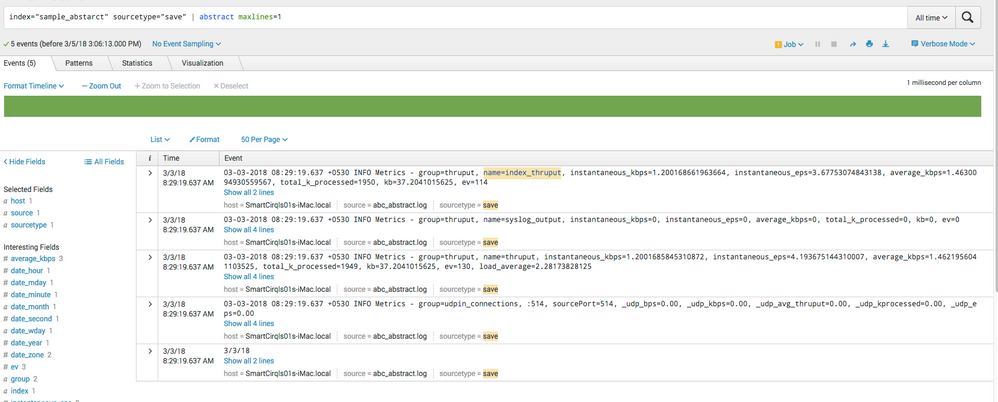
When you use abstract command , it will display summary of event based on maxline settings. Like it shown in attached example screenshots.
Also refer:
https://docs.splunk.com/Documentation/Splunk/7.0.2/SearchReference/Abstract


- Mark as New
- Bookmark Message
- Subscribe to Message
- Mute Message
- Subscribe to RSS Feed
- Permalink
- Report Inappropriate Content
Sorry to ask foolish question what is use of maxlines , I don't see any changes when maxillae is set, if is to restrict lines but i don't see line is getting restrict.Thanks

Join the Splunk Community Slack to learn, troubleshoot, and make connections with fellow Splunk practitioners in real time!
Join Splunk User Groups to connect and learn in-person by region or remotely by topic or industry.
Make Your Machine Data AI-Ready in Splunk
Splunk Asynchronous Forwarding Explained
How to Monitor AI Agents with Splunk Agent Observability
