
Join the Conversation
- Find Answers
- :
- Using Splunk
- :
- Splunk Search
- :
- Re: YOY Analysis showing up until today's date
- Subscribe to RSS Feed
- Mark Topic as New
- Mark Topic as Read
- Float this Topic for Current User
- Bookmark Topic
- Subscribe to Topic
- Mute Topic
- Printer Friendly Page
- Mark as New
- Bookmark Message
- Subscribe to Message
- Mute Message
- Subscribe to RSS Feed
- Permalink
- Report Inappropriate Content

Hi there!
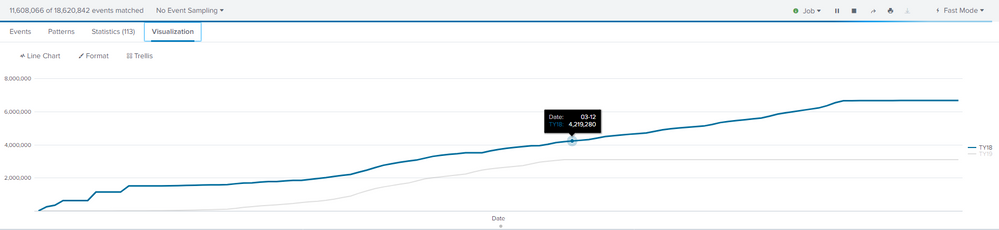
I created a hacky Splunk query for some YOY analysis I'm doing. I was wondering if there was a way to halt data from loading from the previous year up until today's date.
For example, today is 3/12. I'd like data from previous year and this year to show up up until 3/12. The way my query (and time range selector) is now loads all data from previous year (I've attached image of what currently loads). The next day, the "end date" will update to 3/13 and I'd want my previous year data to only reach that date ceiling.
Here's the query I'm working with:
((index=wsi_tax_summary sourcetype=stash capability=109* tax_year=2019 ein=* earliest=1578096000 latest=now()) OR (index=summary_dac_tax partnerId!=*Test* tax_year=2018 capability=*109* tax_year=2018 earliest=1546560000 latest=1556668800)) (intuit_offeringid=Intuit.platform.turbotaxipad.turbotaxmac OR intuit_offeringid=Intuit.platform.turbotaxwindows OR intuit_offeringid=Intuit.tax.ctg.ice.109ximportwidget) error_msg_host=SUCCESS partnerId!=*test* partnerId=*
| eval Date=strftime(_time,"%m-%d")
| chart dc(intuit_tid) by Date tax_year
| rename "2018" as "TY18", "2019" as "TY19"
| sort by Date
| streamstats sum(TY18) as TY18 sum(TY19) as TY19

- Mark as New
- Bookmark Message
- Subscribe to Message
- Mute Message
- Subscribe to RSS Feed
- Permalink
- Report Inappropriate Content


You can fix this in your base search. You currently have:
((index=wsi_tax_summary sourcetype=stash capability=109* tax_year=2019 ein=* earliest=1578096000 latest=now()) OR (index=summary_dac_tax partnerId!=*Test* tax_year=2018 capability=*109* tax_year=2018 earliest=1546560000 test=1556668800)) (intuit_offeringid=Intuit.platform.turbotaxipad.turbotaxmac OR intuit_offeringid=Intuit.platform.turbotaxwindows OR intuit_offeringid=Intuit.tax.ctg.ice.109ximportwidget)
  error_msg_host=SUCCESS partnerId!=*test* partnerId=*
| (evals and stuff...)
All those latest=xxxx and earliest=xxxx clauses can use relative time modifiers. So you can, much as anmolpatel hinted at, do things like this (Trimming out lots of extraneous stuff):
((index=wsi_tax_summary sourcetype=stash capability=109* tax_year=2019 ein=* earliest=-1y@y latest=@y)
I recommend taking a simple search and playing around with those to see their effect, and make sure you understand the difference between @y, -1y@y, and even mixed up things like -1y@w which goes back 1 year, to the closest week to now. (Right now on March 14th 2020, it goes back to March 10th 2019 for me.)
I think with a little use of relative time modifiers, you can achieve what you want.
If you get stuck with anything particular - try it in a simple search, like in your case maybe just one piece at a time, like
index=wsi_tax_summary sourcetype=stash capability=109* tax_year=2019 ein=* earliest=-1y@y latest=@y
Happy Splunking!
-Rich
- Mark as New
- Bookmark Message
- Subscribe to Message
- Mute Message
- Subscribe to RSS Feed
- Permalink
- Report Inappropriate Content
You can fix this in your base search. You currently have:
((index=wsi_tax_summary sourcetype=stash capability=109* tax_year=2019 ein=* earliest=1578096000 latest=now()) OR (index=summary_dac_tax partnerId!=*Test* tax_year=2018 capability=*109* tax_year=2018 earliest=1546560000 test=1556668800)) (intuit_offeringid=Intuit.platform.turbotaxipad.turbotaxmac OR intuit_offeringid=Intuit.platform.turbotaxwindows OR intuit_offeringid=Intuit.tax.ctg.ice.109ximportwidget)
  error_msg_host=SUCCESS partnerId!=*test* partnerId=*
| (evals and stuff...)
All those latest=xxxx and earliest=xxxx clauses can use relative time modifiers. So you can, much as anmolpatel hinted at, do things like this (Trimming out lots of extraneous stuff):
((index=wsi_tax_summary sourcetype=stash capability=109* tax_year=2019 ein=* earliest=-1y@y latest=@y)
I recommend taking a simple search and playing around with those to see their effect, and make sure you understand the difference between @y, -1y@y, and even mixed up things like -1y@w which goes back 1 year, to the closest week to now. (Right now on March 14th 2020, it goes back to March 10th 2019 for me.)
I think with a little use of relative time modifiers, you can achieve what you want.
If you get stuck with anything particular - try it in a simple search, like in your case maybe just one piece at a time, like
index=wsi_tax_summary sourcetype=stash capability=109* tax_year=2019 ein=* earliest=-1y@y latest=@y
Happy Splunking!
-Rich
- Mark as New
- Bookmark Message
- Subscribe to Message
- Mute Message
- Subscribe to RSS Feed
- Permalink
- Report Inappropriate Content

earliest=-y@d will give you that will give you dd/mm/(yyyy-1)
you can test around further, if you want to go back two years, earliest = -2y@d

Accelerating Observability as Code with the Splunk AI Assistant
Integrating Splunk Search API and Quarto to Create Reproducible Investigation ...
Congratulations to the 2025-2026 SplunkTrust!
