
Join the Conversation
- Find Answers
- :
- Using Splunk
- :
- Splunk Search
- :
- Re: Write a request
- Subscribe to RSS Feed
- Mark Topic as New
- Mark Topic as Read
- Float this Topic for Current User
- Bookmark Topic
- Subscribe to Topic
- Mute Topic
- Printer Friendly Page
- Mark as New
- Bookmark Message
- Subscribe to Message
- Mute Message
- Subscribe to RSS Feed
- Permalink
- Report Inappropriate Content

Need help writing a request
file1.csv
| username | src_ip |
| John | 192.168.16.35 |
| Smith | 172.167.3.43 |
| Aram | 132.56.23.3 |
file2.csv
| IP address | ASN | Other |
| 192.168.16.0/24 | 1234 | RU |
| 172.167.3.0/24 | 4321 | AG |
| 132.56.23.0/24 | 6789 | BR |
output
| username | src_ip | asn | other |
| John | 192.168.16.35 | 1234 | RU |
| Smith | 172.167.3.43 | 4321 | AG |
| Aram | 132.56.23.3 | 6789 | BR |
Thanks guys !!!!
- Mark as New
- Bookmark Message
- Subscribe to Message
- Mute Message
- Subscribe to RSS Feed
- Permalink
- Report Inappropriate Content
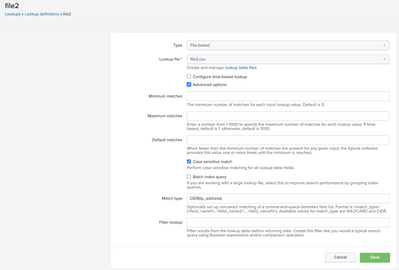
file1.csv -- > csv based lookup
file2.csv --> cidr based lookup (I've renamed "IP Address" field to ip_address)
Add a new lookup definition, name it "file2" and select file2.csv
Check on advanced options. In "Match type" type in "CIDR(ip_address)" .
| inputlookup file1.csv
| fields src_ip, username
| lookup file2 "ip_address" as src_ip output ASN, Other
- Mark as New
- Bookmark Message
- Subscribe to Message
- Mute Message
- Subscribe to RSS Feed
- Permalink
- Report Inappropriate Content
Hi @gitingua
try this out, assuming you've these files uploaded as lookups
| inputlookup file1.csv
| appendcols
    [inputlookup file2.csv
    |  fields ASN,Other ]
| table username,src_ip,ASN,Other
- Mark as New
- Bookmark Message
- Subscribe to Message
- Mute Message
- Subscribe to RSS Feed
- Permalink
- Report Inappropriate Content
No no no no.
if the first three src_ip values match the IP address. then takes on these values
if src_ip(192.168.16.35) = IP address(192.168.16.0/24)
- Mark as New
- Bookmark Message
- Subscribe to Message
- Mute Message
- Subscribe to RSS Feed
- Permalink
- Report Inappropriate Content
file1.csv -- > csv based lookup
file2.csv --> cidr based lookup (I've renamed "IP Address" field to ip_address)
Add a new lookup definition, name it "file2" and select file2.csv
Check on advanced options. In "Match type" type in "CIDR(ip_address)" .
| inputlookup file1.csv
| fields src_ip, username
| lookup file2 "ip_address" as src_ip output ASN, Other


Join the Splunk Community Slack to learn, troubleshoot, and make connections with fellow Splunk practitioners in real time!
Join Splunk User Groups to connect and learn in-person by region or remotely by topic or industry.
Vibe-coding, AI, and Splunkcraft: Highlights from the .conf26 Builder Bar
Thanks for the Memories: .conf26 Took Learning to New Heights
Best Practices: Splunk auto adjust pipeline queue
