
Join the Conversation
- Find Answers
- :
- Using Splunk
- :
- Splunk Search
- :
- Why is data summary not displaying?
- Subscribe to RSS Feed
- Mark Topic as New
- Mark Topic as Read
- Float this Topic for Current User
- Bookmark Topic
- Subscribe to Topic
- Mute Topic
- Printer Friendly Page
- Mark as New
- Bookmark Message
- Subscribe to Message
- Mute Message
- Subscribe to RSS Feed
- Permalink
- Report Inappropriate Content
Why is data summary not displaying?

When I am click on my data summary, it is not displaying anything just showing
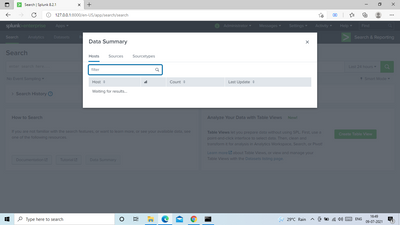
Any suggestions?
Thanks.
- Mark as New
- Bookmark Message
- Subscribe to Message
- Mute Message
- Subscribe to RSS Feed
- Permalink
- Report Inappropriate Content
if you select index=main for your input
the problem will be solved
- Mark as New
- Bookmark Message
- Subscribe to Message
- Mute Message
- Subscribe to RSS Feed
- Permalink
- Report Inappropriate Content


Hi @akankshayadav,
I haven't your issue in my Splunk, which version are you using?
My only hint is to open a Case To Splunk Support.
Ciao and Happy Easter.
Giuseppe
- Mark as New
- Bookmark Message
- Subscribe to Message
- Mute Message
- Subscribe to RSS Feed
- Permalink
- Report Inappropriate Content

Actually a little more searching and I found the answer here (https://community.splunk.com/t5/Knowledge-Management/How-to-fix-misleading-quot-What-to-search-quot-...). I also on my experimental/learning box (latest version) had enabled (under Settings -> Roles -> Admin -> Indexes) the * (All non-internal indexes) and the _* (All internal indexes) to be default and this immediately allowed data summary to work and see all the indexes. I can see how, by default, you might not want to have this enabled for the admin account.
I think in courses you do, they may enable this by default for your accounts on non-internal indexes to make it easier for you to configure things, so I had not had to configure it myself.
- Mark as New
- Bookmark Message
- Subscribe to Message
- Mute Message
- Subscribe to RSS Feed
- Permalink
- Report Inappropriate Content
Good Day. I was curious if you had ever found an answer here. I noticed the same thing, logged in about 3 days later, and the data had been populated (but not for the data I had put in the day before. I assume there is a search that populates this data, but it only runs maybe 1/x per day or week.


Join the Splunk Community Slack to learn, troubleshoot, and make connections with fellow Splunk practitioners in real time!
Join Splunk User Groups to connect and learn in-person by region or remotely by topic or industry.
A Four-Part Event Series: Full Stack Observability For the AI Era
SOC4Kafka - New Kafka Connector Powered by OpenTelemetry
Event Series: Level up your SOC: Advancing with Splunk Enterprise Security
