
Join the Conversation
- Find Answers
- :
- Using Splunk
- :
- Splunk Search
- :
- Why does adding a table command after transaction ...
- Subscribe to RSS Feed
- Mark Topic as New
- Mark Topic as Read
- Float this Topic for Current User
- Bookmark Topic
- Subscribe to Topic
- Mute Topic
- Printer Friendly Page
- Mark as New
- Bookmark Message
- Subscribe to Message
- Mute Message
- Subscribe to RSS Feed
- Permalink
- Report Inappropriate Content
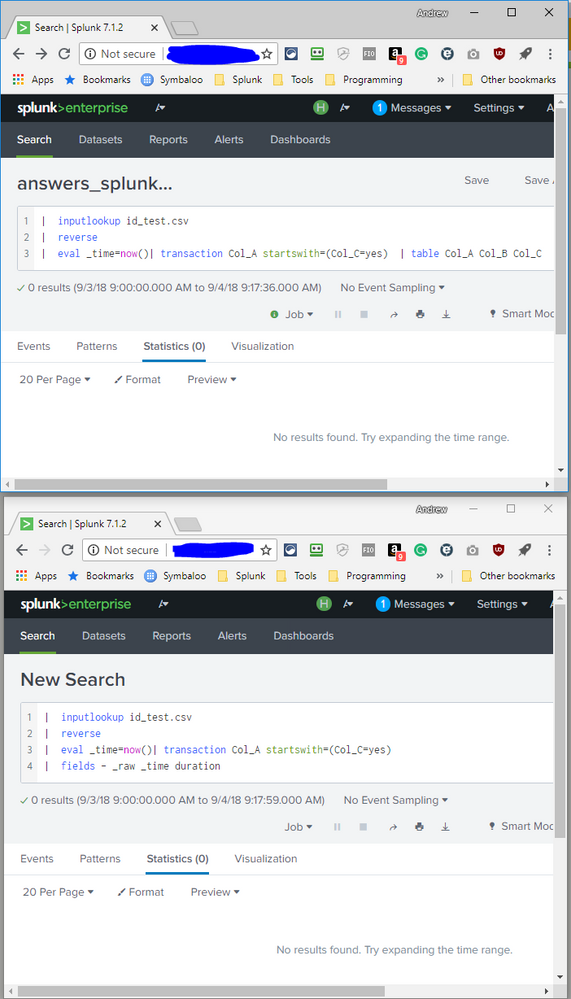
Why does adding a table command after transaction result in no results found?

|  inputlookup id_test.csv
|  reverse
|  eval _time=now()| transaction Col_A startswith=(Col_C=yes)
returns results:

With table and even fields afterward, there are no results:
- Mark as New
- Bookmark Message
- Subscribe to Message
- Mute Message
- Subscribe to RSS Feed
- Permalink
- Report Inappropriate Content

@landen99, from the example in your question, does not see like transaction is the correct approach. You should be better off with stats.
count as eventcount in statsis equivalent of auto generatedeventcount in transactionfirst(Col_C) as startsWith in statsis equivalent ofstartswith in transactionby Col_A in statsis equivalent oftransaction Col_A
Please try the following query based on stats:
| inputlookup id_test.csv
| stats count as eventCount first(Col_C) as startsWith list(Col_B) as Col_B list(Col_C) as Col_C by Col_A
| search startsWith="yes"
PS:
1. Since you do not need duration I did not compute the same but,
min(_time) as _time and max(_time) as LatestTime in stats followed by | eval duration=LatestTime-_time in stats will be equivalent to auto-generated duration field in transaction.
2. Transaction will give you unique values of all correlated events with multiple value. Since they are unique they will be sorted. So,
So, values(Col_B) as Col_B and values(Col_C) as Col_C will be equivalent to Col_B and Col_C or correlated events in transaction with unique values sorted in Alphabetical order.
3. I have used list() instead of values() for stats to show one to one mapping of correlated multi-valued fields. As list shows all values hence it keeps the original sort of events as they occur. However, limitation is that there list retains first 100 values(including duplicate). Which means if more than 100 events are correlated you will loose values using list.
Refer to Splunk documentation for transaction and stats command and also check out Event Grouping And Correlation Splunk Documentation to decide between various correlation commands depending on your use case.
Following is run anywhere search based on sample data provided in the screenshot:
| makeresults
| eval data="Col_A=\"ID_A\",Col_B=\"log 1\",Col_C=\"yes\";Col_A=\"ID_A\",Col_B=\"log 2\",Col_C=\"no\";Col_A=\"ID_A\",Col_B=\"log 3\",Col_C=\"yes\";Col_A=\"ID_C\",Col_B=\"log 5\",Col_C=\"yes\";"
| makemv data delim=";"
| mvexpand data
| rename data as _raw
| KV
| table Col_A, Col_B, Col_C
| stats count as eventCount first(Col_C) as startsWith list(Col_B) as Col_B list(Col_C) as Col_C by Col_A
| search startsWith="yes"
| table Col* eventCount
| makeresults | eval message= "Happy Splunking!!!"
- Mark as New
- Bookmark Message
- Subscribe to Message
- Mute Message
- Subscribe to RSS Feed
- Permalink
- Report Inappropriate Content
This approach does not appear to be able to handle when the first event is not "yes":
| makeresults
| eval data="Col_A=\"ID_A\",Col_B=\"log 0\",Col_C=\"no\";Col_A=\"ID_A\",Col_B=\"log 1\",Col_C=\"yes\";Col_A=\"ID_A\",Col_B=\"log 2\",Col_C=\"no\";Col_A=\"ID_A\",Col_B=\"log 3\",Col_C=\"yes\";Col_A=\"ID_C\",Col_B=\"log 5\",Col_C=\"yes\";"
| makemv data delim=";"
| mvexpand data
| rename data as _raw
| KV
| table Col_A, Col_B, Col_C
| stats count as eventCount first(Col_C) as startsWith list(Col_B) as Col_B list(Col_C) as Col_C by Col_A
| search startsWith="yes"
| table Col* eventCount
I added a log 0 event to the data and ID_A disappeared:


Join the Splunk Community Slack to learn, troubleshoot, and make connections with fellow Splunk practitioners in real time!
Join Splunk User Groups to connect and learn in-person by region or remotely by topic or industry.
[Puzzles] Solve, Learn, Reuse: Word-play
Tuning Edge Processor in Hybrid Mode: What Limits Each Data Path
Best Practices: Splunk auto adjust pipeline queue
