
Join the Conversation
- Find Answers
- :
- Using Splunk
- :
- Splunk Search
- :
- Re: Why are some expected events missing when appl...
- Subscribe to RSS Feed
- Mark Topic as New
- Mark Topic as Read
- Float this Topic for Current User
- Bookmark Topic
- Subscribe to Topic
- Mute Topic
- Printer Friendly Page
- Mark as New
- Bookmark Message
- Subscribe to Message
- Mute Message
- Subscribe to RSS Feed
- Permalink
- Report Inappropriate Content

We recently onboarded some applications' logs, and at our client request, we had to put a custom field to have the application name in the fields. Since those weren’t in the log file, we hard-coded the application name in the log with a “_meta” field in the inputs.conf stanza. Since each application has its own stanza, it was easy.
One of the analysts discovered this week that some events were discarded when a filter was applied for a certain application. We were able to reproduce the problem at a smaller scale.
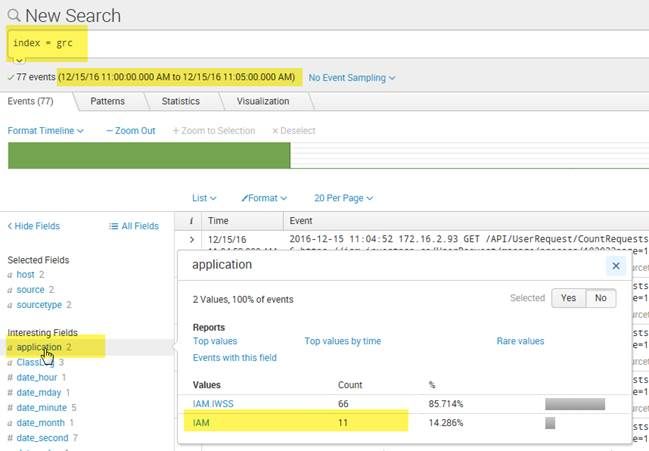
Here the picture shows that there are 11 events for IAM, if we apply the filter for that application...
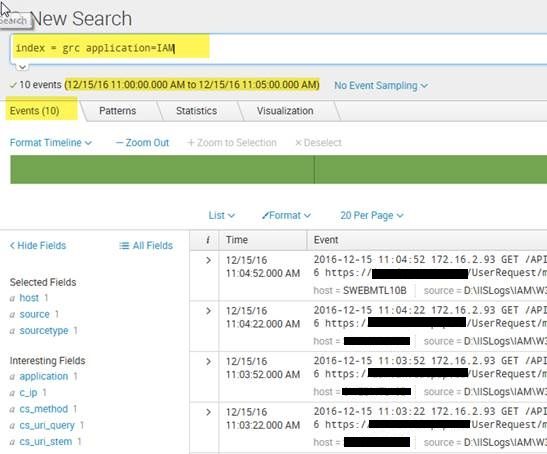
This is only a 5 minutes window, at a "All Time" time range it's more than 10K events that goes missing
Here is our Inputs.conf for that application
[monitor://D:\APPLogs\IAM\IAM.log]
index = grc
sourcetype = GRC:APP
alwaysOpenFile = 1
disabled = false
_meta = application::IAM


- Mark as New
- Bookmark Message
- Subscribe to Message
- Mute Message
- Subscribe to RSS Feed
- Permalink
- Report Inappropriate Content
Thanks somesoni2 for your help, your last fix helped us out with our problem.
Steps:
On our SH and Indexers we deployed a TA with a fields.conf file with this stanza :
[application]
INDEXED = true
(Reference: https://answers.splunk.com/answers/389567/why-is-a-search-for-fields-added-with-meta-in-inpu.html)
Restarted and the problem was gone.
Thanks again
M.
- Mark as New
- Bookmark Message
- Subscribe to Message
- Mute Message
- Subscribe to RSS Feed
- Permalink
- Report Inappropriate Content
Thanks somesoni2 for your help, your last fix helped us out with our problem.
Steps:
On our SH and Indexers we deployed a TA with a fields.conf file with this stanza :
[application]
INDEXED = true
(Reference: https://answers.splunk.com/answers/389567/why-is-a-search-for-fields-added-with-meta-in-inpu.html)
Restarted and the problem was gone.
Thanks again
M.
- Mark as New
- Bookmark Message
- Subscribe to Message
- Mute Message
- Subscribe to RSS Feed
- Permalink
- Report Inappropriate Content

Do you get a correct count when you use either of these searches?
index=grc application=*IAM

index=grc | regex application="IAM"

index=grc application!=IAM:IWSS
- Mark as New
- Bookmark Message
- Subscribe to Message
- Mute Message
- Subscribe to RSS Feed
- Permalink
- Report Inappropriate Content
index=grc application=*IAM
- yes (Only IAM)
index=grc | regex application="IAM"
- We get all events (IAM and IAM:IWSS)
index=grc application!=IAM:IWSS
- yes
- Mark as New
- Bookmark Message
- Subscribe to Message
- Mute Message
- Subscribe to RSS Feed
- Permalink
- Report Inappropriate Content
Ok.. how about this?
index=grc application="IAM"
- Mark as New
- Bookmark Message
- Subscribe to Message
- Mute Message
- Subscribe to RSS Feed
- Permalink
- Report Inappropriate Content
No, showing only 10 Events
- Mark as New
- Bookmark Message
- Subscribe to Message
- Mute Message
- Subscribe to RSS Feed
- Permalink
- Report Inappropriate Content
Ok lets check if there are additional character coming in the application name.
index=grc application=*IAM | eval applength=len(application) | table applength
- Mark as New
- Bookmark Message
- Subscribe to Message
- Mute Message
- Subscribe to RSS Feed
- Permalink
- Report Inappropriate Content
I've got only 3's
- Mark as New
- Bookmark Message
- Subscribe to Message
- Mute Message
- Subscribe to RSS Feed
- Permalink
- Report Inappropriate Content
Try this fix. On your search head and Indexers, add following to fields.conf (preferred to be kept under some app). Should work (Reference: https://answers.splunk.com/answers/389567/why-is-a-search-for-fields-added-with-meta-in-inpu.html)
[application]
 INDEXED = true
- Mark as New
- Bookmark Message
- Subscribe to Message
- Mute Message
- Subscribe to RSS Feed
- Permalink
- Report Inappropriate Content
Hi, sorry for the late reply. It fixed our problem. I'll add an answer to the question with your fix. Thanks for your help

Join the Splunk Community Slack to learn, troubleshoot, and make connections with fellow Splunk practitioners in real time!
Join Splunk User Groups to connect and learn in-person by region or remotely by topic or industry.
[Puzzles] Solve, Learn, Repeat: Character substitutions with Regular Expressions
Splunk Community Badges!
[Puzzles] Solve, Learn, Repeat: Matching cron expressions
