
Join the Conversation
- Find Answers
- :
- Using Splunk
- :
- Splunk Search
- :
- Using eval to Add Field for top Result?
- Subscribe to RSS Feed
- Mark Topic as New
- Mark Topic as Read
- Float this Topic for Current User
- Bookmark Topic
- Subscribe to Topic
- Mute Topic
- Printer Friendly Page
- Mark as New
- Bookmark Message
- Subscribe to Message
- Mute Message
- Subscribe to RSS Feed
- Permalink
- Report Inappropriate Content

I need to create a new field to assign to the top results of a command using eval.
Obviously this syntax doesn't work, so I'm looking for the correct query:
source="tutorialdata.zip*" | eval popular = top limit=5 itemId | stats count(action) by popular, action
Basically I only need the action stats of the top 5 itemId results of the following:
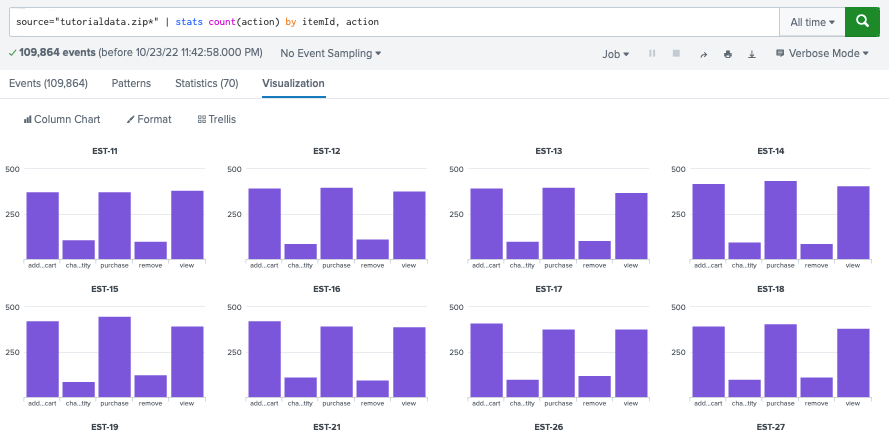
Sorry for the n00b question; I am just getting started with Splunk. Thanks for your time!
- Mark as New
- Bookmark Message
- Subscribe to Message
- Mute Message
- Subscribe to RSS Feed
- Permalink
- Report Inappropriate Content


Is this what you're after?
source="tutorialdata.zip*"
| eval X_{action}=action
| stats count as total count(X_*) as X_* by itemId
| sort - total
| head 5
| rename X_* as *
| fields - total
That will give you 5 rows of the most frequent itemId and then each column is a count of actions
Note the X_ prefix to the new field created is to allow the use of wildcards in the stats command to only collect the fields you're interested in.
You could also replace the eval/stats with
| eval X_{action}=1
| stats count as total sum(X_*) as X_* by itemId
which may be slightly more efficient
- Mark as New
- Bookmark Message
- Subscribe to Message
- Mute Message
- Subscribe to RSS Feed
- Permalink
- Report Inappropriate Content
Is this what you're after?
source="tutorialdata.zip*"
| eval X_{action}=action
| stats count as total count(X_*) as X_* by itemId
| sort - total
| head 5
| rename X_* as *
| fields - total
That will give you 5 rows of the most frequent itemId and then each column is a count of actions
Note the X_ prefix to the new field created is to allow the use of wildcards in the stats command to only collect the fields you're interested in.
You could also replace the eval/stats with
| eval X_{action}=1
| stats count as total sum(X_*) as X_* by itemId
which may be slightly more efficient
- Mark as New
- Bookmark Message
- Subscribe to Message
- Mute Message
- Subscribe to RSS Feed
- Permalink
- Report Inappropriate Content
This works; thank you kindly!

Join the Splunk Community Slack to learn, troubleshoot, and make connections with fellow Splunk practitioners in real time!
Join Splunk User Groups to connect and learn in-person by region or remotely by topic or industry.
Meet the .conf26 AI Agent Buildathon Winners
Trusted Autonomy in the SOC: A Maturity Journey
Supercharging Windows Security Detection Performance: Introducing Hybrid Field ...
