
Turn on suggestions
Auto-suggest helps you quickly narrow down your search results by suggesting possible matches as you type.
Splunk Search
×
Join the Conversation
Without signing in, you're just watching from the sidelines. Sign in or Register to connect, share, and be part of the Splunk Community.
Turn on suggestions
Auto-suggest helps you quickly narrow down your search results by suggesting possible matches as you type.
- Find Answers
- :
- Using Splunk
- :
- Splunk Search
- :
- Using REGEX to extract portion of a string from a ...
Options
- Subscribe to RSS Feed
- Mark Topic as New
- Mark Topic as Read
- Float this Topic for Current User
- Bookmark Topic
- Subscribe to Topic
- Mute Topic
- Printer Friendly Page
- Mark as New
- Bookmark Message
- Subscribe to Message
- Mute Message
- Subscribe to RSS Feed
- Permalink
- Report Inappropriate Content

mdeterville
Path Finder
11-04-2020
05:23 PM
Hi Everyone:
I'd like to extract everything after the third "/" below (starting from the left) in the url field below:
url=http://4.3.3.4/pld_accepted_business "
Note: http://4.3.3.4/ will be constant. The latter may change between pld_accepted_business or pld_accepted_non_business"
Any assistance would be greatly appreciated.
1 Solution
- Mark as New
- Bookmark Message
- Subscribe to Message
- Mute Message
- Subscribe to RSS Feed
- Permalink
- Report Inappropriate Content

inventsekar

SplunkTrust
11-04-2020
06:06 PM
Hi @mdeterville Please check this..
| makeresults
| eval log="url=http://4.3.3.4/pld_accepted_business"
| rex field=log "4\/(?<StrPortion>.*)"
| table log StrPortion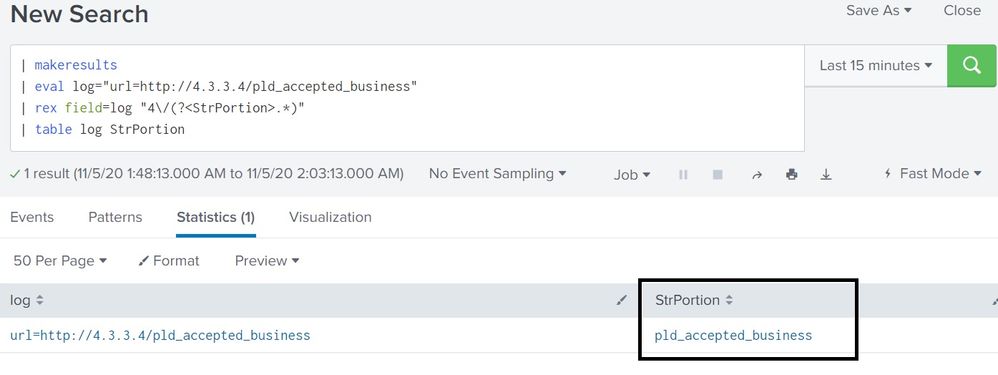
thanks and best regards,
Sekar
PS - If this or any post helped you in any way, pls consider upvoting, thanks for reading !
Sekar
PS - If this or any post helped you in any way, pls consider upvoting, thanks for reading !
- Mark as New
- Bookmark Message
- Subscribe to Message
- Mute Message
- Subscribe to RSS Feed
- Permalink
- Report Inappropriate Content
inventsekar
SplunkTrust
11-04-2020
06:06 PM
Hi @mdeterville Please check this..
| makeresults
| eval log="url=http://4.3.3.4/pld_accepted_business"
| rex field=log "4\/(?<StrPortion>.*)"
| table log StrPortion
thanks and best regards,
Sekar
PS - If this or any post helped you in any way, pls consider upvoting, thanks for reading !
Sekar
PS - If this or any post helped you in any way, pls consider upvoting, thanks for reading !
- Mark as New
- Bookmark Message
- Subscribe to Message
- Mute Message
- Subscribe to RSS Feed
- Permalink
- Report Inappropriate Content
mdeterville
Path Finder
11-04-2020
06:17 PM
This works! Thanks for the quick turnaround @inventsekar!
- Mark as New
- Bookmark Message
- Subscribe to Message
- Mute Message
- Subscribe to RSS Feed
- Permalink
- Report Inappropriate Content

admin12345678
Path Finder
11-04-2020
06:05 PM
| makeresults
| eval url=split("http://4.3.3.4/pld_accepted_business",",")
| mvexpand url
| rex field=url ".*\/+.*\/(?<new>.*)"

Get Updates on the Splunk Community!
Data Management Digest – December 2025
Welcome to the December edition of Data Management Digest!
As we continue our journey of data innovation, the ...
Index This | What is broken 80% of the time by February?
December 2025 Edition
Hayyy Splunk Education Enthusiasts and the Eternally Curious!
We’re back with this ...
Unlock Faster Time-to-Value on Edge and Ingest Processor with New SPL2 Pipeline ...
Hello Splunk Community,
We're thrilled to share an exciting update that will help you manage your data more ...
