
Join the Conversation
- Find Answers
- :
- Using Splunk
- :
- Splunk Search
- :
- Re: Unable to rename _time as Time
- Subscribe to RSS Feed
- Mark Topic as New
- Mark Topic as Read
- Float this Topic for Current User
- Bookmark Topic
- Subscribe to Topic
- Mute Topic
- Printer Friendly Page
- Mark as New
- Bookmark Message
- Subscribe to Message
- Mute Message
- Subscribe to RSS Feed
- Permalink
- Report Inappropriate Content

Hi,
I'm trying to rename _time as Time so that it will display the timestamp in YYYY-MM-DD HH:MM:SS. But when I do rename _time AS "Time" | table Time, it will show the time as Epoch time which was the original format extracted from the log file. How do I rename and table it correctly?
- Mark as New
- Bookmark Message
- Subscribe to Message
- Mute Message
- Subscribe to RSS Feed
- Permalink
- Report Inappropriate Content

I suggest that you don't do a rename of _time, try using an eval to add "Time" and then remove the _time with fields -, such as;
| eval Time = strftime(_time, "%Y-%d-%m %H:%M:%S") | fields - _time | table Time
That works for me.
- Mark as New
- Bookmark Message
- Subscribe to Message
- Mute Message
- Subscribe to RSS Feed
- Permalink
- Report Inappropriate Content
Hi Guys,
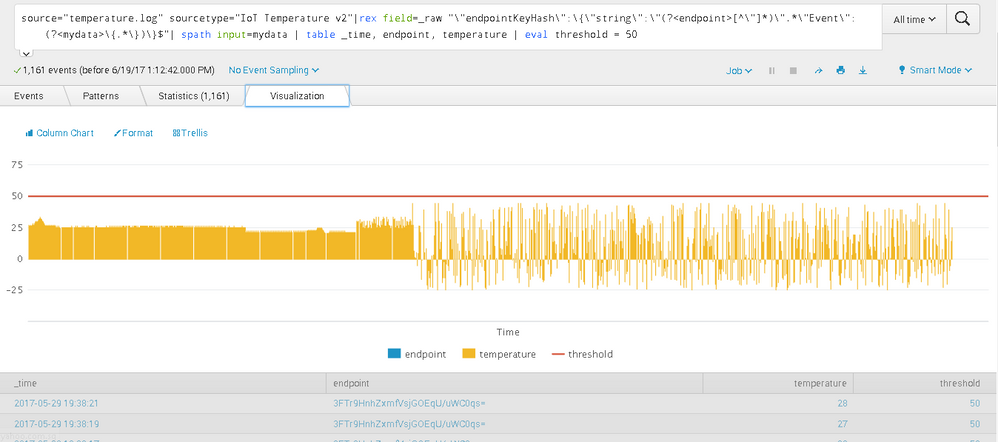
I just realized after using the suggested formats, my earliest to latest timestamp is from right to left instead of the normal left to right. How can I reversed this to go from left to right?
How do I also make the timestamp display on the x-axis? There is only label rotation in x-axis format.

- Mark as New
- Bookmark Message
- Subscribe to Message
- Mute Message
- Subscribe to RSS Feed
- Permalink
- Report Inappropriate Content

The _time field is very special in a number of ways and one of them is that it automatically does this under the sheets:
| fieldformat _time = strftime(_time, <YourLocalRegionTimeFormatStringHere>)
You can do the same like this:
| rename _time AS Time
| fieldformat Time = strftime(Time, "%m/%d/%Y %H:%M:%S")
- Mark as New
- Bookmark Message
- Subscribe to Message
- Mute Message
- Subscribe to RSS Feed
- Permalink
- Report Inappropriate Content

@woodcock I have been dragging though a ton of these threads trying to find a simple way to fix how my field _time output information. I just wanted the date, so I took off the time aspect of your command and BOOM. Thank you.
| rename _time AS Date
| fieldformat Date = strftime(Date, "%Y-%m-%d")
Output:
Date
2021-10-01
- Mark as New
- Bookmark Message
- Subscribe to Message
- Mute Message
- Subscribe to RSS Feed
- Permalink
- Report Inappropriate Content
Thanks Guys!
- Mark as New
- Bookmark Message
- Subscribe to Message
- Mute Message
- Subscribe to RSS Feed
- Permalink
- Report Inappropriate Content
I suggest that you don't do a rename of _time, try using an eval to add "Time" and then remove the _time with fields -, such as;
| eval Time = strftime(_time, "%Y-%d-%m %H:%M:%S") | fields - _time | table Time
That works for me.
- Mark as New
- Bookmark Message
- Subscribe to Message
- Mute Message
- Subscribe to RSS Feed
- Permalink
- Report Inappropriate Content
Please see my other answer below; the way to make it exactly the same is with fieldformat, not with eval.
- Mark as New
- Bookmark Message
- Subscribe to Message
- Mute Message
- Subscribe to RSS Feed
- Permalink
- Report Inappropriate Content

Hi wuming79,
you can't rename the _time field without getting the value all f*cked up.
Instead do something like this:
yoursearch | eval TIME=strftime(_time, "%d-%m-%Y %H:%M:%S") | table TIME | rename TIME AS whateveryouwantittobe
- Mark as New
- Bookmark Message
- Subscribe to Message
- Mute Message
- Subscribe to RSS Feed
- Permalink
- Report Inappropriate Content

try to do an |eval time=strftime(_time,"%Y-%m-%d %H:%M:%S")|table time...

Accelerating Observability as Code with the Splunk AI Assistant
Integrating Splunk Search API and Quarto to Create Reproducible Investigation ...
Congratulations to the 2025-2026 SplunkTrust!
