
Join the Conversation
- Find Answers
- :
- Using Splunk
- :
- Splunk Search
- :
- Re: Unable to get value on x-axis
- Subscribe to RSS Feed
- Mark Topic as New
- Mark Topic as Read
- Float this Topic for Current User
- Bookmark Topic
- Subscribe to Topic
- Mute Topic
- Printer Friendly Page
- Mark as New
- Bookmark Message
- Subscribe to Message
- Mute Message
- Subscribe to RSS Feed
- Permalink
- Report Inappropriate Content
Unable to get value on x-axis

I have a tabular data like below.
**EventTime SQL CPU Utilization Other Process CPU Utilization   Total CPU Utilization**
2019-02-24 10:00:48.0   0   3   3
2019-02-24 10:01:48.0   0   2   2
2019-02-24 10:02:48.0   0   1   1
2019-02-24 10:03:48.0   0   1   1
2019-02-24 10:04:48.0   0   2   2
2019-02-24 10:05:48.0   0   2   2
2019-02-24 10:06:48.0   0   2   2
2019-02-24 10:07:48.0   0   3   3
2019-02-24 10:08:48.0   0   5   5
2019-02-24 10:09:48.0   0   3   3
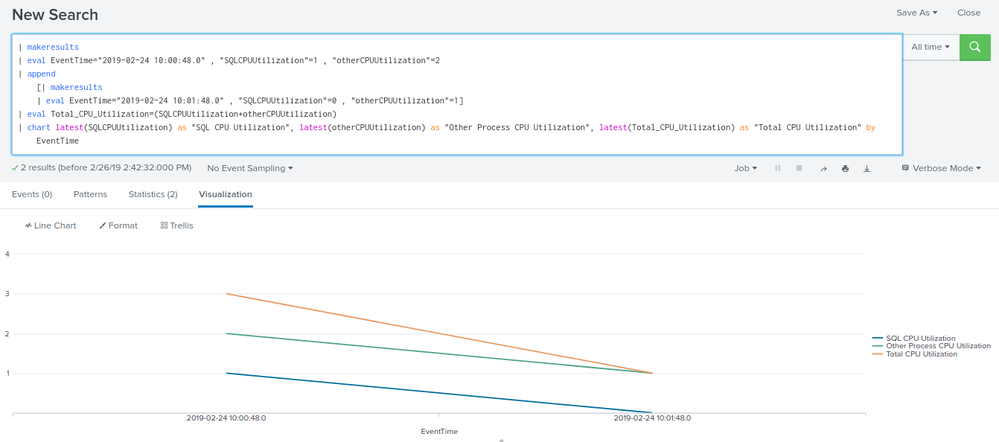
i tried to use the line chart and print EventTime on X-axis and rest values on Y-axis. I am able to get the values on Y-axis but X-axis not displaying the data of EventTime field. I used below query.
index=main sourcettype="SQL" host=ABC | eval Total_CPU_Utilization=(SQLCPUUtilization+OtherProcessCPUUtilization) | chart latest(SQLCPUUtilization) as "SQL CPU Utilization", latest(OtherProcessCPUUtilization) as "Other Process CPU Utilization", latest(Total_CPU_Utilization) as "Total CPU Utilization" by EventTime
Do I need to make any changes in my query?
- Mark as New
- Bookmark Message
- Subscribe to Message
- Mute Message
- Subscribe to RSS Feed
- Permalink
- Report Inappropriate Content

Like this (the key is to convert EventTime to _time😞
|makeresults | eval raw="EventTime=2019-02-24T10:00:48.0,SQL_CPU_Utilization=0,Other_Process_CPU_Utilization=3,Total_CPU_Utilization=3 EventTime=2019-02-24T10:01:48.0,SQL_CPU_Utilization=0,Other_Process_CPU_Utilization=2,Total_CPU_Utilization=2 EventTime=2019-02-24T10:02:48.0,SQL_CPU_Utilization=0,Other_Process_CPU_Utilization=1,Total_CPU_Utilization=1 EventTime=2019-02-24T10:03:48.0,SQL_CPU_Utilization=0,Other_Process_CPU_Utilization=1,Total_CPU_Utilization=1 EventTime=2019-02-24T10:04:48.0,SQL_CPU_Utilization=0,Other_Process_CPU_Utilization=2,Total_CPU_Utilization=2 EventTime=2019-02-24T10:05:48.0,SQL_CPU_Utilization=0,Other_Process_CPU_Utilization=2,Total_CPU_Utilization=2 EventTime=2019-02-24T10:06:48.0,SQL_CPU_Utilization=0,Other_Process_CPU_Utilization=2,Total_CPU_Utilization=2 EventTime=2019-02-24T10:07:48.0,SQL_CPU_Utilization=0,Other_Process_CPU_Utilization=3,Total_CPU_Utilization=3 EventTime=2019-02-24T10:08:48.0,SQL_CPU_Utilization=0,Other_Process_CPU_Utilization=5,Total_CPU_Utilization=5 EventTime=2019-02-24T10:09:48.0,SQL_CPU_Utilization=0,Other_Process_CPU_Utilization=3,Total_CPU_Utilization=3"
| makemv raw
| mvexpand raw
| rename raw AS _raw
| rex mode=sed "s/T(\d)/ \1/"
| kv

| rename COMMENT AS "Everything above generates sample event data; everything below is your solution"

| eval _time = strptime(EventTime, "%Y-%m-%d %H:%M:%S")
| fields - EventTime
| timechart fixedrange=f span=1m avg(*) AS *
- Mark as New
- Bookmark Message
- Subscribe to Message
- Mute Message
- Subscribe to RSS Feed
- Permalink
- Report Inappropriate Content


- Mark as New
- Bookmark Message
- Subscribe to Message
- Mute Message
- Subscribe to RSS Feed
- Permalink
- Report Inappropriate Content
@ashajambagi ,
My query is working fine. But when I switch to visualization tab I am unable to see EventTime field value on X-axis. I am currently using Splunk 7.1.6 .
- Mark as New
- Bookmark Message
- Subscribe to Message
- Mute Message
- Subscribe to RSS Feed
- Permalink
- Report Inappropriate Content
Can you share a screenshot?
- Mark as New
- Bookmark Message
- Subscribe to Message
- Mute Message
- Subscribe to RSS Feed
- Permalink
- Report Inappropriate Content
I am unable to add image for this.
- Mark as New
- Bookmark Message
- Subscribe to Message
- Mute Message
- Subscribe to RSS Feed
- Permalink
- Report Inappropriate Content
try putting it as answer
- Mark as New
- Bookmark Message
- Subscribe to Message
- Mute Message
- Subscribe to RSS Feed
- Permalink
- Report Inappropriate Content

Hi dyude @twh1 ,
Check the field name of EventTime and copy as it is.
Can you try this,
index=main sourcettype="SQL" host=ABC | eval Total_CPU_Utilization=("SQL CPU Utilization"+"Other Process CPU Utilization")
|chart latest("SQL CPU Utilization") as "SQL CPU Utilization", latest("Other Process CPU Utilization") as "Other Process CPU Utilization", latest(Total_CPU_Utilization) as "Total CPU Utilization" by EventTime
- Mark as New
- Bookmark Message
- Subscribe to Message
- Mute Message
- Subscribe to RSS Feed
- Permalink
- Report Inappropriate Content
hi @vinod94 ,
I have copied the field name from event only. I am getting data in statistics tab properly. But while checking in visualization tab, not getting value on X-axis.

Join the Splunk Community Slack to learn, troubleshoot, and make connections with fellow Splunk practitioners in real time!
Join Splunk User Groups to connect and learn in-person by region or remotely by topic or industry.
Why Splunk Customers Should Attend Cisco Live 2026 Las Vegas
What Is the Name of the USB Key Inserted by Bob Smith? (BOTS Hint, Not the Answer)
Automating Threat Operations and Threat Hunting with Recorded Future
