
Join the Conversation
- Find Answers
- :
- Using Splunk
- :
- Splunk Search
- :
- Transaction shows incomplete statistics
- Subscribe to RSS Feed
- Mark Topic as New
- Mark Topic as Read
- Float this Topic for Current User
- Bookmark Topic
- Subscribe to Topic
- Mute Topic
- Printer Friendly Page
- Mark as New
- Bookmark Message
- Subscribe to Message
- Mute Message
- Subscribe to RSS Feed
- Permalink
- Report Inappropriate Content

Hi All,
I am trying to group the events using transaction command but looks like some of the data is not visible in the statistics.
- Are there any limit kind of a thing which we can set?
- If I run below search for lets say a day or two it works fine, but if I run this search for 7 days it shows the result just for 5 days.
Sample search:
(index=test1 logpoint="request-in") OR (index=test1 logpoint="response-in")
| transaction transaction-id startswith="request-in" endswith="response-in" maxevents=2 keeporphans=true
| eval epoch_time=strptime('timestamp-in',"%Y-%m-%dT%H:%M:%S.%N")
| eventstats range(epoch_time) as response_time by transaction-id
| timechart span=1d avg(response_time) as average_duration
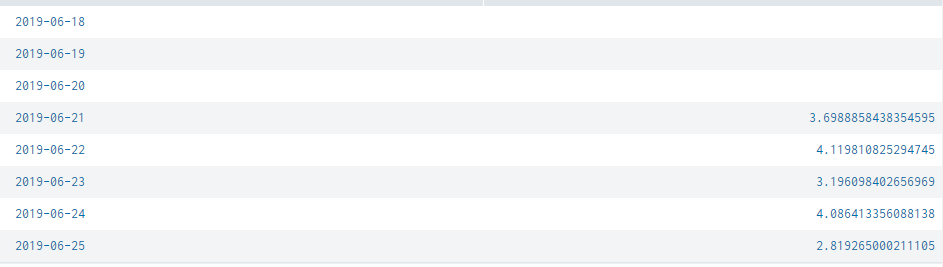
Any help would be highly appreciated.
Thanks,
Sunny
- Mark as New
- Bookmark Message
- Subscribe to Message
- Mute Message
- Subscribe to RSS Feed
- Permalink
- Report Inappropriate Content

Hi @sunnyb147,
Using transactions is resource intensive you can replace it with this which runs only on stats as it will run way faster:
 index=test1 logpoint="request-in" OR logpoint="response-in"
 | stats first(_time) as start last(_time) as end first(timestamp-in) as timestamp-in by transaction-id
 | eval _time=strptime('timestamp-in',"%Y-%m-%dT%H:%M:%S.%N")
 | eval duration=tostring(end-start,"duration")
 | timechart span=1d avg(duration) as average_duration
Cheers,
David
- Mark as New
- Bookmark Message
- Subscribe to Message
- Mute Message
- Subscribe to RSS Feed
- Permalink
- Report Inappropriate Content
Hi @sunnyb147,
Using transactions is resource intensive you can replace it with this which runs only on stats as it will run way faster:
 index=test1 logpoint="request-in" OR logpoint="response-in"
 | stats first(_time) as start last(_time) as end first(timestamp-in) as timestamp-in by transaction-id
 | eval _time=strptime('timestamp-in',"%Y-%m-%dT%H:%M:%S.%N")
 | eval duration=tostring(end-start,"duration")
 | timechart span=1d avg(duration) as average_duration
Cheers,
David
- Mark as New
- Bookmark Message
- Subscribe to Message
- Mute Message
- Subscribe to RSS Feed
- Permalink
- Report Inappropriate Content
Thanks David for the feedback 🙂 Today morning I realized the same thing and it worked like a charm.
- Mark as New
- Bookmark Message
- Subscribe to Message
- Mute Message
- Subscribe to RSS Feed
- Permalink
- Report Inappropriate Content
awesome ! good work 😉
- Mark as New
- Bookmark Message
- Subscribe to Message
- Mute Message
- Subscribe to RSS Feed
- Permalink
- Report Inappropriate Content

Ques -
Have you made sure you have relevant data events available on the dates of 18, 19, 20 ?
Is this the same behavior if you run your search over a different set of 7 days ?
- Mark as New
- Bookmark Message
- Subscribe to Message
- Mute Message
- Subscribe to RSS Feed
- Permalink
- Report Inappropriate Content
I think I found the solution, instead of eventstats I used stats and it worked 🙂
Another small question: I cannot mark this question as closed.. could you please guide me on this.
- Mark as New
- Bookmark Message
- Subscribe to Message
- Mute Message
- Subscribe to RSS Feed
- Permalink
- Report Inappropriate Content
to close the question, simply answer it if you have the answer and accept your answer 🙂
- Mark as New
- Bookmark Message
- Subscribe to Message
- Mute Message
- Subscribe to RSS Feed
- Permalink
- Report Inappropriate Content
Thank you 🙂 Done !



Join the Splunk Community Slack to learn, troubleshoot, and make connections with fellow Splunk practitioners in real time!
Join Splunk User Groups to connect and learn in-person by region or remotely by topic or industry.
Your Feedback. Our Roadmap. Visit the PX Feedback Booth at .conf26
Agentic SOC Triage: Investigating Splunk ES Notables with MCP Server and a Local LLM
Painting a Clearer Picture: Creating Cross-Domain Visibility with AI Canvas
