
Join the Conversation
- Find Answers
- :
- Using Splunk
- :
- Splunk Search
- :
- Timechart Not working after eval _time
- Subscribe to RSS Feed
- Mark Topic as New
- Mark Topic as Read
- Float this Topic for Current User
- Bookmark Topic
- Subscribe to Topic
- Mute Topic
- Printer Friendly Page
- Mark as New
- Bookmark Message
- Subscribe to Message
- Mute Message
- Subscribe to RSS Feed
- Permalink
- Report Inappropriate Content

Hello,
I am using timechart in my query. I want to create timechart based on time specified in file rather than _time (splunk injestion time). when I replace the _time with require time, it's not working. even though format is same for both of them.
Data Coulmns:
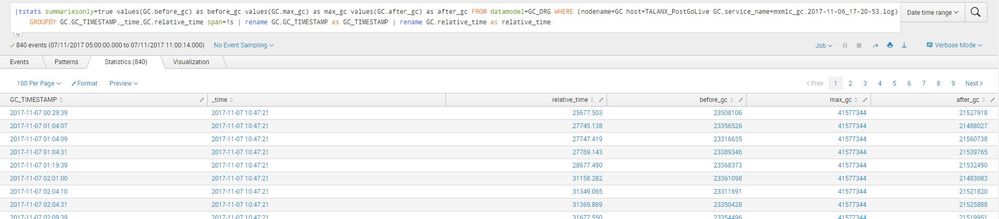
When I replace GC_TIMESTAMP with _time its not working.
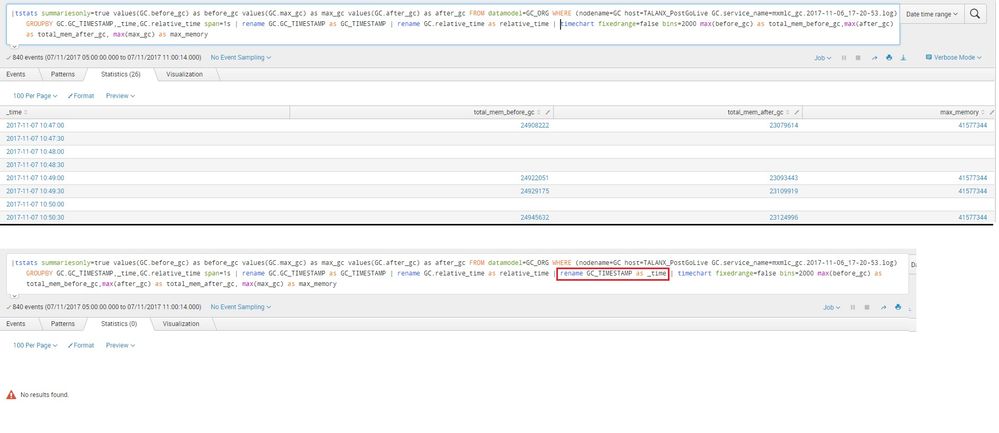
Query:
|tstats summariesonly=true values(GC.before_gc) as before_gc values(GC.max_gc) as max_gc values(GC.after_gc) as after_gc FROM datamodel=GC_ORG WHERE (nodename=GC host=TALANX_PostGoLive GC.service_name=mxmlc_gc.2017-11-06_17-20-53.log) GROUPBY GC.GC_TIMESTAMP,_time,GC.relative_time span=1s | rename GC.GC_TIMESTAMP as GC_TIMESTAMP | rename GC.relative_time as relative_time | rename GC_TIMESTAMP as _time | timechart fixedrange=false bins=2000 max(before_gc) as total_mem_before_gc,max(after_gc) as total_mem_after_gc, max(max_gc) as max_memory
Am I missing some thing ?
Thanks


- Mark as New
- Bookmark Message
- Subscribe to Message
- Mute Message
- Subscribe to RSS Feed
- Permalink
- Report Inappropriate Content

The _time is a special field who values is in epoch but Splunk displays in human readable form in it's visualizations. Renaming your string formatted timestamp column GC_TIMESTAMP as _time will change the value as string, as oppose to epoch, hence it doesn't work. Try like this (using strptime command to convert string GC_TIMESTAMP to epoch and assigned to _time field)
|tstats summariesonly=true values(GC.before_gc) as before_gc values(GC.max_gc) as max_gc values(GC.after_gc) as after_gc FROM datamodel=GC_ORG WHERE (nodename=GC host=TALANX_PostGoLive GC.service_name=mxmlc_gc.2017-11-06_17-20-53.log) GROUPBY GC.GC_TIMESTAMP,_time,GC.relative_time span=1s | rename GC.GC_TIMESTAMP as GC_TIMESTAMP | rename GC.relative_time as relative_time | eval _time=strptime(GC_TIMESTAMP,"%Y-%m-%d %H:%M:%S") | timechart fixedrange=false bins=2000 max(before_gc) as total_mem_before_gc,max(after_gc) as total_mem_after_gc, max(max_gc) as max_memory
- Mark as New
- Bookmark Message
- Subscribe to Message
- Mute Message
- Subscribe to RSS Feed
- Permalink
- Report Inappropriate Content
The _time is a special field who values is in epoch but Splunk displays in human readable form in it's visualizations. Renaming your string formatted timestamp column GC_TIMESTAMP as _time will change the value as string, as oppose to epoch, hence it doesn't work. Try like this (using strptime command to convert string GC_TIMESTAMP to epoch and assigned to _time field)
|tstats summariesonly=true values(GC.before_gc) as before_gc values(GC.max_gc) as max_gc values(GC.after_gc) as after_gc FROM datamodel=GC_ORG WHERE (nodename=GC host=TALANX_PostGoLive GC.service_name=mxmlc_gc.2017-11-06_17-20-53.log) GROUPBY GC.GC_TIMESTAMP,_time,GC.relative_time span=1s | rename GC.GC_TIMESTAMP as GC_TIMESTAMP | rename GC.relative_time as relative_time | eval _time=strptime(GC_TIMESTAMP,"%Y-%m-%d %H:%M:%S") | timechart fixedrange=false bins=2000 max(before_gc) as total_mem_before_gc,max(after_gc) as total_mem_after_gc, max(max_gc) as max_memory

Join the Splunk Community Slack to learn, troubleshoot, and make connections with fellow Splunk practitioners in real time!
Join Splunk User Groups to connect and learn in-person by region or remotely by topic or industry.
How Splunk AI Assistant Is Transforming Investigations: Insights from .conf26
Make Your Machine Data AI-Ready in Splunk
Splunk Asynchronous Forwarding Explained
