
Turn on suggestions
Auto-suggest helps you quickly narrow down your search results by suggesting possible matches as you type.
Splunk Search
×
Join the Conversation
Without signing in, you're just watching from the sidelines. Sign in or Register to connect, share, and be part of the Splunk Community.
- Find Answers
- :
- Using Splunk
- :
- Splunk Search
- :
- Strptime() Eval command returning empty
Options
- Subscribe to RSS Feed
- Mark Topic as New
- Mark Topic as Read
- Float this Topic for Current User
- Bookmark Topic
- Subscribe to Topic
- Mute Topic
- Printer Friendly Page
- Mark as New
- Bookmark Message
- Subscribe to Message
- Mute Message
- Subscribe to RSS Feed
- Permalink
- Report Inappropriate Content

olawalePS
Path Finder
11-06-2023
02:59 AM
What is wrong with the query below, it does not return any value in the timestamp field. The attached image shows a result sample
index="jamf" sourcetype="jssUapiComputer:computerGeneral"
| dedup computer_meta.serial
| eval timestamp = strptime(computerGeneral.lastEnrolledDate, "%Y-%m-%dT%H:%M:%S.%3QZ")
| eval sixtyDaysAgo = relative_time(now(), "-60d")
| table computer_meta.name, computerGeneral.lastEnrolledDate,timestamp, sixtyDaysAgo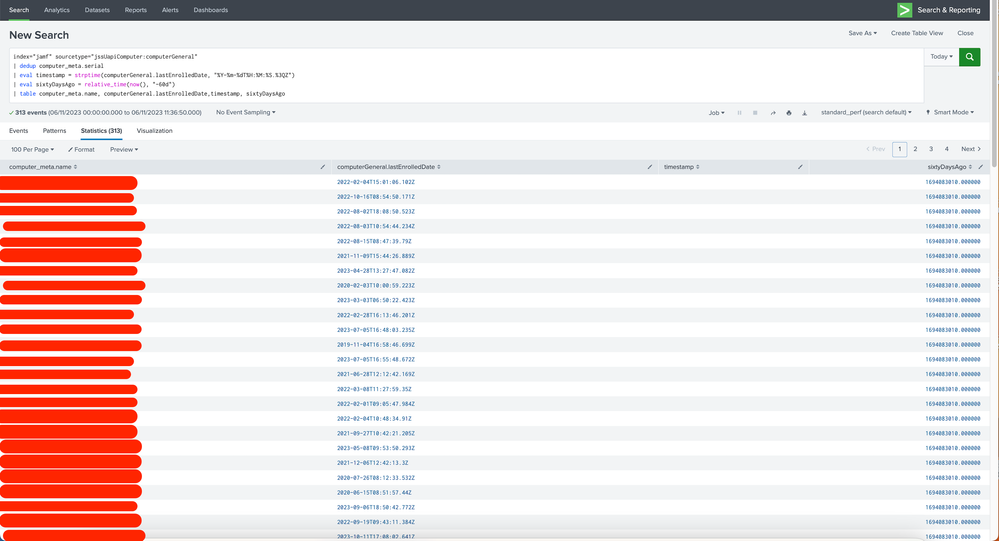

1 Solution
- Mark as New
- Bookmark Message
- Subscribe to Message
- Mute Message
- Subscribe to RSS Feed
- Permalink
- Report Inappropriate Content

gcusello

SplunkTrust
11-06-2023
03:03 AM
Hi @olawalePS,
try to rename the field:
index="jamf" sourcetype="jssUapiComputer:computerGeneral"
| dedup computer_meta.serial
| rename computerGeneral.lastEnrolledDate AS lastEnrolledDate
| eval timestamp = strptime(lastEnrolledDate, "%Y-%m-%dT%H:%M:%S.%3QZ")
| eval sixtyDaysAgo = relative_time(now(), "-60d")
| table computer_meta.name, lastEnrolledDate,timestamp, sixtyDaysAgo
or using quotes (').
ciao.
Giuseppe
- Mark as New
- Bookmark Message
- Subscribe to Message
- Mute Message
- Subscribe to RSS Feed
- Permalink
- Report Inappropriate Content
gcusello
SplunkTrust
11-06-2023
03:03 AM
Hi @olawalePS,
try to rename the field:
index="jamf" sourcetype="jssUapiComputer:computerGeneral"
| dedup computer_meta.serial
| rename computerGeneral.lastEnrolledDate AS lastEnrolledDate
| eval timestamp = strptime(lastEnrolledDate, "%Y-%m-%dT%H:%M:%S.%3QZ")
| eval sixtyDaysAgo = relative_time(now(), "-60d")
| table computer_meta.name, lastEnrolledDate,timestamp, sixtyDaysAgo
or using quotes (').
ciao.
Giuseppe
- Mark as New
- Bookmark Message
- Subscribe to Message
- Mute Message
- Subscribe to RSS Feed
- Permalink
- Report Inappropriate Content
olawalePS
Path Finder
11-06-2023
03:17 AM
Thanks, it works, but do you know why it did not work previously, there is no space in the "computerGeneral.lastEnrolledDate" field
- Mark as New
- Bookmark Message
- Subscribe to Message
- Mute Message
- Subscribe to RSS Feed
- Permalink
- Report Inappropriate Content
gcusello
SplunkTrust
11-06-2023
03:20 AM
Hi @olawalePS,
dot is a special char and sometimes requires the quotes or the rename.
Anyway, good for you, see next time!
Ciao and happy splunking
Giuseppe
P.S.: Karma Points are appreciated 😉

Got questions? Get answers!
Join the Splunk Community Slack to learn, troubleshoot, and make connections with fellow Splunk practitioners in real time!
Meet up IRL or virtually!
Join Splunk User Groups to connect and learn in-person by region or remotely by topic or industry.
Get Updates on the Splunk Community!
Accelerate Splunk App Development with AI
Learn how to automate the repetitive parts of your build cycle.
Watch On-Demand
Replay the Accelerate ...
Splunk Agent Observability: Measuring AI Value with Splunk Tokenomics on AWS
The AI landscape is moving faster than ever, and our latest 2026 State of Observability report provides the ...
Enterprise Security Watch Party: What’s New in 8.8 - Recap
Splunk Community HQ hosted a Splunk Enterprise Security Watch Party: What’s New In ES 8.8 last Thursday. I had ...
