
Join the Conversation
- Find Answers
- :
- Using Splunk
- :
- Splunk Search
- :
- Stats - Why isn't Splunk converting _time to Human...
- Subscribe to RSS Feed
- Mark Topic as New
- Mark Topic as Read
- Float this Topic for Current User
- Bookmark Topic
- Subscribe to Topic
- Mute Topic
- Printer Friendly Page
- Mark as New
- Bookmark Message
- Subscribe to Message
- Mute Message
- Subscribe to RSS Feed
- Permalink
- Report Inappropriate Content
Stats - Why isn't Splunk converting _time to Human readable format

Hello,
I have the below search
 <base search>..
|stats values(Source) as Source count min(_time) as firstTime max(_time) as lastTime by dest,Service_Name, Service_ID, Ticket_Encryption_Type, Ticket_Options
|convert timeformat="%F %H:%M:%S" ctime(values(lastTime))
|convert timeformat="%F %H:%M:%S" ctime(values(firstTime))
I got the above search from: https://docs.splunksecurityessentials.com/content-detail/kerberoasting_spn_request_with_rc4_encrypti...
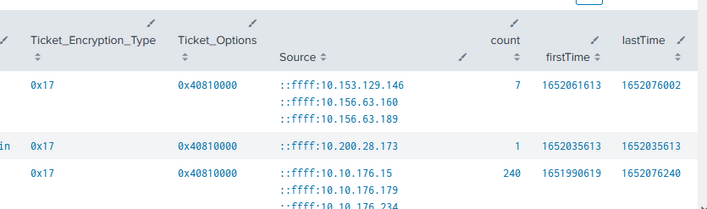
Yet Splunk is not coverting the firstTime and LastTime values into human readable format. It continues to display in unix time. Please advise.
Results of Search:
Note: I also tried using eval before the stats command , but same thing the firstTime and LastTime are still showing in unix format
| eval _time = strftime(_time, "%F %H:%M:%S")
- Mark as New
- Bookmark Message
- Subscribe to Message
- Mute Message
- Subscribe to RSS Feed
- Permalink
- Report Inappropriate Content


values() is an aggregation function (used with stats command etc) not an evaluation function. Try it this way:
|convert timeformat="%F %H:%M:%S" ctime(lastTime)
|convert timeformat="%F %H:%M:%S" ctime(firstTime)- Mark as New
- Bookmark Message
- Subscribe to Message
- Mute Message
- Subscribe to RSS Feed
- Permalink
- Report Inappropriate Content

Hi @neerajs_81,
you should try to use the eval function after the stats command:
<base search>
| stats values(Source) as Source count min(_time) as firstTime max(_time) as lastTime by dest,Service_Name, Service_ID, Ticket_Encryption_Type, Ticket_Options
| eval firstTime=strftime(firstTime,"%Y-%m-%d %H:%M:%S"), lastTime=strftime(lastTime,"%Y-%m-%d %H:%M:%S")
ciao.
Giuseppe
- Mark as New
- Bookmark Message
- Subscribe to Message
- Mute Message
- Subscribe to RSS Feed
- Permalink
- Report Inappropriate Content

Even better - use fieldformat. That way the value itself is left as unix timestamp and is easy to manipulate, adjust, compare and so on but is displayed in a human-redable format.


Join the Splunk Community Slack to learn, troubleshoot, and make connections with fellow Splunk practitioners in real time!
Join Splunk User Groups to connect and learn in-person by region or remotely by topic or industry.
A Four-Part Event Series: Full Stack Observability For the AI Era
SOC4Kafka - New Kafka Connector Powered by OpenTelemetry
Event Series: Level up your SOC: Advancing with Splunk Enterprise Security
