
Join the Conversation
- Find Answers
- :
- Using Splunk
- :
- Splunk Search
- :
- Splunk timechart with average line
- Subscribe to RSS Feed
- Mark Topic as New
- Mark Topic as Read
- Float this Topic for Current User
- Bookmark Topic
- Subscribe to Topic
- Mute Topic
- Printer Friendly Page
- Mark as New
- Bookmark Message
- Subscribe to Message
- Mute Message
- Subscribe to RSS Feed
- Permalink
- Report Inappropriate Content

Hello everyone!
I want to combine two searches or find another solution. 🙂
Here my problem:
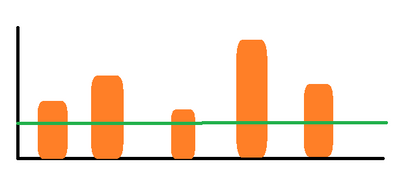
I need a timechart where i can show the occurences of some ID´s (example for an ID: 345FsdEE344FED- 354235werfDF2) and put an average line over it.
Graph Idea:
Orange: Timechart with a distinct count for the ID´s
Green: Stats with average for the count of the ID´s
index=example_dev
| bin span=1m _time
| stats dc(TEST_ID) as count_of_testid by _time
For the timeframe i want to be flexibel but for the span 15 minutes are ok.
Thank you all a lot and have a nice day.
- Mark as New
- Bookmark Message
- Subscribe to Message
- Mute Message
- Subscribe to RSS Feed
- Permalink
- Report Inappropriate Content


index=example_dev
| bin span=1m _time
| stats dc(TEST_ID) as count_of_testid by _time
| eventstats avg(count_of_testid) as average_dc- Mark as New
- Bookmark Message
- Subscribe to Message
- Mute Message
- Subscribe to RSS Feed
- Permalink
- Report Inappropriate Content
index=example_dev
| bin span=1m _time
| stats dc(TEST_ID) as count_of_testid by _time
| eventstats avg(count_of_testid) as average_dc- Mark as New
- Bookmark Message
- Subscribe to Message
- Mute Message
- Subscribe to RSS Feed
- Permalink
- Report Inappropriate Content
This works!
Thank you very much.
@ITWhisperer
and thank you too. @gcusello
Have a nice day.
- Mark as New
- Bookmark Message
- Subscribe to Message
- Mute Message
- Subscribe to RSS Feed
- Permalink
- Report Inappropriate Content

Hi @klischatb,
you can use the join command as used in the License Consuption report, or append, like the following example that I tried on my environemtn and runs:
index=_internal
| bin span=10m _time
| stats max(linecount) AS linecount BY _time
| append [ search
   index=_internal
   | bin span=10m _time
   | stats avg(linecount) AS average BY _time
   ]
| stats values(linecount) AS linecount values(average) AS average BY _time
Ciao.
Giuseppe
- Mark as New
- Bookmark Message
- Subscribe to Message
- Mute Message
- Subscribe to RSS Feed
- Permalink
- Report Inappropriate Content
Unfortunately, this does not work, but thank you very much for this information.
The IDs are not numeric fields, so the max command will not work.
I had thought about eventstats, but I couldn't find a solution with testing.
- Mark as New
- Bookmark Message
- Subscribe to Message
- Mute Message
- Subscribe to RSS Feed
- Permalink
- Report Inappropriate Content
Hi @klischatb,
you could try to make the avg of dc(TEST_ID), something like this:
index=your_index
| bin span=1m _time
| stats dc(TEST_ID) as count_of_testid BY _time
| append [ search
   index=your_index
   | bin span=1m _time
   | stats avg(dc(TEST_ID)) as avg_of_dc_testid BY _time
   ]
| stats values(count_of_testid) AS count_of_testid values(avg_of_dc_testid) AS avg_of_dc_testid BY _time
Ciao.
Giuseppe
- Mark as New
- Bookmark Message
- Subscribe to Message
- Mute Message
- Subscribe to RSS Feed
- Permalink
- Report Inappropriate Content
I tried to adapt this solutions but for my ID´s i didnt found the right way to do it.
https://community.splunk.com/t5/Splunk-Search/How-to-overlay-a-straight-line-showing-the-average-tim...


Join the Splunk Community Slack to learn, troubleshoot, and make connections with fellow Splunk practitioners in real time!
Join Splunk User Groups to connect and learn in-person by region or remotely by topic or industry.
Meet Splunk Observability Studio: AI-Assisted OpenTelemetry Instrumentation Without ...
Federated Search for Cisco Security and Analytics Logging (SAL) is now GA on Splunk ...
Your Path to AgenticOps: AI Experiences for Every Splunk Practitioner
