
Join the Conversation
- Find Answers
- :
- Using Splunk
- :
- Splunk Search
- :
- Re: Splunk 640: How to eval the difference between...
- Subscribe to RSS Feed
- Mark Topic as New
- Mark Topic as Read
- Float this Topic for Current User
- Bookmark Topic
- Subscribe to Topic
- Mute Topic
- Printer Friendly Page
- Mark as New
- Bookmark Message
- Subscribe to Message
- Mute Message
- Subscribe to RSS Feed
- Permalink
- Report Inappropriate Content
Splunk 640: How to eval the difference between events' values

Hello Everybody,
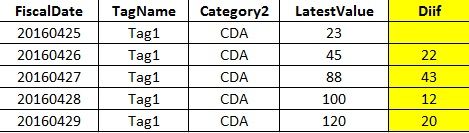
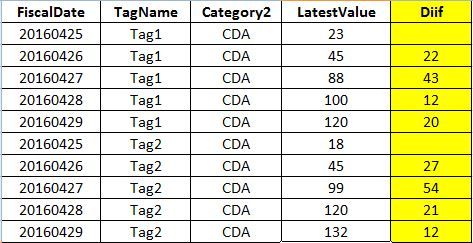
I've a table (w/o the yellow column), as shown below. I want to eval another field (in yellow). It shows the difference between the LatestValue, by Category2, TagName, FiscalDate (number). Pls. advise. Thanks.
- Mark as New
- Bookmark Message
- Subscribe to Message
- Mute Message
- Subscribe to RSS Feed
- Permalink
- Report Inappropriate Content

You could do as @javiergn suggested (set Diff to "" if negative). The risk with that if there are negative Diffs within a tag, you would lose those. Another option would be to use streamstats and group by tag. Like this
your search here | streamstats window=1 current=f first(LatestValue) as NextValue by TagName | eval Diff=LatestValue-NextValue
- Mark as New
- Bookmark Message
- Subscribe to Message
- Mute Message
- Subscribe to RSS Feed
- Permalink
- Report Inappropriate Content

You want to use delta:
your search here
| delta LatestValue as Diff p=1
By the way, make sure your events are sorted first. For instance:
your search here
| sort FiscalDate
| delta LatestValue as Diff p=1
If you need something more granular, such as only sum those where category and tag match then you can use streamstats probably or maybe just sort by FiscalDate, Category2, TagName.
Let me know if the above works for you anyway
- Mark as New
- Bookmark Message
- Subscribe to Message
- Mute Message
- Subscribe to RSS Feed
- Permalink
- Report Inappropriate Content



- Mark as New
- Bookmark Message
- Subscribe to Message
- Mute Message
- Subscribe to RSS Feed
- Permalink
- Report Inappropriate Content
If you don't want the negative numbers then simply append the following to your search:
| eval Diff = if (Diff < 0, "", Diff)

Join the Splunk Community Slack to learn, troubleshoot, and make connections with fellow Splunk practitioners in real time!
Join Splunk User Groups to connect and learn in-person by region or remotely by topic or industry.
Make Your Machine Data AI-Ready in Splunk
Splunk Asynchronous Forwarding Explained
How to Monitor AI Agents with Splunk Agent Observability
