
Join the Conversation
- Find Answers
- :
- Using Splunk
- :
- Splunk Search
- :
- Splitting Multi-Value and Multi-Line field?
- Subscribe to RSS Feed
- Mark Topic as New
- Mark Topic as Read
- Float this Topic for Current User
- Bookmark Topic
- Subscribe to Topic
- Mute Topic
- Printer Friendly Page
- Mark as New
- Bookmark Message
- Subscribe to Message
- Mute Message
- Subscribe to RSS Feed
- Permalink
- Report Inappropriate Content

I have a list of chrome extensions that are installed that is returned in a multivalue field. One of the results looks like this:
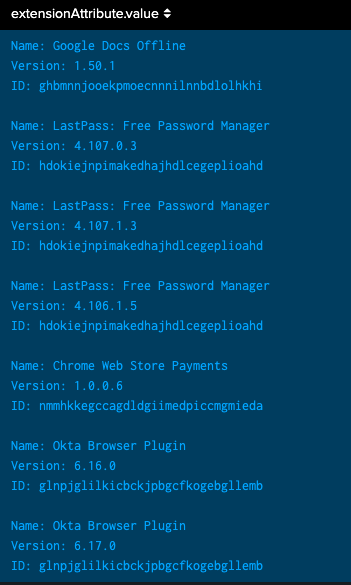
All I really care about is the extension name so I was able to run this query to use rex to extract the names of all the extensions:
index=jamf source=jss_inventory "extensionAttribute.name"="Installed Chrome Extensions & Versions"
| fields extensionAttribute.name, computer_meta.assignedUser
| rex field=extensionAttribute.value max_match=0 "Name: (?<extensions>.*)\n"
| table extensions
This returns:
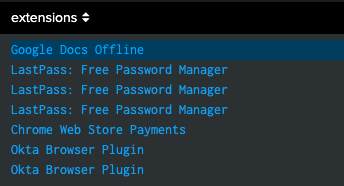
How can I further extract these extensions in this multi-value field. I can't get mvexpand to work because it says that the new extensions field I created doesn't exist in the data. I can't figure out how to extract each line as a separate result so that I can dedup and get a full list of all installed extensions.
- Mark as New
- Bookmark Message
- Subscribe to Message
- Mute Message
- Subscribe to RSS Feed
- Permalink
- Report Inappropriate Content


mvexpand should work
index=jamf source=jss_inventory "extensionAttribute.name"="Installed Chrome Extensions & Versions"
| fields extensionAttribute.name, computer_meta.assignedUser
| rex field=extensionAttribute.value max_match=0 "Name: (?<extensions>.*)\n"
| table extensions
| mvexpand extensions
Do you get an error?
Alternatively, you could try this
index=jamf source=jss_inventory "extensionAttribute.name"="Installed Chrome Extensions & Versions"
| fields extensionAttribute.name, computer_meta.assignedUser
| rex field=extensionAttribute.value max_match=0 "Name: (?<extensions>.*)\n"
| stats count by extensions
| fields - count- Mark as New
- Bookmark Message
- Subscribe to Message
- Mute Message
- Subscribe to RSS Feed
- Permalink
- Report Inappropriate Content
mvexpand should work
index=jamf source=jss_inventory "extensionAttribute.name"="Installed Chrome Extensions & Versions"
| fields extensionAttribute.name, computer_meta.assignedUser
| rex field=extensionAttribute.value max_match=0 "Name: (?<extensions>.*)\n"
| table extensions
| mvexpand extensions
Do you get an error?
Alternatively, you could try this
index=jamf source=jss_inventory "extensionAttribute.name"="Installed Chrome Extensions & Versions"
| fields extensionAttribute.name, computer_meta.assignedUser
| rex field=extensionAttribute.value max_match=0 "Name: (?<extensions>.*)\n"
| stats count by extensions
| fields - count- Mark as New
- Bookmark Message
- Subscribe to Message
- Mute Message
- Subscribe to RSS Feed
- Permalink
- Report Inappropriate Content
The mvexpand doesn't work. No errors, but it doesn't return anything. Your second suggestion inexplicably did work, but I don't understand why.


Join the Splunk Community Slack to learn, troubleshoot, and make connections with fellow Splunk practitioners in real time!
Join Splunk User Groups to connect and learn in-person by region or remotely by topic or industry.
Cisco Data Fabric from Architecture to Investigation, Better SOC Visibility, and More ...
The Trust Gap: Why a Data Foundation is Fundamental to an Agentic Enterprise
Data Management Digest – September 2026
