
Join the Conversation
- Find Answers
- :
- Using Splunk
- :
- Splunk Search
- :
- Re: Show increasing values with dropoff
- Subscribe to RSS Feed
- Mark Topic as New
- Mark Topic as Read
- Float this Topic for Current User
- Bookmark Topic
- Subscribe to Topic
- Mute Topic
- Printer Friendly Page
- Mark as New
- Bookmark Message
- Subscribe to Message
- Mute Message
- Subscribe to RSS Feed
- Permalink
- Report Inappropriate Content

I have a data set similar to the following:
"_time",source,increment
"2020-02-26","third",
"2020-02-25","third","yes"
"2020-02-21","third",
"2020-02-20","third","yes"
"2020-02-29","second",
"2020-02-28","second","yes"
"2020-02-27","second","yes"
"2020-02-26","second","yes"
"2020-02-25","second","yes"
"2020-02-24","second","yes"
"2020-02-23","second","yes"
"2020-02-22","second","yes"
"2020-03-01","first",
"2020-02-29","first","yes"
I would like to make this chart with first=blue, second=red, and third=green:
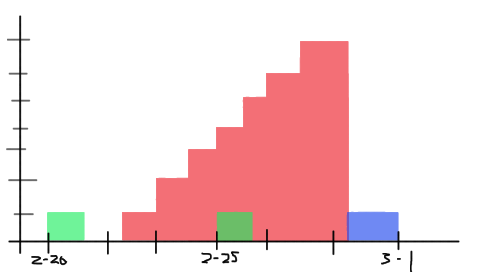
So for each yes in the increment column add 1 to the current count for the source, else reset the count back to 0. If a source does not have a reset column it should continue at the current count to the end of the chart.
Is this possible?
- Mark as New
- Bookmark Message
- Subscribe to Message
- Mute Message
- Subscribe to RSS Feed
- Permalink
- Report Inappropriate Content

Hi @jlieberg,
Yes, this is possible with below query:
| makeresults
| eval _raw="time,source,increment
2020-02-26,third,
2020-02-25,third,yes
2020-02-21,third,
2020-02-20,third,yes
2020-02-29,second,
2020-02-28,second,yes
2020-02-27,second,yes
2020-02-26,second,yes
2020-02-25,second,yes
2020-02-24,second,yes
2020-02-23,second,yes
2020-02-22,second,yes
2020-03-01,first,
2020-02-29,first,yes"
| multikv forceheader=1
| sort source, time
| streamstats count(increment) as step by source reset_after="("isnull(increment)")"
| eval step=if(increment=="yes", step, 0)
| xyseries time source step
Once you run the search, go to Visualization tab and select Column Chart.
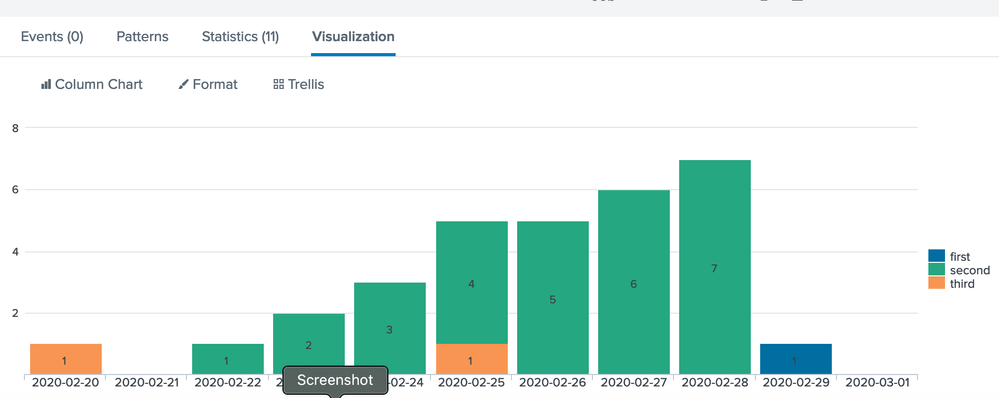

In your search query you can add this:
| eval time=strftime(_time, "%y-%m-%d")
| sort source, time
| streamstats count(increment) as step by source reset_after="("isnull(increment)")"
| eval step=if(increment=="yes", step, 0)
| xyseries time source step

- Mark as New
- Bookmark Message
- Subscribe to Message
- Mute Message
- Subscribe to RSS Feed
- Permalink
- Report Inappropriate Content
Hi @jlieberg,
Yes, this is possible with below query:
| makeresults
| eval _raw="time,source,increment
2020-02-26,third,
2020-02-25,third,yes
2020-02-21,third,
2020-02-20,third,yes
2020-02-29,second,
2020-02-28,second,yes
2020-02-27,second,yes
2020-02-26,second,yes
2020-02-25,second,yes
2020-02-24,second,yes
2020-02-23,second,yes
2020-02-22,second,yes
2020-03-01,first,
2020-02-29,first,yes"
| multikv forceheader=1
| sort source, time
| streamstats count(increment) as step by source reset_after="("isnull(increment)")"
| eval step=if(increment=="yes", step, 0)
| xyseries time source step
Once you run the search, go to Visualization tab and select Column Chart.
In your search query you can add this:
| eval time=strftime(_time, "%y-%m-%d")
| sort source, time
| streamstats count(increment) as step by source reset_after="("isnull(increment)")"
| eval step=if(increment=="yes", step, 0)
| xyseries time source step
- Mark as New
- Bookmark Message
- Subscribe to Message
- Mute Message
- Subscribe to RSS Feed
- Permalink
- Report Inappropriate Content
Wow, that is really cool! I did change increment=="yes" to !isnull(increment) to be more flexible, but this is a cool solution that I figured had to be possible. My actual date ranges are longer than in this example, and I was hoping I could use some kind of "stepped" area chart that didn't interpolate between points, do you know if that is possible?

Join the Splunk Community Slack to learn, troubleshoot, and make connections with fellow Splunk practitioners in real time!
Join Splunk User Groups to connect and learn in-person by region or remotely by topic or industry.
Make Your Machine Data AI-Ready in Splunk
Splunk Asynchronous Forwarding Explained
How to Monitor AI Agents with Splunk Agent Observability
