
Join the Conversation
- Find Answers
- :
- Using Splunk
- :
- Splunk Search
- :
- Re: See what time range users search
- Subscribe to RSS Feed
- Mark Topic as New
- Mark Topic as Read
- Float this Topic for Current User
- Bookmark Topic
- Subscribe to Topic
- Mute Topic
- Printer Friendly Page
- Mark as New
- Bookmark Message
- Subscribe to Message
- Mute Message
- Subscribe to RSS Feed
- Permalink
- Report Inappropriate Content

I want to write a query to see what time range users are using in their searches. e.g. 90% of searches use the last 24 hours and 10% of searches use 1+ day ago for the time frame.
I am using the following search:
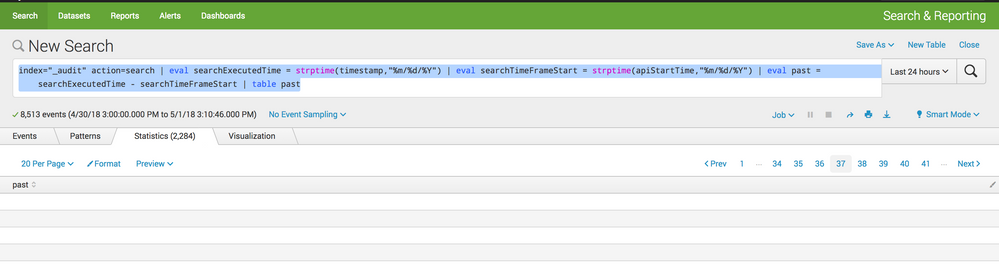
index="_audit" action=search | eval searchExecutedTime = strptime(timestamp,"%m/%d/%Y") | eval searchTimeFrameStart = strptime(apiStartTime,"%m/%d/%Y") | eval past = searchExecutedTime - searchTimeFrameStart | table past
When I run this search it just opens to the statistics tab with an empty table but the tab shows that there are 2000+ results.
- Mark as New
- Bookmark Message
- Subscribe to Message
- Mute Message
- Subscribe to RSS Feed
- Permalink
- Report Inappropriate Content


I just checked my audit log, and at least from what I see your timestamp format are completely off. timestamp and apiStartTime are in completely different formats, returning both fields as empty, resulting in past being empty, and therefore getting an empty table with 2000+ lines, because in all events the past field does not exist.
If you fix your timestamp parsings, everything should be fine 🙂
Check the strftime.org documentation for an overview.
- Mark as New
- Bookmark Message
- Subscribe to Message
- Mute Message
- Subscribe to RSS Feed
- Permalink
- Report Inappropriate Content
I just checked my audit log, and at least from what I see your timestamp format are completely off. timestamp and apiStartTime are in completely different formats, returning both fields as empty, resulting in past being empty, and therefore getting an empty table with 2000+ lines, because in all events the past field does not exist.
If you fix your timestamp parsings, everything should be fine 🙂
Check the strftime.org documentation for an overview.
- Mark as New
- Bookmark Message
- Subscribe to Message
- Mute Message
- Subscribe to RSS Feed
- Permalink
- Report Inappropriate Content
Thank you very much. I think you found my problem (user error). I have been able to correct the timestamp extraction and that one is working great now. I am still unable to get results with the apiStartTime part though. Do you see anything wrong with it?
Here is what I am trying to match and what I used:
Sat Mar 31 00:00:00 2018
“%a %b %d %H:%M:%S %Y”
- Mark as New
- Bookmark Message
- Subscribe to Message
- Mute Message
- Subscribe to RSS Feed
- Permalink
- Report Inappropriate Content
It needed single quotes included. "'%a...%Y'"
- Mark as New
- Bookmark Message
- Subscribe to Message
- Mute Message
- Subscribe to RSS Feed
- Permalink
- Report Inappropriate Content
Ah, damn, I saw that, but forget to post it here. Sorry!
- Mark as New
- Bookmark Message
- Subscribe to Message
- Mute Message
- Subscribe to RSS Feed
- Permalink
- Report Inappropriate Content
No worries, that was the info I needed and it got me straightened out. I appreciate it!
- Mark as New
- Bookmark Message
- Subscribe to Message
- Mute Message
- Subscribe to RSS Feed
- Permalink
- Report Inappropriate Content

Give this a try
index="_audit" action=search search_id=* api_et=* api_lt=* | eval Past=tostring(round(api_lt-api_et),"duration") | stats count by Past
- Mark as New
- Bookmark Message
- Subscribe to Message
- Mute Message
- Subscribe to RSS Feed
- Permalink
- Report Inappropriate Content
Thank you that was helpful.



Join the Splunk Community Slack to learn, troubleshoot, and make connections with fellow Splunk practitioners in real time!
Join Splunk User Groups to connect and learn in-person by region or remotely by topic or industry.
Event Series: Level up your SOC: Advancing with Splunk Enterprise Security
Announcing Modern Navigation: A New Era of Splunk User Experience
SOC4Kafka - New Kafka Connector Powered by OpenTelemetry
